







Question: Solution Person.java public class Person { private int age; private double height; private double weight; private String name; private String gender; public Person() { super();
Solution
Person.java
public class Person { private int age; private double height; private double weight; private String name; private String gender; public Person() { super(); } public Person(int age, double height, double weight, String name, String gender) { super(); this.age = age; this.height = height; this.weight = weight; this.name = name; this.gender = gender; } /** * @return the age */ public int getAge() { return age; } /** * @param age the age to set */ public void setAge(int age) { this.age = age; } /** * @return the height */ public double getHeight() { return height; } /** * @param height the height to set */ public void setHeight(double height) { this.height = height; } /** * @return the weight */ public double getWeight() { return weight; } /** * @param weight the weight to set */ public void setWeight(double weight) { this.weight = weight; } /** * @return the name */ public String getName() { return name; } /** * @param name the name to set */ public void setName(String name) { this.name = name; } /** * @return the gender */ public String getGender() { return gender; } /** * @param gender the gender to set */ public void setGender(String gender) { this.gender = gender; } @Override public String toString() { StringBuilder str=new StringBuilder(); String formattedStr=String.format("%-20s%-20s%-20s%-20s%-20s ", name,age,gender,height,weight); str.append(formattedStr); return str.toString(); } @Override public boolean equals(Object obj) { if (this == obj) return true; if (obj == null) return false; if (getClass() != obj.getClass()) return false; Person other = (Person) obj; if (age != other.age) return false; if (gender == null) { if (other.gender != null) return false; } else if (!gender.equalsIgnoreCase(other.gender)) return false; if (Double.doubleToLongBits(height) != Double.doubleToLongBits(other.height)) return false; if (name == null) { if (other.name != null) return false; } else if (!name.equalsIgnoreCase(other.name)) return false; if (Double.doubleToLongBits(weight) != Double.doubleToLongBits(other.weight)) return false; return true; } } PersonAlreasyExistsException.java
public class PersonAlreadyExistsException extends Exception { public PersonAlreadyExistsException(String msg) { super(msg); } } PersonDataManagar.Java
import java.io.File; import java.io.FileNotFoundException; import java.io.FileWriter; import java.io.IOException; import java.util.Scanner; public class PersonDataManager { private static Person[] people; public static void buildFromFile(String location) throws IllegalArgumentException{ try { Scanner sc=new Scanner(new File("personData.csv")); int rowCount=0; String header=sc.nextLine(); while(sc.hasNext()) { String row=sc.nextLine(); rowCount++; } sc.close(); people=new Person[rowCount]; rowCount=0; sc=new Scanner(new File("personData.csv")); header=sc.nextLine(); while(sc.hasNext()) { String row=sc.nextLine(); String rowArr[]=row.split(","); Person p = new Person(); if(!rowArr[0].matches("[a-zA-Z]+")) throw new IllegalArgumentException("Invalid name!"); p.setName(rowArr[0]); p.setGender(rowArr[1]); p.setAge(Integer.parseInt(rowArr[2])); if(!rowArr[3].matches("[0-9].+")) throw new IllegalArgumentException("Invalid height!"+rowArr[3]); p.setHeight(Double.parseDouble(rowArr[3])); if(!rowArr[4].matches("[0-9].+")) throw new IllegalArgumentException("Invalid weight!"); p.setWeight(Double.parseDouble(rowArr[4])); people[rowCount]=p; rowCount++; } } catch (FileNotFoundException e) { System.out.println("File not found!"); } //Print data String formattedStr=String.format("%-20s%-20s%-20s%-20s%-20s ", "Name","Age","Gender","Height","Weight"); System.out.println(formattedStr); for(int i=0;i PersonDoesNotExistsException.java
public class PersonDoesNotExistsException extends Exception { public PersonDoesNotExistsException(String msg) { super(msg); } }
PersonManager.java
import java.util.Scanner; public class PersonManager { private static PersonDataManager personDataManager=new PersonDataManager(); public static void main(String[] args) { Scanner sc=new Scanner(System.in); char choice='\0'; while(choice!='Q' && choice!='q') { System.out.println("Menu (I) - Import from file"); System.out.println("(A) - Add person"); System.out.println("(R) - Remove person"); System.out.println("(G) - Get Info on person"); System.out.println("(P) - Print table"); System.out.println("(S) - Save to file"); System.out.print("(Q) - Quit Enter your choice:"); choice=sc.nextLine().charAt(0); switch(choice) { case 'I': case 'i': PersonDataManager.buildFromFile("personData.txt"); break; case 'A': case 'a': System.out.print("Enter person name: "); String name=sc.nextLine(); System.out.print("Enter person gender: "); String gender=sc.nextLine(); System.out.print("Enter person age: "); int age=sc.nextInt(); sc.nextLine(); System.out.print("Enter person height: "); double height=sc.nextDouble(); sc.nextLine(); System.out.print("Enter person weight: "); double weight=sc.nextDouble(); sc.nextLine(); Person p=new Person(age, height, weight, name, gender); try { personDataManager.addPerson(p); } catch (PersonAlreadyExistsException e) { System.out.println(e.getMessage()); } break; case 'R': case 'r': System.out.print("Enter person name: "); name=sc.nextLine(); try { personDataManager.removePerson(name); } catch (PersonDoesNotExistsException e) { System.out.println(e.getMessage()); } break; case 'G': case 'g': System.out.print("Enter person name: "); name=sc.nextLine(); try { personDataManager.getPerson(name); } catch (PersonDoesNotExistsException e) { System.out.println(e.getMessage()); } break; case 'P': case 'p': personDataManager.printTable(); break; case 'S': case 's': personDataManager.saveToFile(); break; case 'Q': case 'q': System.out.println("Thank you!"); break; } } } }
I am working on a mac. Instead of personData.csv, I am putting in User/username/Downloads/filename.csv which is the file path. But I am getting an error. It says
Exception in thread "main" java.lang.NullPointerException: Cannot read the array length because "PersonDataManager.people" is null at PersonDataManager.buildFromFile(PersonDataManager.java:54) at PersonManager.main(PersonManager.java:22)
Please solve this.
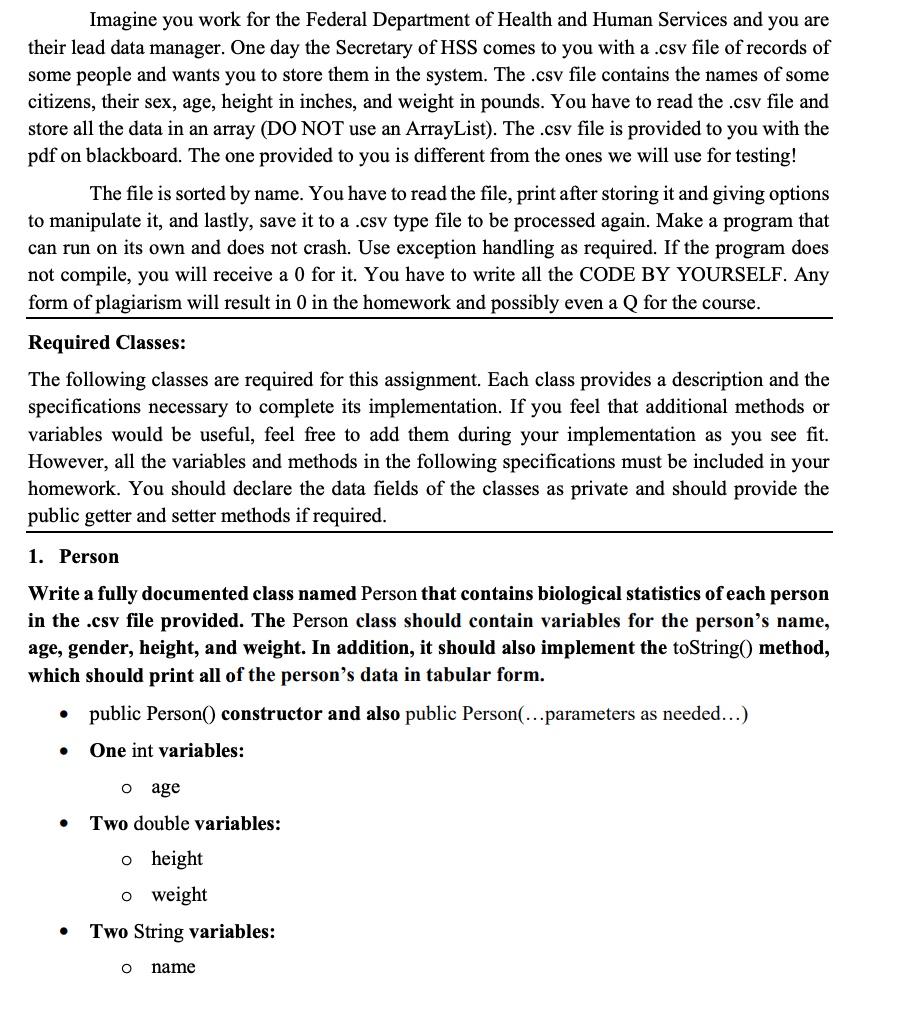
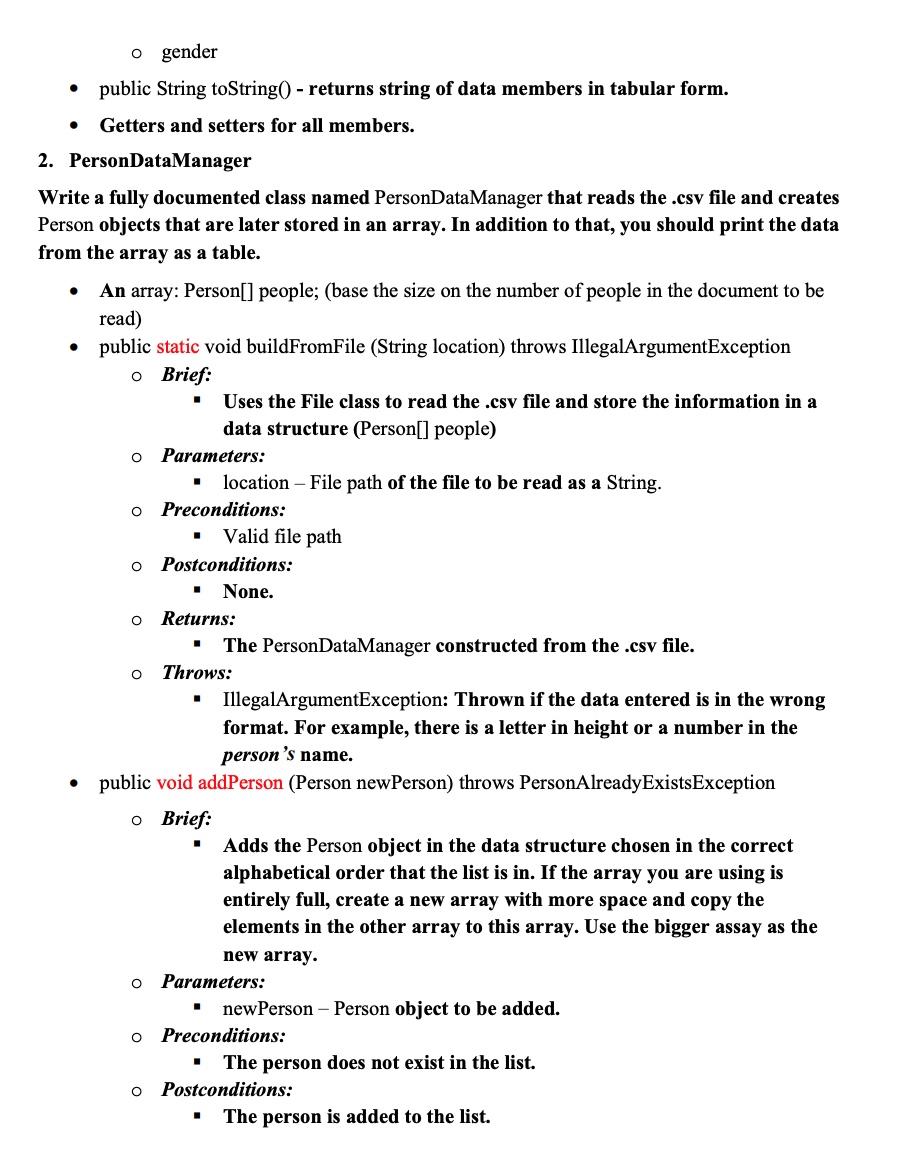
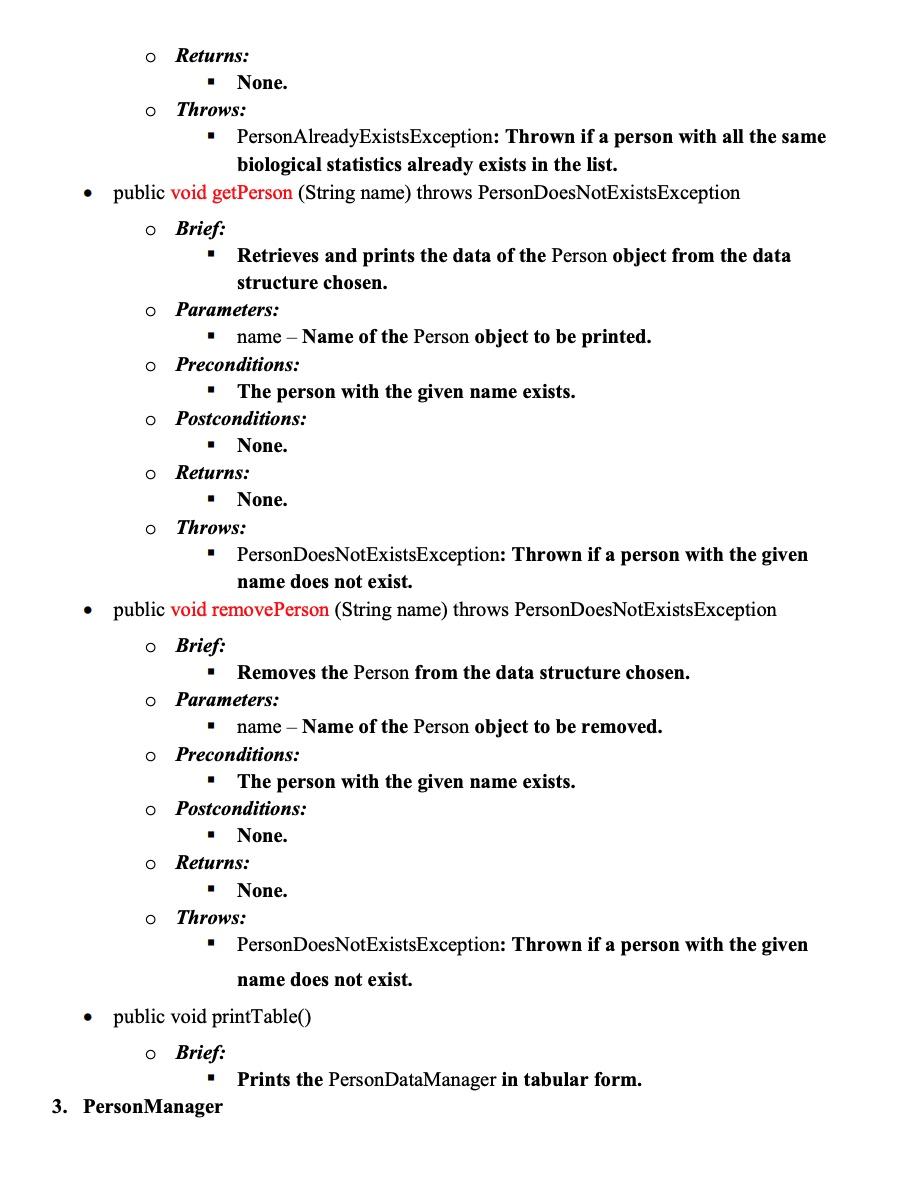
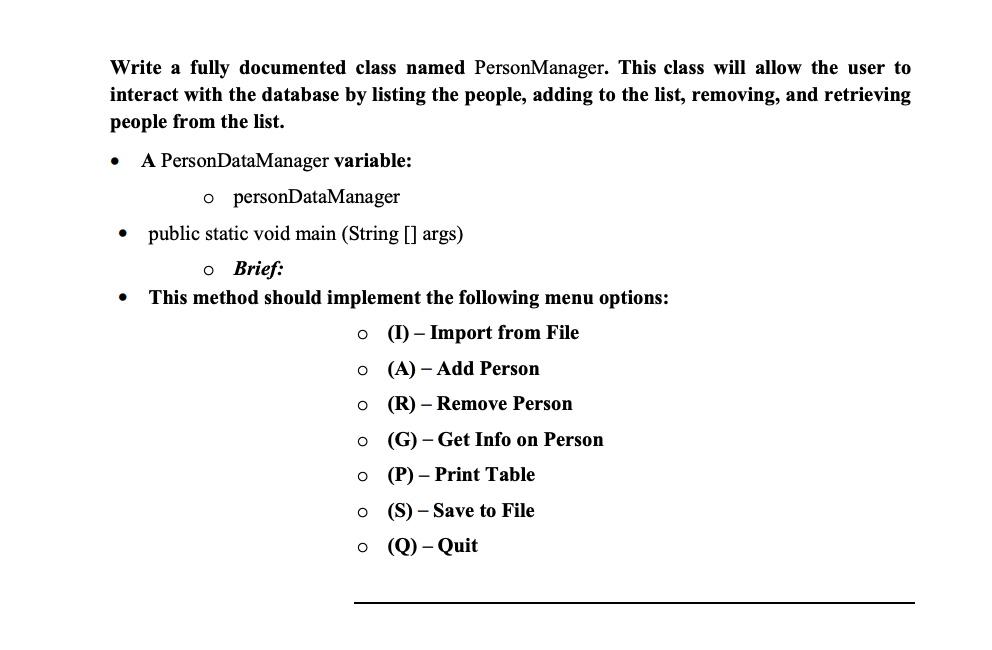
Imagine you work for the Federal Department of Health and Human Services and you are their lead data manager. One day the Secretary of HSS comes to you with a .csv file of records of some people and wants you to store them in the system. The .csv file contains the names of some citizens, their sex, age, height in inches, and weight in pounds. You have to read the .csv file and store all the data in an array (DO NOT use an ArrayList). The .csv file is provided to you with the pdf on blackboard. The one provided to you is different from the ones we will use for testing! The file is sorted by name. You have to read the file, print after storing it and giving options to manipulate it, and lastly, save it to a .csv type file to be processed again. Make a program that can run on its own and does not crash. Use exception handling as required. If the program does not compile, you will receive a 0 for it. You have to write all the CODE BY YOURSELF. Any form of plagiarism will result in 0 in the homework and possibly even a Q for the course. Required Classes: The following classes are required for this assignment. Each class provides a description and the specifications necessary to complete its implementation. If you feel that additional methods or variables would be useful, feel free to add them during your implementation as you see fit. However, all the variables and methods in the following specifications must be included in your homework. You should declare the data fields of the classes as private and should provide the public getter and setter methods if required. 1. Person Write a fully documented class named Person that contains biological statistics of each person in the .csv file provided. The Person class should contain variables for the person's name, age, gender, height, and weight. In addition, it should also implement the toString () method, which should print all of the person's data in tabular form. - public Person( ) constructor and also public Person(...parameters as needed...) - One int variables: o age - Two double variables: height weight - Two String variables: - name 0 gender - public String toString( - returns string of data members in tabular form. - Getters and setters for all members. 2. PersonDataManager Write a fully documented class named PersonDataManager that reads the .csv file and creates Person objects that are later stored in an array. In addition to that, you should print the data from the array as a table. - An array: Person[] people; (base the size on the number of people in the document to be read) - public static void buildFromFile (String location) throws IllegalArgumentException - Brief: - Uses the File class to read the .csv file and store the information in a data structure (Person[] people) Parameters: - location - File path of the file to be read as a String. Preconditions: - Valid file path Postconditions: - None. Returns: - The PersonDataManager constructed from the .csv file. Throws: - IllegalArgumentException: Thrown if the data entered is in the wrong format. For example, there is a letter in height or a number in the person's name. - public void addPerson (Person newPerson) throws PersonAlreadyExistsException Brief: - Adds the Person object in the data structure chosen in the correct alphabetical order that the list is in. If the array you are using is entirely full, create a new array with more space and copy the elements in the other array to this array. Use the bigger assay as the new array. Parameters: - newPerson - Person object to be added. Preconditions: - The person does not exist in the list. Postconditions: - The person is added to the list. Returns: - None. Throws: - PersonAlreadyExistsException: Thrown if a person with all the same biological statistics already exists in the list. - public void getPerson (String name) throws PersonDoesNotExistsException Brief: - Retrieves and prints the data of the Person object from the data structure chosen. Parameters: - name - Name of the Person object to be printed. Preconditions: - The person with the given name exists. Postconditions: - None. Returns: - None. Throws: - PersonDoesNotExistsException: Thrown if a person with the given name does not exist. - public void removePerson (String name) throws PersonDoesNotExistsException Brief: - Removes the Person from the data structure chosen. Parameters: - name - Name of the Person object to be removed. Preconditions: - The person with the given name exists. Postconditions: - None. Returns: - None. Throws: - PersonDoesNotExistsException: Thrown if a person with the given name does not exist. - public void printTable() Brief: - Prints the PersonDataManager in tabular form. 3. PersonManager Write a fully documented class named PersonManager. This class will allow the user to interact with the database by listing the people, adding to the list, removing, and retrieving people from the list. - A PersonDataManager variable: - personDataManager - public static void main (String [] args) - Brief: - This method should implement the following menu options: (I) - Import from File - (A) - Add Person - (R)-Remove Person - (G) - Get Info on Person - (P) - Print Table - (S)-Save to File - (Q)-Quit Imagine you work for the Federal Department of Health and Human Services and you are their lead data manager. One day the Secretary of HSS comes to you with a .csv file of records of some people and wants you to store them in the system. The .csv file contains the names of some citizens, their sex, age, height in inches, and weight in pounds. You have to read the .csv file and store all the data in an array (DO NOT use an ArrayList). The .csv file is provided to you with the pdf on blackboard. The one provided to you is different from the ones we will use for testing! The file is sorted by name. You have to read the file, print after storing it and giving options to manipulate it, and lastly, save it to a .csv type file to be processed again. Make a program that can run on its own and does not crash. Use exception handling as required. If the program does not compile, you will receive a 0 for it. You have to write all the CODE BY YOURSELF. Any form of plagiarism will result in 0 in the homework and possibly even a Q for the course. Required Classes: The following classes are required for this assignment. Each class provides a description and the specifications necessary to complete its implementation. If you feel that additional methods or variables would be useful, feel free to add them during your implementation as you see fit. However, all the variables and methods in the following specifications must be included in your homework. You should declare the data fields of the classes as private and should provide the public getter and setter methods if required. 1. Person Write a fully documented class named Person that contains biological statistics of each person in the .csv file provided. The Person class should contain variables for the person's name, age, gender, height, and weight. In addition, it should also implement the toString () method, which should print all of the person's data in tabular form. - public Person( ) constructor and also public Person(...parameters as needed...) - One int variables: o age - Two double variables: height weight - Two String variables: - name 0 gender - public String toString( - returns string of data members in tabular form. - Getters and setters for all members. 2. PersonDataManager Write a fully documented class named PersonDataManager that reads the .csv file and creates Person objects that are later stored in an array. In addition to that, you should print the data from the array as a table. - An array: Person[] people; (base the size on the number of people in the document to be read) - public static void buildFromFile (String location) throws IllegalArgumentException - Brief: - Uses the File class to read the .csv file and store the information in a data structure (Person[] people) Parameters: - location - File path of the file to be read as a String. Preconditions: - Valid file path Postconditions: - None. Returns: - The PersonDataManager constructed from the .csv file. Throws: - IllegalArgumentException: Thrown if the data entered is in the wrong format. For example, there is a letter in height or a number in the person's name. - public void addPerson (Person newPerson) throws PersonAlreadyExistsException Brief: - Adds the Person object in the data structure chosen in the correct alphabetical order that the list is in. If the array you are using is entirely full, create a new array with more space and copy the elements in the other array to this array. Use the bigger assay as the new array. Parameters: - newPerson - Person object to be added. Preconditions: - The person does not exist in the list. Postconditions: - The person is added to the list. Returns: - None. Throws: - PersonAlreadyExistsException: Thrown if a person with all the same biological statistics already exists in the list. - public void getPerson (String name) throws PersonDoesNotExistsException Brief: - Retrieves and prints the data of the Person object from the data structure chosen. Parameters: - name - Name of the Person object to be printed. Preconditions: - The person with the given name exists. Postconditions: - None. Returns: - None. Throws: - PersonDoesNotExistsException: Thrown if a person with the given name does not exist. - public void removePerson (String name) throws PersonDoesNotExistsException Brief: - Removes the Person from the data structure chosen. Parameters: - name - Name of the Person object to be removed. Preconditions: - The person with the given name exists. Postconditions: - None. Returns: - None. Throws: - PersonDoesNotExistsException: Thrown if a person with the given name does not exist. - public void printTable() Brief: - Prints the PersonDataManager in tabular form. 3. PersonManager Write a fully documented class named PersonManager. This class will allow the user to interact with the database by listing the people, adding to the list, removing, and retrieving people from the list. - A PersonDataManager variable: - personDataManager - public static void main (String [] args) - Brief: - This method should implement the following menu options: (I) - Import from File - (A) - Add Person - (R)-Remove Person - (G) - Get Info on Person - (P) - Print Table - (S)-Save to File - (Q)-Quit Step by Step Solution
There are 3 Steps involved in it
1 Expert Approved Answer
Step: 1 Unlock

Question Has Been Solved by an Expert!
Get step-by-step solutions from verified subject matter experts
Step: 2 Unlock
Step: 3 Unlock
 Study Help