







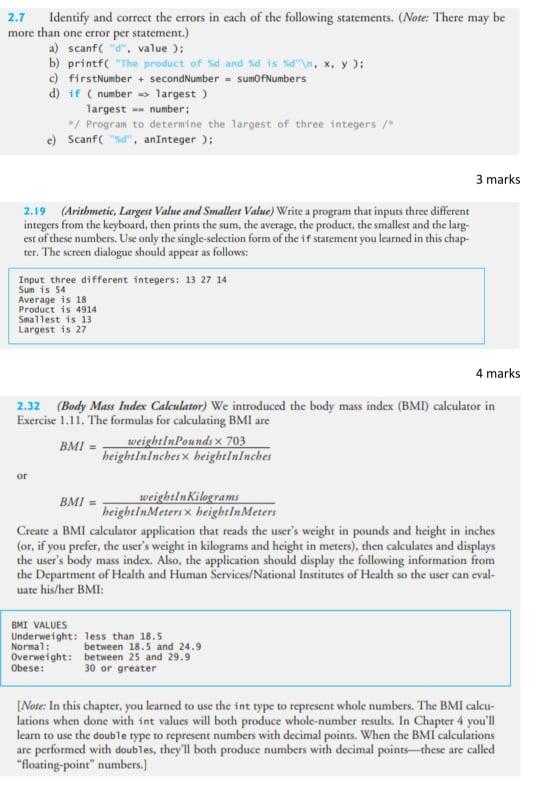
Question: solution with C++ 2.7 Identify and correct the errors in each of the following statements. (Note: There may be more than one error per statement.)
 solution with C++
2.7 Identify and correct the errors in each of the following statements. (Note: There may be more than one error per statement.) a) scanf("d", value): b) printf("The product of d and dis d"\. *. y): c) firstNumber + secondNumber - sumOf Numbers d) if (number -> largest ) largest -- number: *7 Program to determine the largest of three integers / c) Scanf("sd", anInteger ): 3 marks 2.19 (Arithmetic, Largest Value and Smallest Value) Write a program that inputs three different integers from the keyboard, then prints the sum, the average, the product, the smallest and the larg est of these numbers. Use only the single-selection form of the if statement you learned in this chap ter. The screen dialogue should appear as follows: Input three different integers: 13 27 14 Average is 18 Product is 4914 Smallest is 13 Largest is 27 Sun is 54 4 marks 2.32 (Body Mass Index Calculator) We introduced the body mass index (BMI) calculator in Exercise 1.11. The formulas for calculating BMI are BMI = weightIn Pounds x 703 heightInInches x heightIninches or BMI = weightInKilograms heightInMeters x heightIn Meters Create a BMI calculator application that reads the user's weight in pounds and height in inches (or, if you prefer, the user's weight in kilograms and height in meters), then calculates and displays the user's body mass index. Also, the application should display the following information from the Department of Health and Human Services/National Institutes of Health so the user can eval- uate his/her BMI: BMI VALUES Underweight: less than 18.5 Normal: between 18.5 and 24.9 Overweight: between 25 and 29.9 Obese: 30 or greater (Note: In this chapter, you learned to use the int type to represent whole numbers. The BMI calcu- lations when done with int values will both produce whole-number results. In Chapter 4 you'll learn to use the double type to represent numbers with decimal points. When the BMI calculations are performed with doubles, they'll both produce numbers with decimal points-these are called "Floating-point" numbers.)
Step by Step Solution
There are 3 Steps involved in it

Get step-by-step solutions from verified subject matter experts
 Study Help