





Question: solve 7 Multiple Choice 1 point Molecule Shapes Simulation - Step 5 Replacement of one single bond with a lone pair of electrons: Remove one

solve
solve 7 Multiple Choice 1 point Molecule Shapes
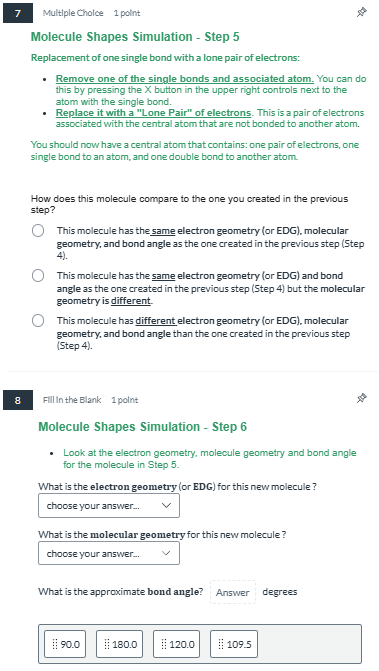
7 Multiple Choice 1 point Molecule Shapes Simulation - Step 5 Replacement of one single bond with a lone pair of electrons: Remove one of the single bonds and associated atom. You can do this by pressing the X button in the upper right controls next to the atom with the single bond. Replace it with a "Lone Pair" of electrons. This is a pair of electrons associated with the central atom that are not bonded to another atom. You should now have a central atom that contains: one pair of electrons, one single bond to an atom, and one double bond to another atom. How does this molecule compare to the one you created in the previous step? O This molecule has the same electron geometry (or EDG), molecular geometry, and bond angle as the one created in the previous step (Step 4). O This molecule has the same electron geometry (or EDG) and bond angle as the one created in the previous step (Step 4) but the molecular geometry is different. O This molecule has different electron geometry (or EDG). molecular geometry, and bond angle than the one created in the previous step (Step 4). B Fill In the Blank 1 point Molecule Shapes Simulation - Step 6 . Look at the electron geometry, molecule geometry and bond angle for the molecule in Step 5. What is the electron geometry (or EDG) for this new molecule ? choose your answer... What is the molecular geometry for this new molecule ? choose your answer... What is the approximate bond angle? Answer degrees #: 9010 #180.0 #: 109.5

Step by Step Solution

There are 3 Steps involved in it

1 Expert Approved Answer
Step: 1 Unlock blur-text-image

Question Has Been Solved by an Expert!

Get step-by-step solutions from verified subject matter experts

Step: 2 Unlock
Step: 3 Unlock

Students Have Also Explored These Related Accounting Questions!