







Question: Solve a simple JavaScript problem. There is JS code: const fs = require('fs'); // async write fs.writeFile('hello.txt', 'hello from Node! I am here Another line',
Solve a simple JavaScript problem.
There is JS code:
const fs = require('fs');
// async write
fs.writeFile('hello.txt', 'hello from Node! I am here Another line', function(err) {
if(err) {
console.log('-------');
console.log('Error writing to file.');
console.log('-------');
} else {
console.log('-------');
console.log('1. writing to file is successful.');
console.log('-------');
}
}
);
// async write with __dirname
fs.writeFile(__dirname + '/hello1.txt', 'another hello from Node! I am here Another line', function(err) {
if(err) {
console.log('-------');
console.log('Error writing to file.');
console.log('-------');
} else {
console.log('-------');
console.log('2. writing to file is successful.');
console.log('-------');
}
}
);
// sync write
try {
fs.writeFileSync(__dirname + '/hello2.txt', 'hello from Node!');
console.log('-------');
console.log('3. sync write successful');
console.log('-------');
} catch(err) {
console.log('-------');
console.error('Error writing file.');
console.error(err);
console.log('-------');
}
After I run those code, I got the result as follows:
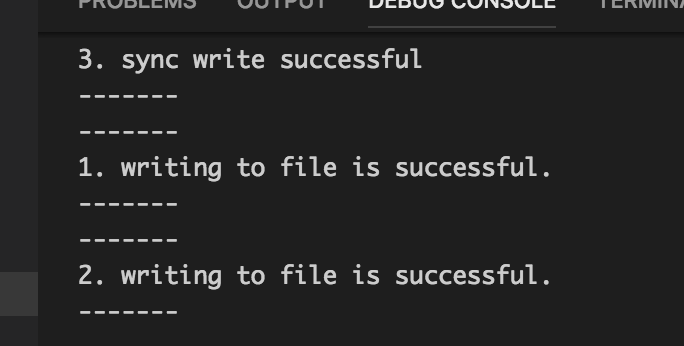
My question is why output is in "3...1....2..." order? Can you explain it carefully?
3. sync write successful 1. writing to file is successful. 2. writing to file is successful
Step by Step Solution
There are 3 Steps involved in it

Get step-by-step solutions from verified subject matter experts
 Study Help