







Question: solve asap the instruction is to use php to create a calculator that calculates the information represented. Purpose: Practice the creation of a dynamic Website
solve asap
the instruction is to use php to create a calculator that calculates the information represented.
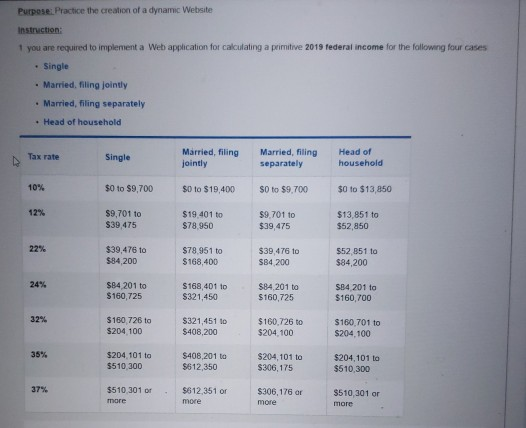
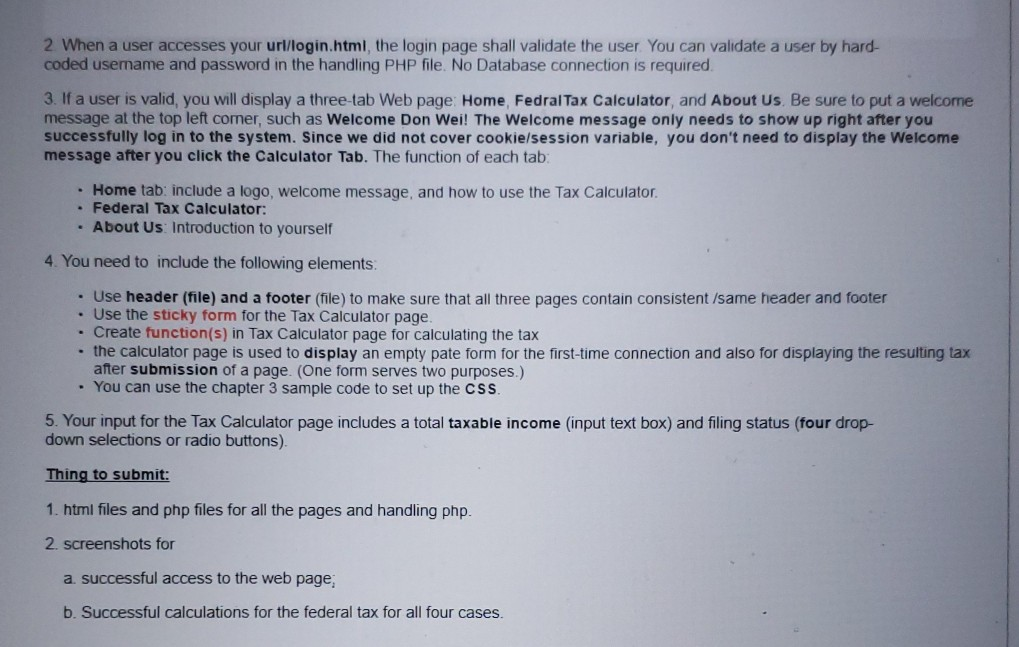
Purpose: Practice the creation of a dynamic Website Instruction: 1 you are required to implement a Web application for calculating a primitive 2019 federal income for the following four cases Single Married, filing jointly Married, Filing separately Head of household Tax rate Single Married, filing jointly Married, filing separately Head of household 10% $0 to $9,700 $0 to $19,400 S0 to $9.700 $0 to $13,850 12% $9,701 to $39 475 $19.401 to $78.950 $9.701 to $39,475 $13,851 to $52,850 $39.476 10 $84.200 $78 951 to $168.400 $39 476 to $84.200 552 851 to $84,200 24% $84 201 to $160,725 $168.401 to $321.450 $84 201 to $160,725 SB4 201 to $160,700 32% $160 726 to $204 100 $321451 to $408,200 $160.726 to $204 100 $160,701 to $204,100 35% $204,101 to $510 300 $408.201 to $612 350 $204,101 to $306,175 $204,101 to $510,300 31% $510 301 or more $612 351 or more $306,176 or $510 301 or more 2 When a user accesses your url/login.html, the login page shall validate the user. You can validate a user by hard- coded usemame and password in the handling PHP file. No Database connection is required 3. If a user is valid, you will display a three-tab Web page: Home, Fedral Tax Calculator, and About Us. Be sure to put a welcome message at the top left comer, such as Welcome Don Wei! The Welcome message only needs to show up right after you successfully log in to the system. Since we did not cover cookie/session variable, you don't need to display the Welcome message after you click the Calculator Tab. The function of each tab . Home tab: include a logo, welcome message, and how to use the Tax Calculator Federal Tax Calculator: . About Us Introduction to yourself 4. You need to include the following elements. Use header (file) and a footer (file) to make sure that all three pages contain consistent /same header and footer Use the sticky form for the Tax Calculator page. Create function(s) in Tax Calculator page for calculating the tax the calculator page is used to display an empty pate form for the first-time connection and also for displaying the resulting tax after submission of a page. (One form serves two purposes.) - You can use the chapter 3 sample code to set up the CSS. 5. Your input for the Tax Calculator page includes a total taxable income (input text box) and filing status (four drop- down selections or radio buttons) Thing to submit: 1. html files and php files for all the pages and handling php. 2. screenshots for a successful access to the web page, b. Successful calculations for the federal tax for all four cases. Purpose: Practice the creation of a dynamic Website Instruction: 1 you are required to implement a Web application for calculating a primitive 2019 federal income for the following four cases Single Married, filing jointly Married, Filing separately Head of household Tax rate Single Married, filing jointly Married, filing separately Head of household 10% $0 to $9,700 $0 to $19,400 S0 to $9.700 $0 to $13,850 12% $9,701 to $39 475 $19.401 to $78.950 $9.701 to $39,475 $13,851 to $52,850 $39.476 10 $84.200 $78 951 to $168.400 $39 476 to $84.200 552 851 to $84,200 24% $84 201 to $160,725 $168.401 to $321.450 $84 201 to $160,725 SB4 201 to $160,700 32% $160 726 to $204 100 $321451 to $408,200 $160.726 to $204 100 $160,701 to $204,100 35% $204,101 to $510 300 $408.201 to $612 350 $204,101 to $306,175 $204,101 to $510,300 31% $510 301 or more $612 351 or more $306,176 or $510 301 or more 2 When a user accesses your url/login.html, the login page shall validate the user. You can validate a user by hard- coded usemame and password in the handling PHP file. No Database connection is required 3. If a user is valid, you will display a three-tab Web page: Home, Fedral Tax Calculator, and About Us. Be sure to put a welcome message at the top left comer, such as Welcome Don Wei! The Welcome message only needs to show up right after you successfully log in to the system. Since we did not cover cookie/session variable, you don't need to display the Welcome message after you click the Calculator Tab. The function of each tab . Home tab: include a logo, welcome message, and how to use the Tax Calculator Federal Tax Calculator: . About Us Introduction to yourself 4. You need to include the following elements. Use header (file) and a footer (file) to make sure that all three pages contain consistent /same header and footer Use the sticky form for the Tax Calculator page. Create function(s) in Tax Calculator page for calculating the tax the calculator page is used to display an empty pate form for the first-time connection and also for displaying the resulting tax after submission of a page. (One form serves two purposes.) - You can use the chapter 3 sample code to set up the CSS. 5. Your input for the Tax Calculator page includes a total taxable income (input text box) and filing status (four drop- down selections or radio buttons) Thing to submit: 1. html files and php files for all the pages and handling php. 2. screenshots for a successful access to the web page, b. Successful calculations for the federal tax for all four cases
Step by Step Solution
There are 3 Steps involved in it

Get step-by-step solutions from verified subject matter experts
 Study Help