







Question: Solve errors you get with this and send the final fixed code!! II. Use nano text editor to type a program, compile, and run it.
Solve errors you get with this and send the final fixed code!!
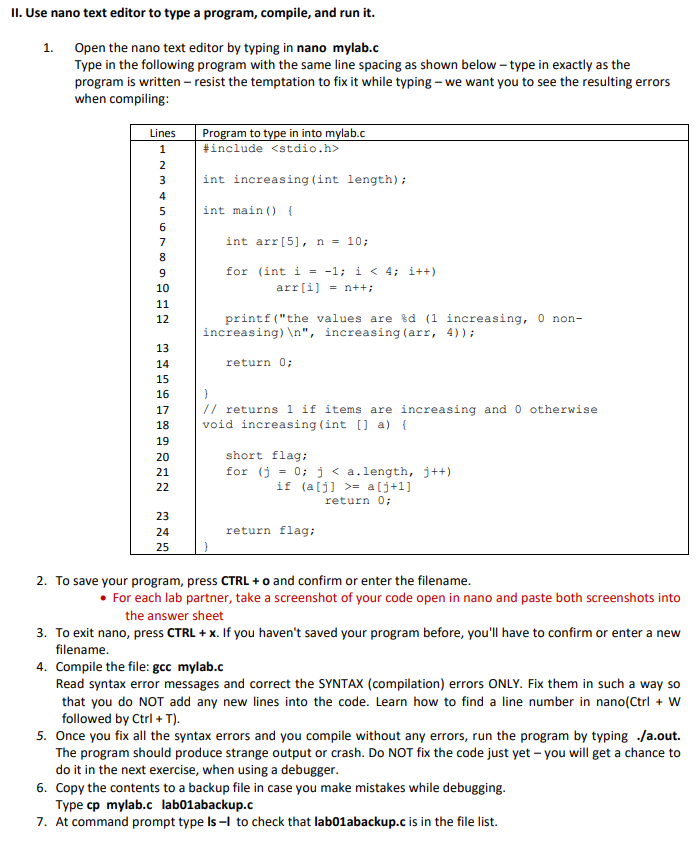
II. Use nano text editor to type a program, compile, and run it. 1. Open the nano text editor by typing in nano mylab.c Type in the following program with the same line spacing as shown below - type in exactly as the program is written - resist the temptation to fix it while typing - we want you to see the resulting errors when compiling: 2. To save your program, press CTRL+o and confirm or enter the filename. - For each lab partner, take a screenshot of your code open in nano and paste both screenshots into the answer sheet 3. To exit nano, press CTRL +x. If you haven't saved your program before, you'll have to confirm or enter a new filename. 4. Compile the file: gcc mylab.c Read syntax error messages and correct the SYNTAX (compilation) errors ONLY. Fix them in such a way so that you do NOT add any new lines into the code. Learn how to find a line number in nano(Ctrl +W followed by Ctrl+T ). 5. Once you fix all the syntax errors and you compile without any errors, run the program by typing ./a.out. The program should produce strange output or crash. Do NOT fix the code just yet - you will get a chance to do it in the next exercise, when using a debugger. 6. Copy the contents to a backup file in case you make mistakes while debugging. Type cp mylab.c lab01abackup.c 7. At command prompt type Is I to check that lab01abackup.c is in the file list
Step by Step Solution
There are 3 Steps involved in it

Get step-by-step solutions from verified subject matter experts
 Study Help