







Question: Solvelt.java Requirements: Solve for the result of the expression in the formula below for a value x of type double which is read in from
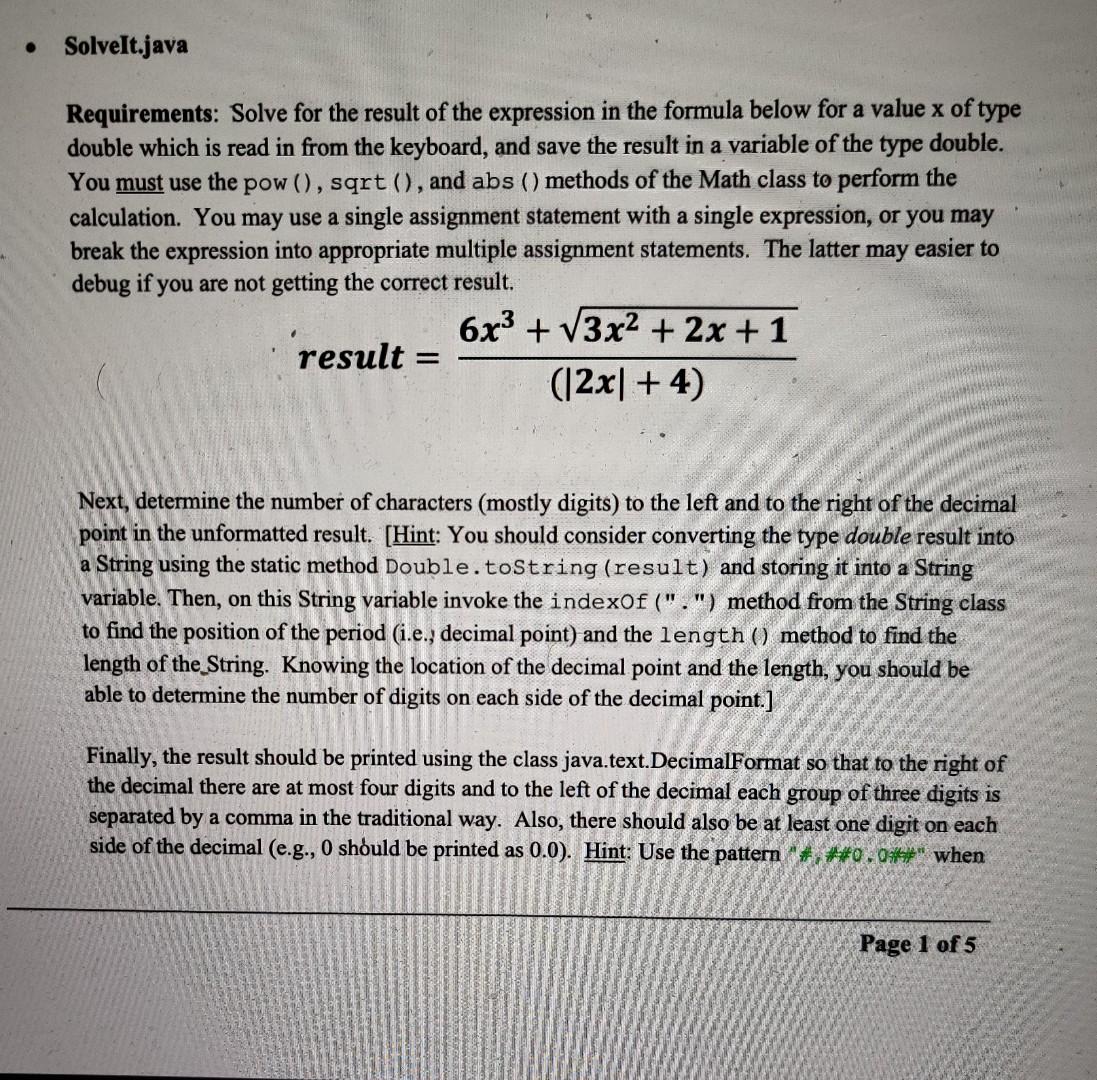
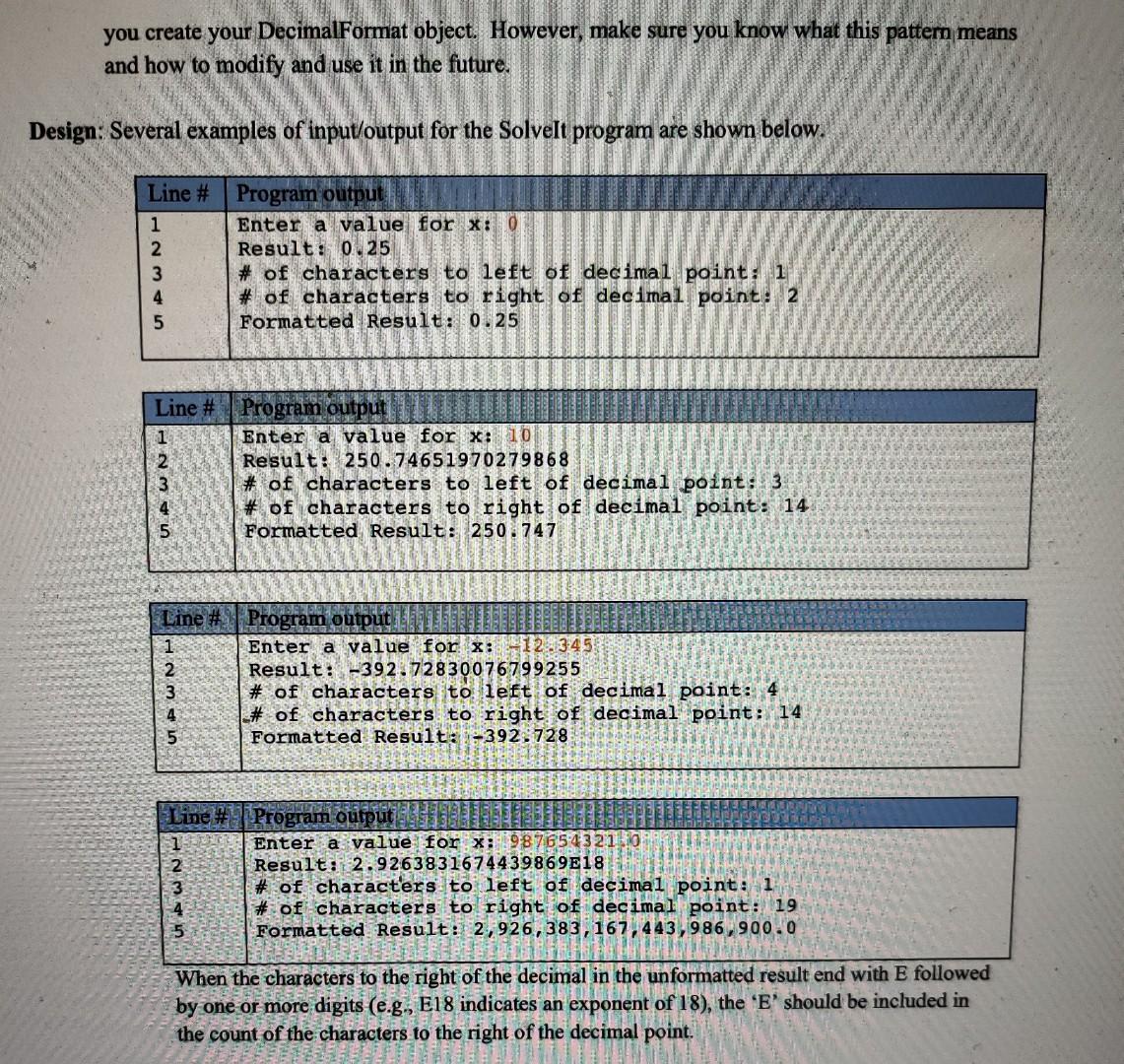
Solvelt.java Requirements: Solve for the result of the expression in the formula below for a value x of type double which is read in from the keyboard, and save the result in a variable of the type double. You must use the pow(), sqrt(), and abs () methods of the Math class to perform the calculation. You may use a single assignment statement with a single expression, or you may break the expression into appropriate multiple assignment statements. The latter may easier to debug if you are not getting the correct result 6x3 + 13x2 + 2x + 1 result (12x+4) = Next, determine the number of characters (mostly digits) to the left and to the right of the decimal point in the unformatted result. (Hint: You should consider converting the type double result into a String using the static method Double.toString (result) and storing it into a String variable. Then, on this String variable invoke the indexOf(".") method from the String class to find the position of the period (i.e., decimal point) and the length () method to find the length of the String. Knowing the location of the decimal point and the length, you should be able to determine the number of digits on each side of the decimal point.] Finally, the result should be printed using the class java.text.DecimalFormat so that to the right of the decimal there are at most four digits and to the left of the decimal each group of three digits is separated by a comma in the traditional way. Also, there should also be at least one digit on each side of the decimal (e.g., 0 should be printed as 0.0). Hint: Use the pattern "#, **0.04*" when Page 1 of 5 you create your DecimalFormat object. However, make sure you know what this pattem means and how to modify and use it in the future. Design: Several examples of input/output for the Solvelt program are shown below. Line # Program output 1 Enter a value for x: 0 2 Result: 0.25 3 # of characters to left of decimal point: 1 # of characters to right of decimal point: 2 Formatted Result: 0.25 Line # 1 Program output Enter a value for x: 10 Result: 250.746519 70279868 # of characters to left of decimal point: 3 # of characters to right of decimal point: 14 Formatted Result: 250.747 Line # Program output 1 Enter a value for x: 12.345 2 Result: -392.72830076799255 3 # of characters to left of decimal point: 4 4 # of characters to right of decimal point: 14 5 Formatted Result::-392.728 Line # 1 - 2 3 4 5 Program output Enter a value for x: 987654321 Result: 2.9263831674439869E18 # of characters to left of decimal point: 1 # of characters to right of decimal point: 19 Formatted Result: 2,926,383, 167, 443,986,900.0 When the characters to the right of the decimal in the unformatted result end with E followed by one or more digits (e.g., E18 indicates an exponent of 18), the 'E' should be included in the count of the characters to the right of the decimal point
Step by Step Solution
There are 3 Steps involved in it

Get step-by-step solutions from verified subject matter experts
 Study Help