







Question: Solving a MSSQL query in TWO different ways: Given two tables below, Department and Employee. The Dept column of Employee table indicates the department an
Solving a MSSQL query in TWO different ways:
Given two tables below, Department and Employee. The Dept column of Employee table indicates the department an employee belongs to. If Dept is NULL, the employee either does not belong to any department or his belonging department is unknown.
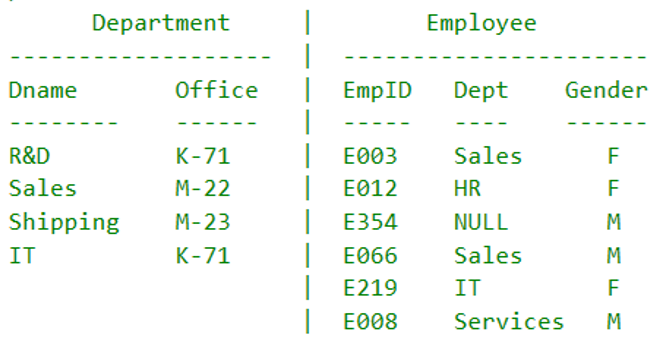
Which employee(s) belongs to a department but that department doesn't exist in Department table? Display his/her EmpID, Dept, and Gender. If the output contains more than one employee, they should be sorted by their EmpID in ascending order.
This query can be solved in many different ways, including (1) ~ (6) described below. Do not include any hard coded data values such as 'Sales' or 'E219' in your SQL statements.
(1) By a SELECT statement with a regular non-correlated subquery and no table joins, no set operators. (2) By a SELECT statement with a correlated subquery and keyword EXISTS but no table joins, no set operators. (3) By a SELECT statement which uses a CTE [all_dept] with a regular non-correlated subquery but no table joins, no set operators. [all_dept] is defined by "select Dname from Department". (4) Same as (3) but the CTE is used in a table join. No subqueries and no set operators are used in the SELECT statement. (5) By a SELECT statement with a table join and no subqueries, no set operators. (6) By a SELECT statement with set operators but no table joins, no subqueries.
You are required to solve the query by using any two of the six methods.
That is, print which method (e.g., (1), (5), etc.) you choose to solve followed by your SELECT statement of the method.
- - - - - - - - ----- Department ------------------- Dname Office ----- R&D K-71 Sales M-22 Shipping M-23 IT K-71 Employee ---------------------- EmpID Dept Gender ---- ---- E003 Sales E012 HR E354 NULL E066 Sales E219 IT | E008 Services M
Step by Step Solution
There are 3 Steps involved in it

Get step-by-step solutions from verified subject matter experts
 Study Help