







Question: Some examples of importing the script and calling GetDataByHeaderAndRow are below. C: Users brokow UCM C 1 asses ME 0 2
Some examples of importing the script and calling GetDataByHeaderAndRow are below.
C:UsersbrokowUCM CassesME Fa Assignments pythonHWGetDataByHeaderAndRowHWdatatxt 'LABEL',
'Treasure'HWGetDataByHeaderAndRowHWdatatxt 'Name',
'Warning: header Python File Reading and Dictionaries: More Practice
Storing data and adding to data in a dictionary: Experiment with Python dictionaries and their keys
member function that returns a list of a dictionary's keys. You can check if a particular key is in a dictionary by
using the in test with the keys list. For example, if our dictionary is
MyDict : 'One', : 'Two', : 'Three'
Then
MyDict.keys
evaluates to True, indicating that is a valid key for MyDict. This can be used in conditional statements if
statements, while statements, etc.
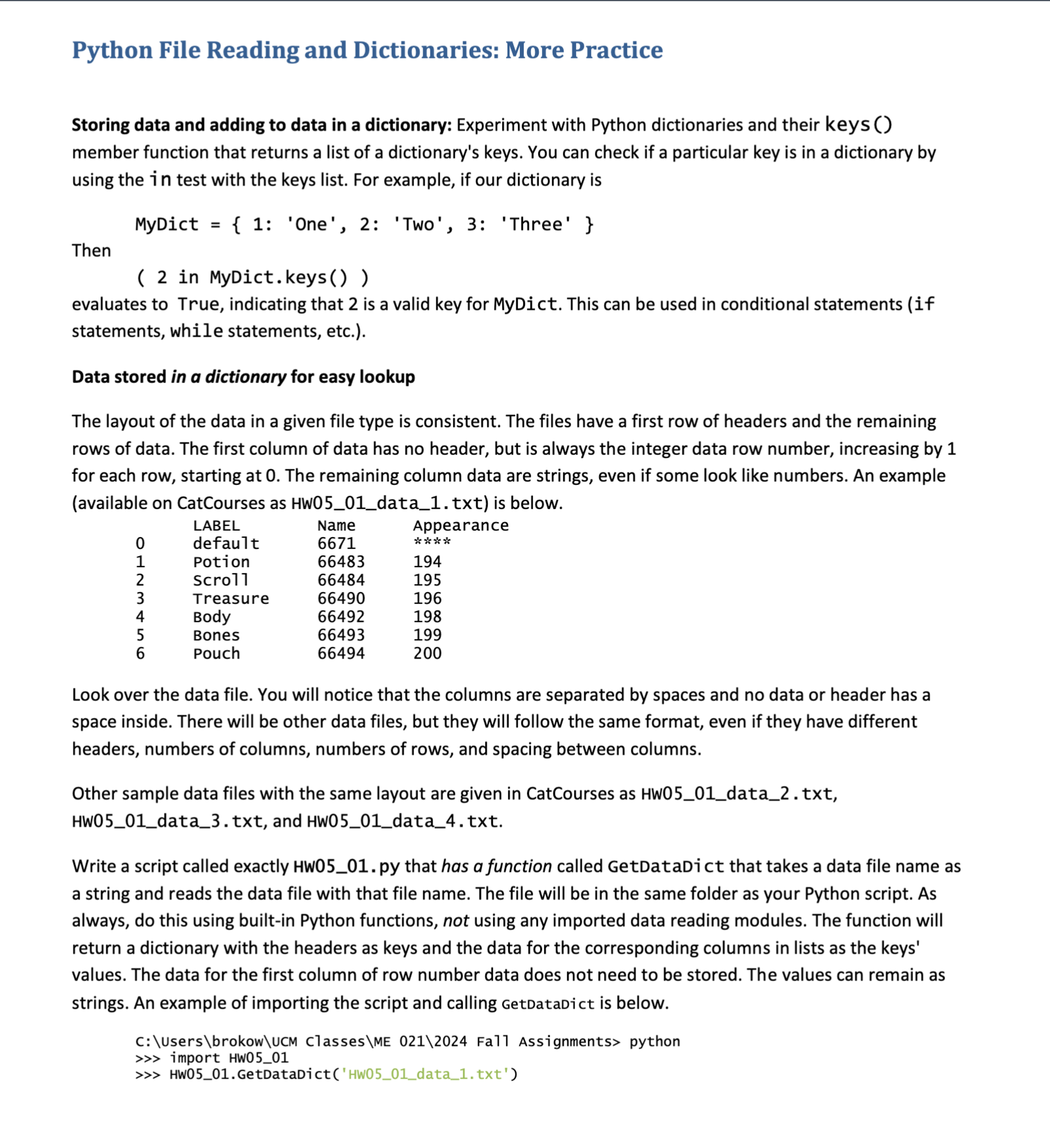
Data stored in a dictionary for easy lookup
The layout of the data in a given file type is consistent. The files have a first row of headers and the remaining
rows of data. The first column of data has no header, but is always the integer data row number, increasing by
for each row, starting at The remaining column data are strings, even if some look like numbers. An example
available on CatCourses as HWdatatxt is below.
Look over the data file. You will notice that the columns are separated by spaces and no data or header has a
space inside. There will be other data files, but they will follow the same format, even if they have different
headers, numbers of columns, numbers of rows, and spacing between columns.
Other sample data files with the same layout are given in CatCourses as HWdata txt
HWdatatxt and HWdatatxt
Write a script called exactly HW py that has a function called GetDataDict that takes a data file name as
a string and reads the data file with that file name. The file will be in the same folder as your Python script. As
always, do this using builtin Python functions, not using any imported data reading modules. The function will
return a dictionary with the headers as keys and the data for the corresponding columns in lists as the keys'
values. The data for the first column of row number data does not need to be stored. The values can remain as
strings. An example of importing the script and calling GetDatadict is below.
C:UsersbrokowUCM ClassesME Fa Assignments pythonHWGetDataDictHwdatatxt
LABEL: default 'Potion', 'Scroll', 'Treasure', 'Body', 'Bones', 'Pouch' 'Name':
'Appearance':
The same script will have a second function called GetDataByHeaderAndRow that will take three arguments:
the data file name as a string, the header name as a string, and a row number as an integer starting at It will
return a string which is the file's data for the given column header and row number. Obviously, it should make
use of GetDataDict. This function must do some checking on the last two parameters given to it:
If the given header is not one of the headers for the data, it will print an informative warning to that
effect and return None.
If the given row is outside the range of rows for the data, it will print an informative warning to that
effect and return None.
Note that neither function should make any assumptions about the number of headers or rows. Both functions
should work without adjustment for other files with the same data layout.
Some examples of importing the script and calling GetDataByHeaderAndRow are below.
C:UsersbrokowUCM ClassesME Fall Assignments python
import HW
HWGetDataByHeaderAndRowHWdatatxt 'LABEL',
'Treasure'
HWGetDataByHeaderAndRowHWdatatxt 'Appearance',
HWGetDataByHeaderAndRowHWdatatxt 'Name',
HWGetDataByHeaderAndRowHWdatatxt 'Name',
HWGetDataByHeaderAndRowHWdatatxt 'LoooBEL',
Warning: header was not in the data read from file HWdatatxt Quitting.
HWGetDataByHeaderAndRowHWdatatxt 'LABEL',
Warning: file HWdatatxt has row numbers going from to Quitting.
# try a couple of the other files
HWGetDataByHeaderAndRowHWdatatxt 'MDLNAME',
'NECK'
HWGetDataByHeaderAndRowHWdatatxt 'LABEL',
'Fancy'
Step by Step Solution
There are 3 Steps involved in it
1 Expert Approved Answer
Step: 1 Unlock

Question Has Been Solved by an Expert!
Get step-by-step solutions from verified subject matter experts
Step: 2 Unlock
Step: 3 Unlock
 Study Help