





Question: Some help please. Thank you for explaining and helping me understand these assignment. Explain #include #include using namespace std; int main() {int denom, finalDenom, finalPower;
 Some help please. Thank you for explaining and helping me understand

Some help please. Thank you for explaining and helping me understand these assignment.

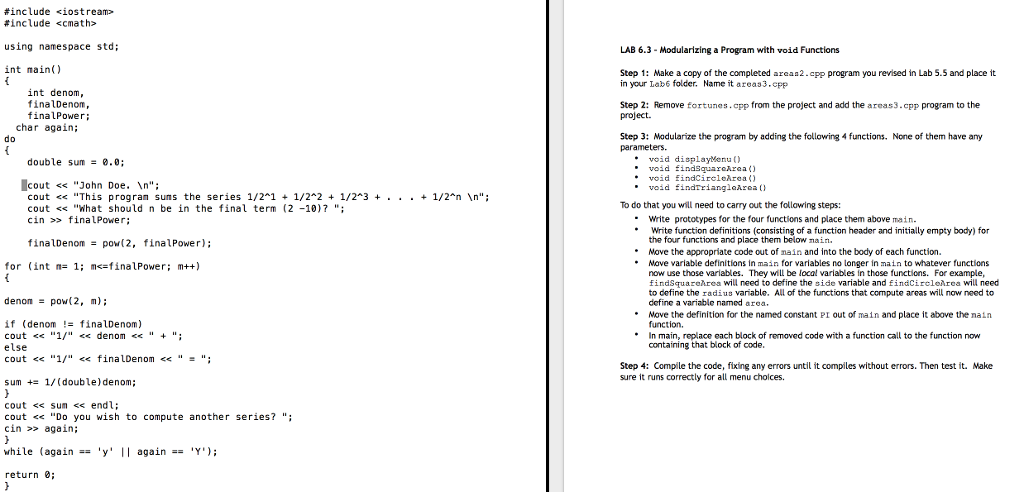
Explain #include #include using namespace std; int main() {int denom, finalDenom, finalPower; char again; do {double sum = 0.0; cout > finalPower; finalDenom = pow(2, finalPower); for (int n= 1; m>again;} while (again == 'y' || again == 'Y'); return 0;} Modularizing a Program with void Functions Step 1: Make a copy of the completed areas2.cpp program you revised In Lab 5.5 and place It in your lab6 folder. Name it areas3.cpp Step 2: Remove fortunes.cpp from the project and add the areas3.cpp program to the project. Step 3: Modularize the program by adding the following 4 functions. None of them have any parameters. void displayMenu() void findSquareArea() void findCircleArea() void findTriangleArea () To do that you will need to carry out the following steps: Write prototypes for the four functions and place them above main. Write function definitions (consisting of a function header and initially empty body) for the four functions and place them below main. Move the appropriate code out of main and into the body of each function. Move variable definitions in main for variables no longer in main to whatever functions now use those variables. They will be local variables in those functions. For example, findSquareArea will reed to define the side variable and findCircleArea will need to define the radius variable. All of the functions that compute areas will row need to define a variable named area. Move the definition for the named constant PI out of main and place It above the main function. In main, replace each block of removed code with a function call to the function now containing that block of code. Step 4: Compile the code, fixing any errors until it compiles without errors. Then test it. Make sure it runs correctly for all menu choices

Step by Step Solution

There are 3 Steps involved in it

1 Expert Approved Answer
Step: 1 Unlock blur-text-image
Question Has Been Solved by an Expert!

Get step-by-step solutions from verified subject matter experts

Step: 2 Unlock
Step: 3 Unlock

Students Have Also Explored These Related Databases Questions!