







Question: Someone please answer this matlab question simply, it shouldnt be a very long answer and we just learned the basics of imaging in matlab. 2.
 Someone please answer this matlab question simply, it shouldnt be a very long answer and we just learned the basics of imaging in matlab.
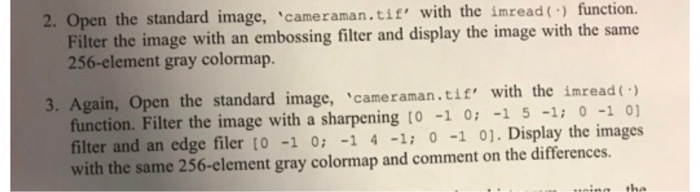
 2. Open the standard image, 'cameraman.tie' with the imread function. Filter the image with an embossing filter and display the image with the same 256-element gray colormap. 3. Again, Open the standard image, 'camman ti' with the inread( function. Filter the image with a sharpening to -1 0 1 5 -1: 0 -1 01 filter and an edge filer to -1 0: 1 4 -1 0 -1 01. Display the images with the same 256-clement gray colormap and comment on the differences. uing the
Step by Step Solution
There are 3 Steps involved in it
1 Expert Approved Answer
Step: 1 Unlock

Question Has Been Solved by an Expert!
Get step-by-step solutions from verified subject matter experts
Step: 2 Unlock
Step: 3 Unlock
 Study Help