







Question: Space Invaders This assignment will focus on masking binary numbers. You will read image data from a text file in the form of binary strings.
Space Invaders
This assignment will focus on masking binary numbers. You will read image data from a text file in the form of binary strings. The image data contains pixel art from the popular Space Invaders game from the 1970s (plus one surprise guest).
Image File
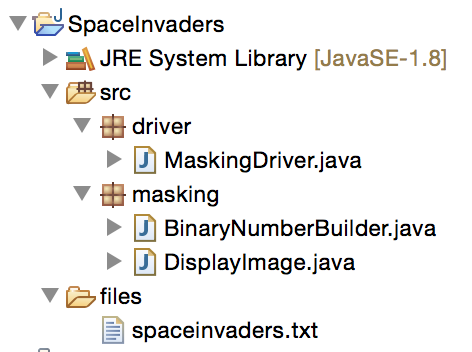
Download the following files from Canvas and add them to a new Eclipse project: spaceinvaders.txt (https://egator.greenriver.edu/courses/1674866/files/105339118/download?download_frd=1), BinaryNumberBuilder.java (https://egator.greenriver.edu/courses/1674866/files/105339275/download?download_frd=1) The text file should be placed in a "files" directory as seen below:
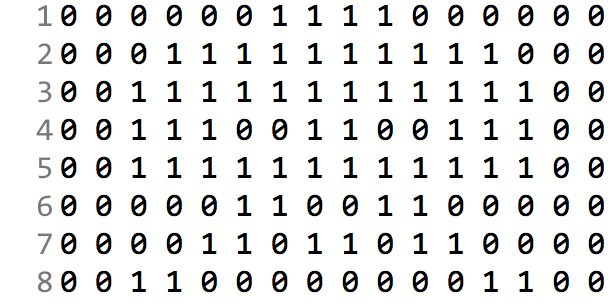
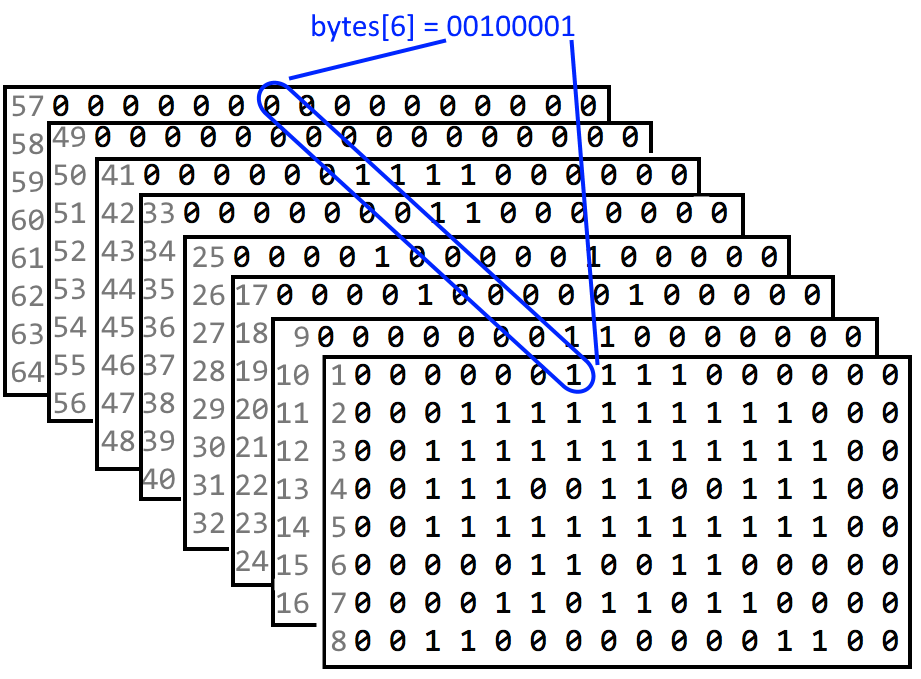
The contents of the file contains eight images, declared as bit-strings of length 16. Each image is comprised of 8 rows. If you look closely at the image below you can barely see the shape of an alien where the one-bits are located:
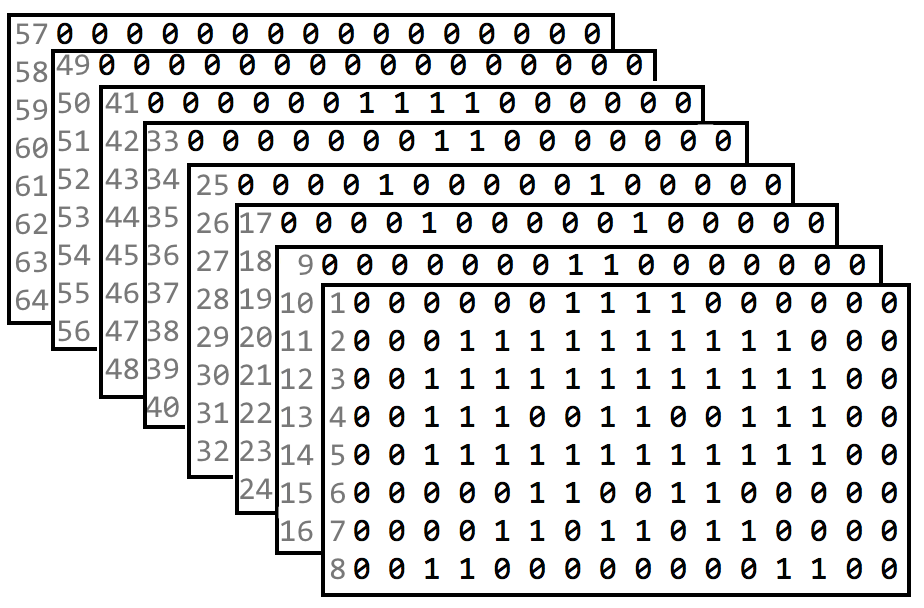
Each of the eight images are found in subsequent groups of eight rows in the input file:
The BinaryNumberBuilder Class
You have been given the BinaryNumberBuilder class which contains a getInput() method that parses through the bit strings in the input file and returns an array of bytes. Each byte represents the bit at a row/column for each of the eight images. For example, the first byte in the byte array represents the bit for all eight images at row=0, column=0:
| BinaryNumberBuilder |
| + getInput(fileName : String, rows : int, columns : int) : byte[] |
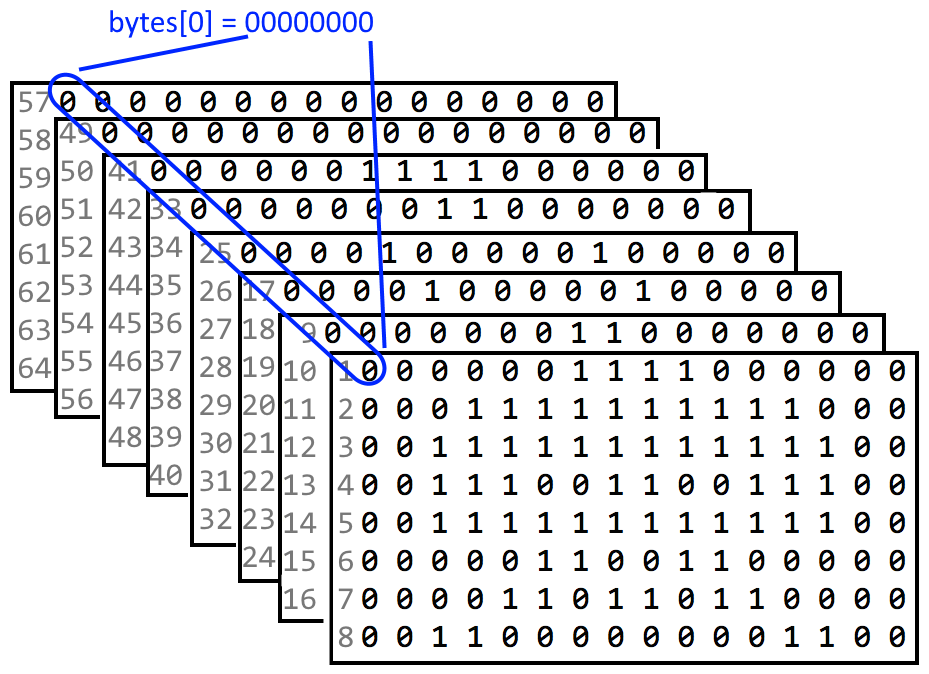
Similarly, the seventh bit for all eight images is represented by the byte at index six:
Note: the getInput() method returns an array of size: 8 (rows) x 16 (columns) = 128
Note: the order of the bits in the byte - the bit for image 1 is the least significant bit and the bit for image 8 is the most significant bit.
The DisplayImage Class
Begin by writing a class called DisplayImage that works together with the BinaryNumberBuilder class to display an image from your input file. Use the following class diagram and descriptions as guidance:
| DisplayImage |
| - data : byte[] - rows : int - columns : int |
| + DisplayImage(data : byte[], rows : int, columns : int) + showImage(choice : int) : void |
data: this array holds each byte as it was read from the file using BinaryNumberBuilder. This byte array should be passed into the DisplayImage object using the constructor
showImage(): displays the image at the chosen index, where choice represents one of the eight possible images (1-8). For example, if choice is 4 (the user is requesting image 4) then this method will loop over the data array and for every byte, look at the 4th bit (from the right).
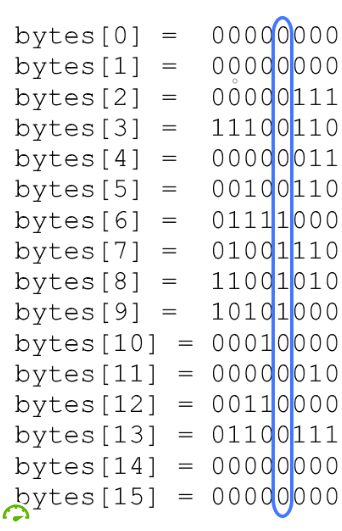
If the 4th bit is zero, the method will print a space; otherwise, the method will print an "X".
0000001111000000 --> ______XXXX______
After reading 16 bytes a new line should be printed to the console.
0000001111000000 --> ______XXXX______ 0001111111111000 --> ___XXXXXXXXXX___
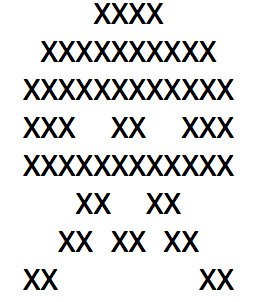
After your method has completed you should see the outline of the associated alien from your input file displayed on the console:
Driver Class
Write a driver class that prompts the user for an image number and uses the BinaryNumberBuilder & DisplayImage classes to draw the associated image to the Console. Some example output can be seen below:
Choose an image (1-8) or enter 0 to exit: 1 XXXX XXXXXXXXXX XXXXXXXXXXXX XXX XX XXX XXXXXXXXXXXX XX XX XX XX XX XX XX Choose an image (1-8) or enter 0 to exit: 2 XX XXXX XXXXXX XX XX XX XXXXXXXX X X X XX X X X X X Choose an image (1-8) or enter 0 to exit: 3 X X X X XXXXXXX XX XXX XX XXXXXXXXXXX X XXXXXXX X X X X X XX XX Choose an image (1-8) or enter 0 to exit: 4 X X X X X X X XXXXXXX X XXX XXX XXX XXXXXXXXXXX XXXXXXXXX X X X X Choose an image (1-8) or enter 0 to exit: 5 XX XXXX XXXXXX XX XX XX XXXXXXXX X XX X X X X X Choose an image (1-8) or enter 0 to exit: 6 XXXX XXXXXXXXXX XXXXXXXXXXXX XXX XX XXX XXXXXXXXXXXX XXX XXX XX XX XX XX XX Choose an image (1-8) or enter 0 to exit: 7 XXXX XXXXXXXXXX XXXXXXXXXXXX XX XX XX XX XX XXXXXXXXXXXXXXXX XXX XX XXX X X Choose an image (1-8) or enter 0 to exit: 8 XXXXX XXXXXXX XX X XX XX XX XXX XXXXXXXXX XXXXXXXXX X X X X X Choose an image (1-8) or enter 0 to exit: 0
Spacelnvaders JRE System Library [JavaSE-1.8] driver JMaskingDriver.java Emasking JBinaryNumberBuilder.java Displaylmage.java files spaceinvaders.txt Spacelnvaders JRE System Library [JavaSE-1.8] driver JMaskingDriver.java Emasking JBinaryNumberBuilder.java Displaylmage.java files spaceinvaders.txt
Step by Step Solution
There are 3 Steps involved in it

Get step-by-step solutions from verified subject matter experts
 Study Help