







Question: Specifications: You are allowed at most three DATA steps and eight PROC steps to complete this assignment. Create library and file references that point to
Specifications:
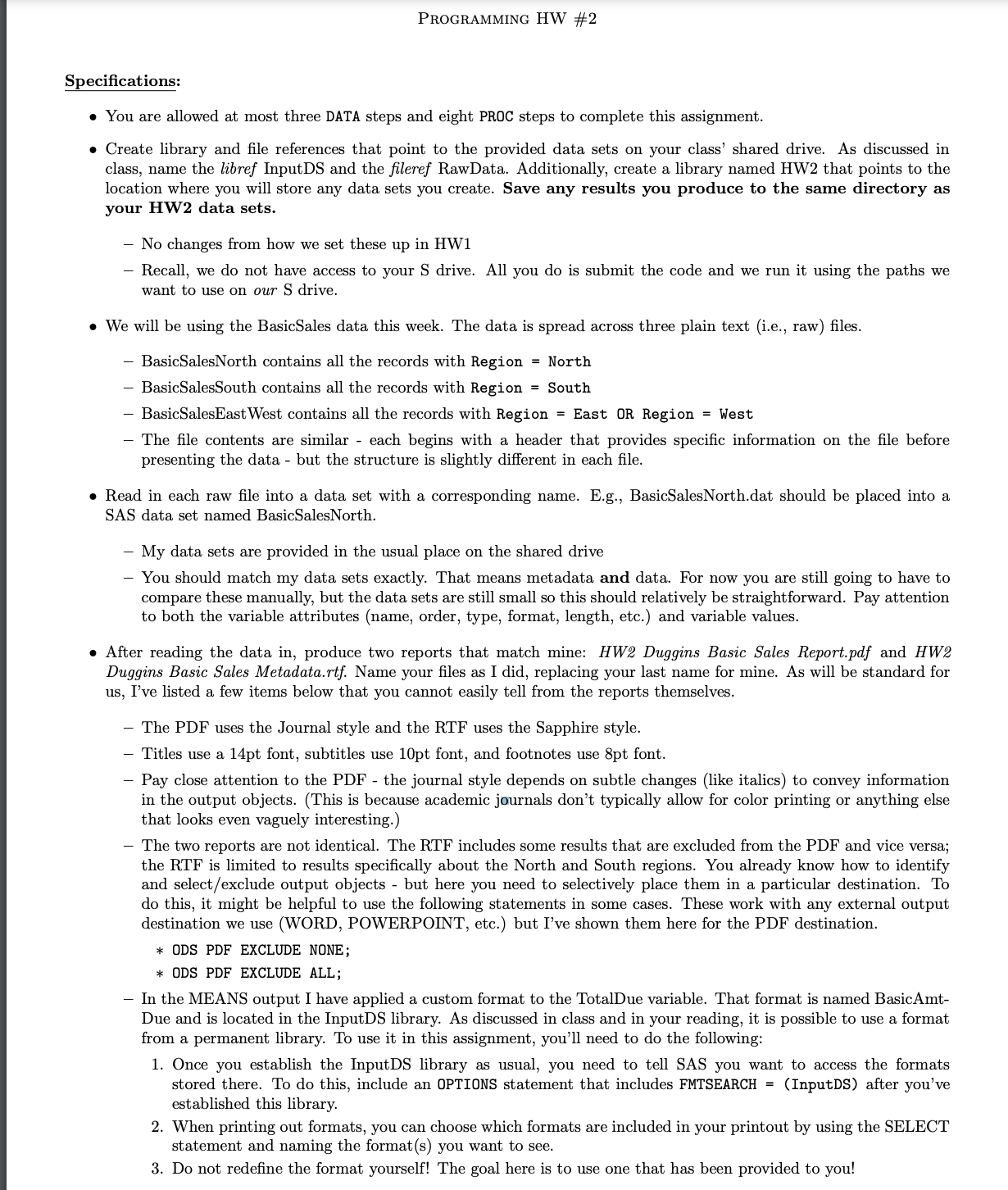
You are allowed at most three DATA steps and eight PROC steps to complete this assignment.
Create library and file references that point to the provided data sets on your class' shared drive. As discussed in
class, name the libref InputDS and the fileref RawData. Additionally, create a library named HW that points to the
location where you will store any data sets you create. Save any results you produce to the same directory as
your HW data sets.
No changes from how we set these up in HW
Recall, we do not have access to your drive. All you do is submit the code and we run it using the paths we
want to use on our S drive.
We will be using the BasicSales data this week. The data is spread across three plain text ie raw files.
BasicSalesNorth contains all the records with Region North
BasicSalesSouth contains all the records with Region South
BasicSalesEastWest contains all the records with Region East OR Region West
The file contents are similar each begins with a header that provides specific information on the file before
presenting the data but the structure is slightly different in each file.
Read in each raw file into a data set with a corresponding name. Eg BasicSalesNorth.dat should be placed into a
SAS data set named BasicSalesNorth.
My data sets are provided in the usual place on the shared drive
You should match my data sets exactly. That means metadata and data. For now you are still going to have to
compare these manually, but the data sets are still small so this should relatively be straightforward. Pay attention
to both the variable attributes name order, type, format, length, etc. and variable values.
After reading the data in produce two reports that match mine: HW Duggins Basic Sales Report.pdf and HW
Duggins Basic Sales Metadata.rtf Name your files as I did, replacing your last name for mine. As will be standard for
us I've listed a few items below that you cannot easily tell from the reports themselves.
The PDF uses the Journal style and the RTF uses the Sapphire style.
Titles use a pt font, subtitles use pt font, and footnotes use pt font.
Pay close attention to the PDF the journal style depends on subtle changes like italics to convey information
in the output objects. This is because academic journals don't typically allow for color printing or anything else
that looks even vaguely interesting.
The two reports are not identical. The RTF includes some results that are excluded from the PDF and vice versa;
the RTF is limited to results specifically about the North and South regions. You already know how to identify
and selectexclude output objects but here you need to selectively place them in a particular destination. To
do this, it might be helpful to use the following statements in some cases. These work with any external output
destination we use WORD POWERPOINT, etc. but I've shown them here for the PDF destination.
ODS PDF EXCLUDE NONE;
ODS PDF EXCLUDE ALL;
In the MEANS output I have applied a custom format to the TotalDue variable. That format is named BasicAmt
Due and is located in the InputDS library. As discussed in class and in your reading, it is possible to use a format
from a permanent library. To use it in this assignment, you'll need to do the following:
Once you establish the InputDS library as usual, you need to tell SAS you want to access the formats
stored there. To do this, include an OPTIONS statement that includes FMTSEARCH InputDS after you've
established this library.
When printing out formats, you can choose which formats are included in your printout by using the SELECT
statement and naming the formats you want to see.
Do not redefine the format yourself! The goal here is to use one that has been provided to you! PROGRAMMING HW #
The labels are rather long, and make the PROC MEANS results look pretty messy. Just like PROC PRINT has a LABEL
option, PROC MEANS has a NOLABELS option use it
In the PROC FREQ step, the dates have been grouped into quarters labelled with Roman numerals using the QTRR
format. Optional task: Compare the default sort order to the results when using ORDERFORMATTED. Why does
this happen?
Step by Step Solution
There are 3 Steps involved in it
1 Expert Approved Answer
Step: 1 Unlock

Question Has Been Solved by an Expert!
Get step-by-step solutions from verified subject matter experts
Step: 2 Unlock
Step: 3 Unlock
 Study Help