







Question: Specifying a UML design for FlexEvent . FlexEvent has a potentially large scope but your solution should focus on an aspect or aspects that you
Specifying a UML design forFlexEvent. FlexEventhas a potentially large scope but your solution should focus on an aspect or aspects that you select.
Build a UML Class & Sequence using the requirements and use case below. Break the use case into Entities classes, Non-entity, Methods, and Attributes using any color.
| Use case Name | Create an event and Book a venue to host an event. | |
| Actor: | Eventcoordinator | |
| Description: | The Event Coordinatorwants to host an Afrobeat Concert and is looking for a venue that will accommodate up to 300 people indoor. | |
| Pre-condition: | The user opens the FlexEvent site and log in to the system and is on the Homepage. | |
| Step # | Actor | System |
| 1 | Clicks on the button "Create an Event". | Displays a form prompting users to enter events information such as event title, description, maximum capacity allowed, parking structures, event date range, event type, etc. |
| 2 | Enters event information | Validates the data and the system saves the information if there's no error. |
| 3 | Displays a list of venues based on the user's provided information. | |
| 4 | Users select a venue | The system display detail information on the venue with the list of COVID policy. |
| 5 | Clicks on the button to 'Book/Reserve' a venue. Submits the request to book/reserve a venue | Displays payment preference for user to select. The system will charge the user after the request is approved. |
| 6 | Enters payment information and submit it | Process user request then displays system message, notifying them whether the approval went through. |
| Alternate Courses: | Step 2: The system will show an error message on the screen and not save the information if there is any validation error. Step 4: If no venue is selected, exit the screen. The detailed information will be saved as a draft and can be retrieved on the homepage. Step 5: The user will be asked to pay after the request is approved if the user decides to pay later. |
This is assumed to include the following requirements:
- FlexEventwill notify the event coordinator with COVID regulations changes so they can act on whether to re-book or cancel the venue booking accordingly.
- FlexEventwill allow the event coordinator to plan, manage and book venues.
- The system will allow the user to generate an event.
- The system will allow the user to search for venues using the allowed maximum capacity, parking structures, date range, size with the given social distance requirements.
- The system will send the user a request to book/reserve a venue.
- The system will notify the user whether the venue booking request has been approved.
- The system will allow the user to make payments to reserve the venue.
- The system will allow the user to see the reserved event venue information.
- The system will allow the user to cancel/reschedule event venue reservations.
- FlexEventwill allow venue owners to post their venue to be booked.
- The system will allow the user to list their venues.
- The system will allow the user to enter new venue information:
- Location, Maximum capacity allowed, Parking structure (parking lot or valet), social distance capacity & guidelines, vaccination requirements for guests, cancellation policy, etc.
- The system will allow the user to register venue information.
- The system will allow the user to approve venue booking requests.
- The system will allow the user to deny/reschedule venue booking requests.
- The system will allow the user to update venue information and date availability
Given the Entity classes as Blue, Non-entity as Green, Attributes as Orange, Methods as Purple, With the provided use-case,
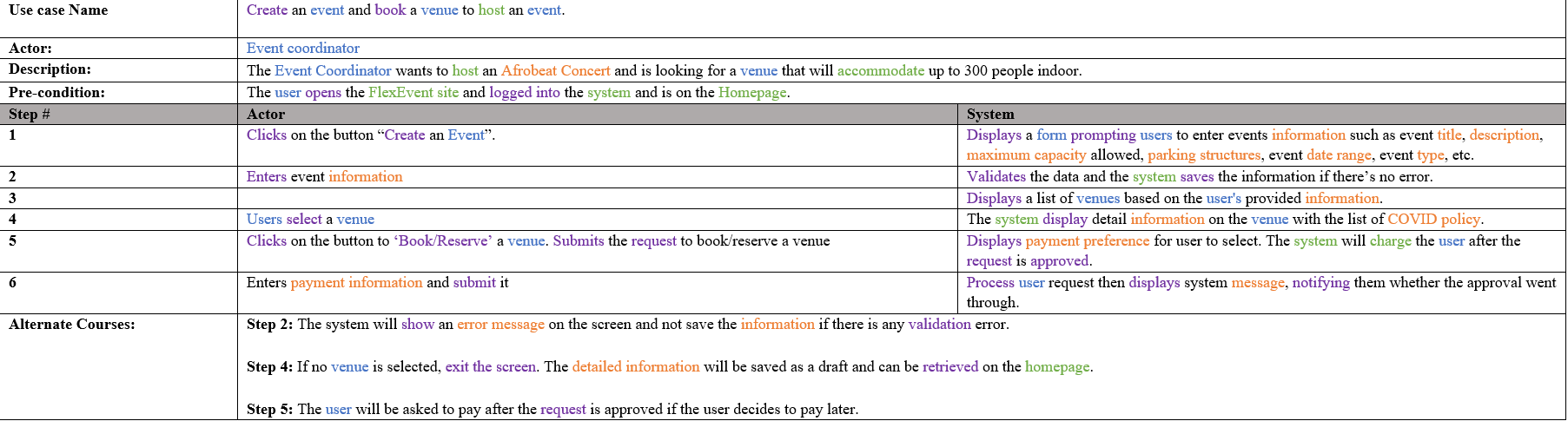
Use case Name Create an event and book a venue to host an event. Actor: Event coordinator Deseription: The Event Coordinator wants to host an Afrsbeat Concert and is looking for a vame that will accommodate up to 300 people indoor. Pmeundition: The user 0pm the FlexEvent site and logged into the systm'n and is on the Homepage. 1 Clicks on the button \"Create an Event\". Displays a form prompting users to enter events information such as event title, description, maximum capacity allowed, parking structures, event date range, event type, etc. 2 Enters event information Validates the data and the system saves the information ifthere's no error. 3 Displays a list of venues based on the user's provided information. 4 Users select a venue The system display detail information on the venue with the list of COVID policy. 5 Clicks on the button to 'BoolrfReserve' a venue. Submits the request to bnokfresve a value Displays payment preference for user to select. The system will charge the user alter the request is approved. 6 Enters payment information and. submit it Process user request then displays system message, notifying them whether the appmval wait through. Alternate Courses: Step 2: The system will show an error message on the screen and not save the information if there is anyvalidation error. Step 4: If no value is selected, exit the screen. The demrled information will he saved as a dra and can be retrieved on the homepage. Step 5: The user will be asked to pay aka the request is approved ifthe user decides to pay later
Step by Step Solution
There are 3 Steps involved in it

Get step-by-step solutions from verified subject matter experts
 Study Help