







Question: SQL ClassicModels Database Query 1. Write a query to display the city and country where an office is located and the first and last name
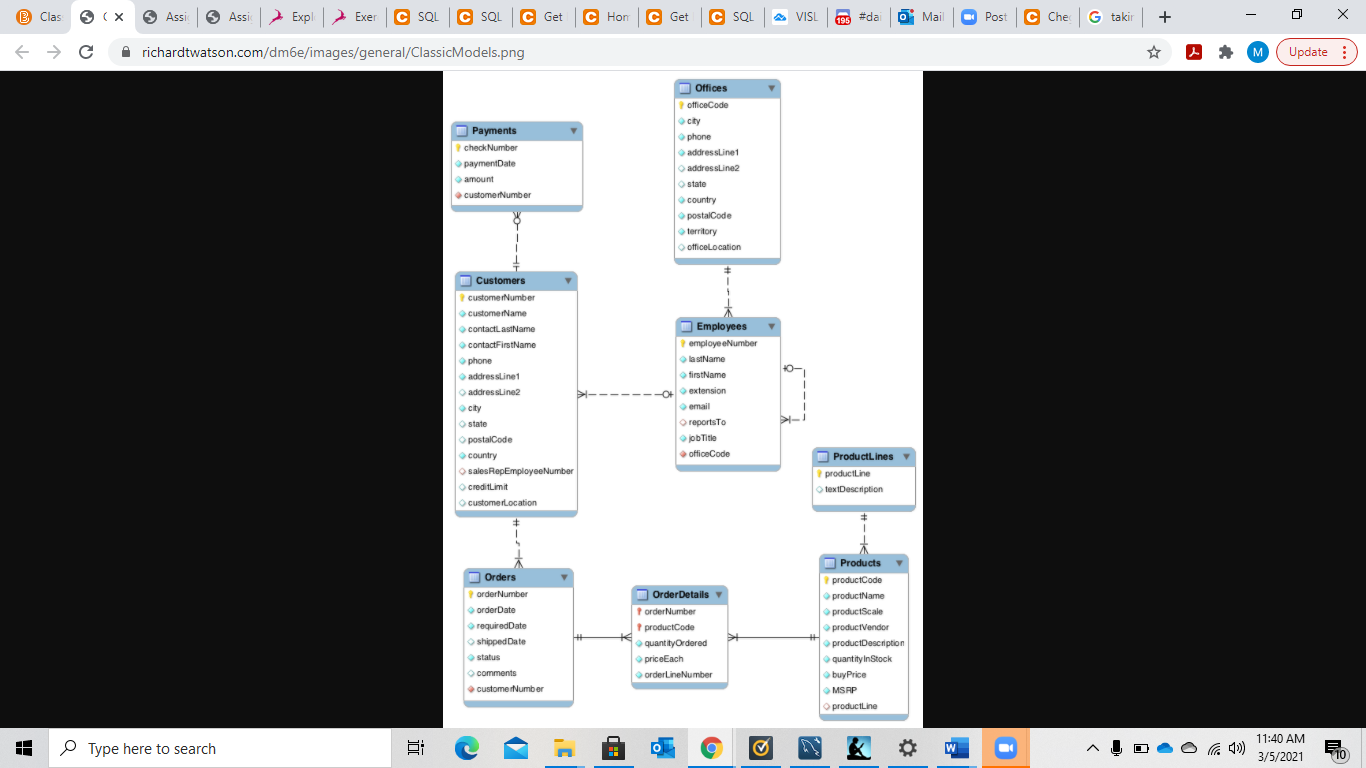 SQL ClassicModels Database
Query 1. Write a query to display the city and country where an office is located and the first and last name of employees (in 1 column) at that loca3on. Order the results in reverse alphabe3cal order.
Query 2. List the orderNumber, the name of the products on the order if the product is a type of car. Order the results in ascending order of the order number.
Query 3. Write a query to list out the product name and the percentage discount on each product. Provide the result with a % sign and order the results in the descending order of the discount.
Query 4. Write a query to count the number of orders whose status is Shipped for customers from France whose credit limit is greater than 100000.
B Clas S (X Assi 5 Assi Assi Expl Exer C SQL C SQL C Get C Hon C Get C SQL VISL O Mail 196 #da Post Che G taki + richardtwatson.com/dm6e/images/general/ClassicModels.png M Update: Offices officeCode city phone Payments check Number payment Date amount customerNumber addressLine1 WressUne2 state stare country postalCode territory officeLocation + 1 Customers customerNumber customerName contactLastName contactFirstName phone addressLine1 addressLine2 city city state we postalCode country sales RepEmployeeNumber creditimit Employees employeeNumber lastName firstName extension email reports to Job Title officeCode > Product Lines productLine textDescription customerlocation Products product Code productName productScale Orders order Number order Date requiredDate shipped Date status comments customerNumber Order Details order Number product Code quantityOrdered priceEach orderline Number productVendor product Description quantity in Stock buy Price MSRP productLine I Type here to search c J' 11:40 AM 3/5/2021 B 710
Step by Step Solution
There are 3 Steps involved in it

Get step-by-step solutions from verified subject matter experts
 Study Help