







Question: SQL CODE 1- Create new user 2- Give the user privileges such as (CONNECT, RESOURCE, DBA ...) 3-Use the new account that you created. (connect
SQL CODE
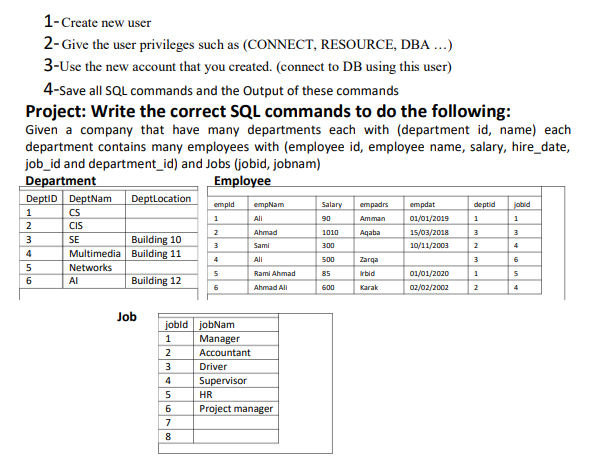
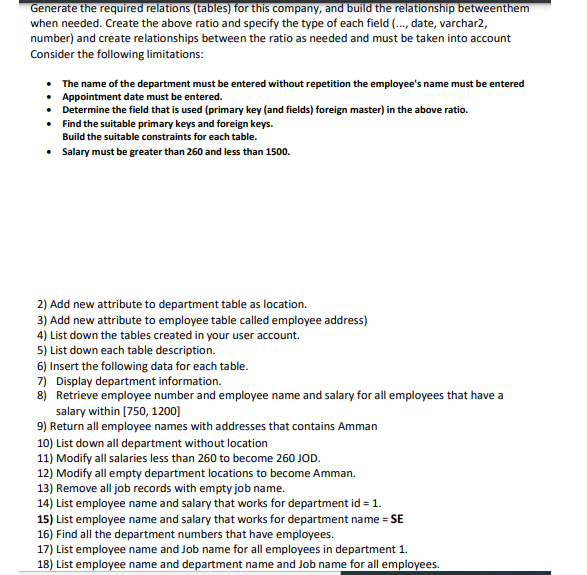
1- Create new user 2- Give the user privileges such as (CONNECT, RESOURCE, DBA ...) 3-Use the new account that you created. (connect to DB using this user) 4-Save all SQL commands and the Output of these commands Project: Write the correct SQL commands to do the following: Given a company that have many departments each with (department id, name) each department contains many employees with (employee id, employee name, salary, hire_date, job_id and department_id) and Jobs (jobid, jobnam) Department Employee DeptiD DeptNam DeptLocation emple deptid 1 jobid 1 1 empadrs Amman Aqaba empNam All Ahmad Sami Salary 90 1010 300 1 2 3 4 5 2 empat 01/01/2019 15/03/2018 10/11/2003 3 3 CS CIS SE Building 10 Multimedia Building 11 Networks Building 12 3 2 4 4 All 3 6 onun 27 500 85 Zarga Irbid 5 Rami Ahmad 1 01/01/2020 02/02/2002 5 4 6 Ahmad Ali 600 Karak 2 Job jobldjobNam 1 Manager 2 Accountant 3 Driver 4 Supervisor 5 HR 6 Project manager 7 8 00 Generate the required relations (tables) for this company, and build the relationship betweenthem when needed. Create the above ratio and specify the type of each field (..., date, varchar2, number) and create relationships between the ratio as needed and must be taken into account Consider the following limitations: The name of the department must be entered without repetition the employee's name must be entered Appointment date must be entered. Determine the field that is used (primary key (and fields) foreign master) in the above ratio. Find the suitable primary keys and foreign keys. Build the suitable constraints for each table. Salary must be greater than 260 and less than 1500. 2) Add new attribute to department table as location. 3) Add new attribute to employee table called employee address) 4) List down the tables created in your user account 5) List down each table description. 6) Insert the following data for each table. 7) Display department information. 8) Retrieve employee number and employee name and salary for all employees that have a salary within (750, 1200) 9) Return all employee names with addresses that contains Amman 10) List down all department without location 11) Modify all salaries less than 260 to become 260 JOD. 12) Modify all empty department locations to become Amman. 13) Remove all job records with empty job name. 14) List employee name and salary that works for department id = 1. 15) List employee name and salary that works for department name = SE 16) Find all the department numbers that have employees. 17) List employee name and Job name for all employees in department 1. 18) List employee name and department name and Job name for all employees
Step by Step Solution
There are 3 Steps involved in it

Get step-by-step solutions from verified subject matter experts
 Study Help