







Question: SQl language Lab Exercises First: - Create the following tables: 1.CREATE TABLE access_control group access control_group_id number (10) primary key NOT NULL, access control groupname
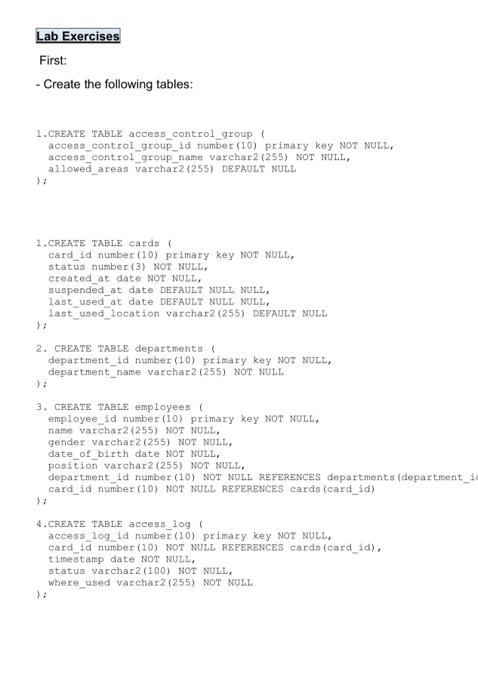
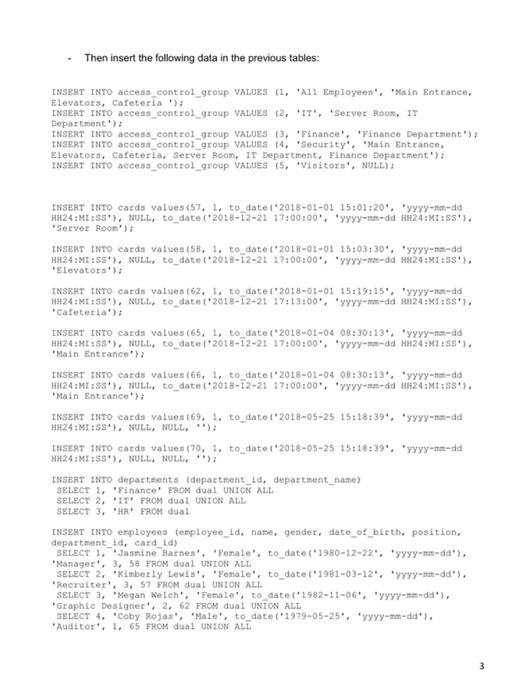
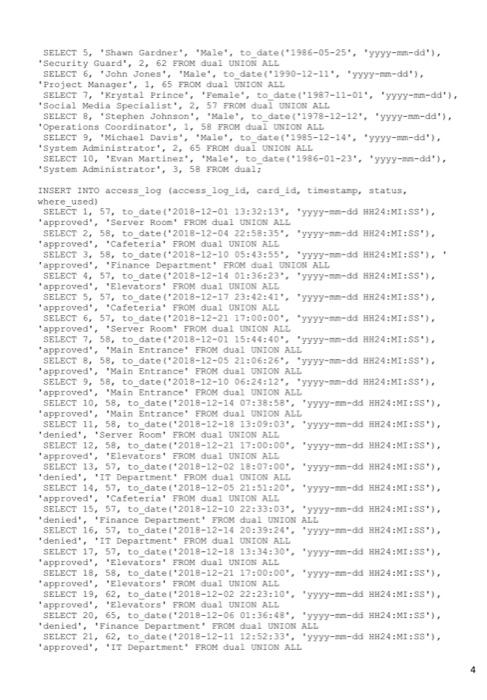
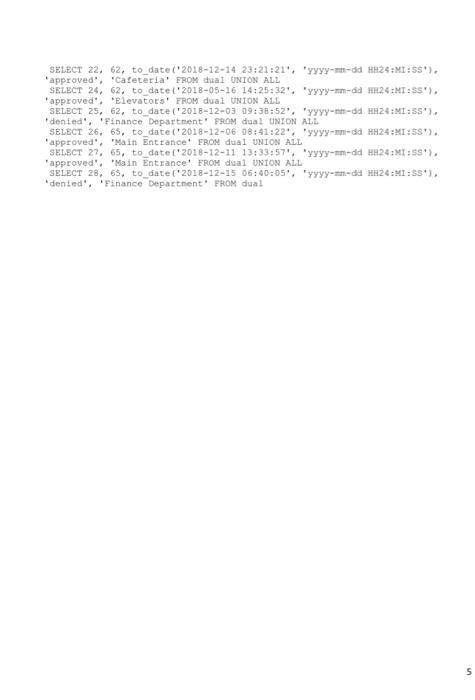
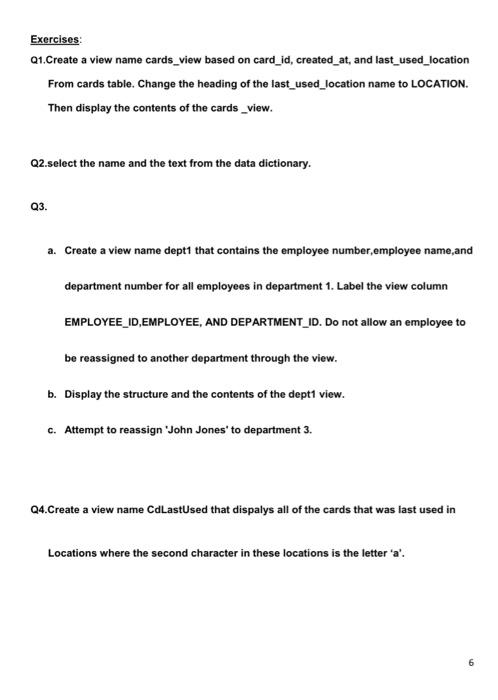
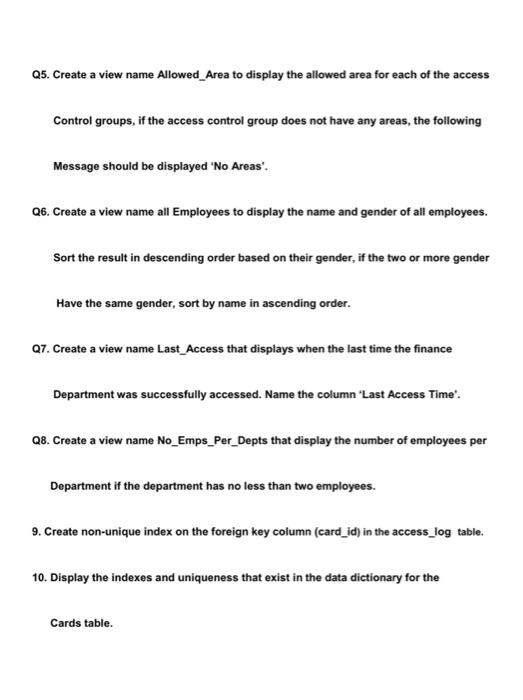
Lab Exercises First: - Create the following tables: 1.CREATE TABLE access_control group access control_group_id number (10) primary key NOT NULL, access control groupname varchar2 (255) NOT NULL, allowed_areas varchar2 (255) DEFAULT NULL ); 1.CREATE TABLE cards card_id number (10) primary key NOT NULL, status number (3) NOT NULL, created_at date NOT NULL, suspended_at date DEFAULT NULL NULL, last_used_at date DEFAULT NULL NULL, last_used_location varchar2 (255) DEFAULT NULL ); 2. CREATE TABLE departments department_id number (10) primary key NOT NULL, department name varchar2 (255) NOT NULL ) 3. CREATE TABLE employees employee_id number (10) primary key NOT NULL, name varchar2(255) NOT NULL, gender varchar2 (255) NOT NULL, date of birth date NOT NULL, position varchar2 (255) NOT NULL, department_id number (10) NOT NULL REFERENCES departments (department_ card_id number (10) NOT NULL REFERENCES cards (card_id) ); 4.CREATE TABLE access_log access_log_id number (10) primary key NOT NULL, card_id number (10) NOT NULL REFERENCES cards (card_id), timestamp date NOT NULL, status varchar2 (100) NOT NULL, where_used varchar2 (255) NOT NULL ) Then insert the following data in the previous tables: INSERT INTO access control_group VALUES 11, 221 Employees', 'Main Entrance, Elevators, Cafeteria); INSERT INTO access control group VALUES (2, 'IT', 'Server Room, IT Department): INSERT INTO access_control_group VALUES (3, Finance', Finance Department'); INSERT INTO access control group VALUES 4, Security', 'Main Entrance Elevators, Cafeteria, Server Room, IT Department. Finance Department'); INSERT INTO access control group VALUES (5, Visitors', NULL): INSERT INTO cards values (57. 1. to date('2018-01-01 15:01:20. yyyy-se-dd HH24:M:SS), NULL, to date ('2018-12-21 17:00:00. yyyy-mm-dd HH24:MI:53'). Server Room'); INSERT INTO cards values (58, 1, to_date '2018-01-01 15:03:30. yyyy-an-dd HH24:MI:SS), NULL, to_date('2018-12-21 17:00:00', 'yyyy-me-dd HH24:MI:SS'). Elevators'; INSERT INTO cards values (62. 1. to date('2018-01-01 15:19:15'. 'Yyyy-na-da HH24:M:SS'), NULL, to_date('2018-12-21 17:13:00", "yyyy-m-dd 1824:MI:55'), *Cafeteria); INSERT INTO cards values (65, 1, to_date('2018-01-04 08:30:13", "yyyy-na-dad HH24:MI:55'), NULL, to date 2018-12-21 17:00:00', 'yyyy-edd HH24:MT:SS'). Main Entrance) INSERT INTO cards values (66, 1. to_date('2018-01-04 08:30:13", "yyyy-na-dd HH24:M:SS'), NULL, to date(2018-12-21 17:00:00', 'yyyy-sm-dd HH24:MI:SS'), *Main Entrance): INSERT INTO cards values (69, 1, to_date: 2018-05-25 15:18:39. yyyy-me-dd HH24:MI:SS). NULL, NULL); INSERT INTO cards values 170, 1, to_date('2018-05-25 15:18:39", "yyyy-me-dd HH24:MI:SS). NULL, NULL, ""); INSERT INTO departments (department_id, department_name) SELECT 1, "Finance` FROM dual UNION ALL SELECT 2, 'ITFROM dual UNION ALL SELECT 3. HR FROM dual INSERT INTO employees temployec_id, name, gender, date_of_birth. position, department_id, card id) SELECT 1, Jasmine Barnes, Pemale', to_date("1980-12-22', 'yyyy-mm-dd'). *Manager, 3, 58 FROM dual UNION ALL SELECT 2. Kimberly Lewis', 'Female', to_date(*1981-03-12", "yyyy-na-dd). Recruiter', 3, 57 FROM dual UNION ALL SELECT 3, "Megan Welch', 'Female', to date 1982-11-06", "yyyy-na-dd', Graphic Designer', 2. 62 FROM dual UNION ALL SELECT 4, "Coby Rojas', 'Male', to_date("1979-05-25", "yyyy-am-dd'). Auditor'. 1.65 FROM dual UNION ALL SELECT 5, Shawn Gardner', ale', to_date(*1986-05-25*, "yyyy-mm-da'), Security Guard', 2, 62 FROM dual UNION ALL SELECT 6. John Jones'. Male'. to date (1990-12-11. yyyy-mm-dd'). Project Manager', 1.65 FROM dual UNION ALL SELECT 7, Krystal Prince, Female, to date("1987-12-01", "yyyy-an-dd'). Social Media Specialist, 2, 57 FROM dual UNION ALL SELECT B. Stephen Johnson', ale', to_date("1978-12-12", "yyyy-am-da', Operations Coordinator', 1, 58 FROM dual UNION ALL SELECT 9, Michael Davis', ale', to date(*1985-12-14", "yyyy-mm-dd', System Administrator', 2. 65 FROM dual UNION ALL SELECT 10, Evan Martinez, Male', to date{1986-01-23", "yyyy-na-dd'), System Administrator, 3, 58 FROM dual: INSERT INTO access_log (access_log_ld, card_id, timestamp, status, where_used) SELECT 1, 57, to_date('2018-12-01 13:32:13", "yyyy-s-od 24:MI:SS), 'approved', 'Server Room' FRON dual UNION ALL SELECT 2, 58, to date (2018-12-04 22:58:35". "yyyy-dd 1824:MI:SS'). approved', 'Cafeteria' FROM dual UNION ALL SELECT 3. 58, to_date('2018-12-10 05:43:55. YYYY-me-dd824:MI:55"}, approved', Finance Department FROM doal UNION ALL SELECT 4, 57, to_date (2028-12-14 01:36:23. yyyy --dd 1824:MI:SS'), *approved', 'Elevators' FROM dual UNION ALL SELECT 5, 57, to_date('2018-12-17 23:42:41", "yyyy-me-dd HR24:MT:SS). approved', 'Cafeteria' FROM dual UNION ALL SELECT 6, 57, to_date [*2018-12-21 17:00:00', 'YYYY--- HH24:MT:55'). 'approved', *Server Room! FROM dual UNION ALL SELECT 7, 58, to_datet'2018-12-01 15:44:40. yyyy --dd HH24:MT:SS'). approved', 'Main Entrance FROM dual UNION ALL SELECT 8, 58, to_date('2018-12-05 22:06:26", "yyyy-m-dd HH24:MI:SS. approved", "Main Entrance FROM dual UNION ALL SELECT %. 58. to date (2018-12-10 06:24:12. yyyy-am-dd *#24:M1:55'). approved", "Main Entrance FROM dual UNION ALL SELECT 10, 58, to date('2018-12-14 07:38:58", "yyyy-in-dd HH24:M:SS'). approved', 'Main Entrance' FROM dual UNION ALL SELECT 11, 58, to_date('2018-12-18 13:09:03", "yyyy-m-dd 24:M:S). denied', *Server Room' FROM dual UNION ALL SELECT 12, 58, to_date('2018-12-21 17:00:00", "yyyy-s-dd 1824:M:SS'), approved', 'Elevators' FROM dual UNION ALL SELECT 13, 57, to_date1.2018-12-02 18:07:00. yyyy-m-dd HH24:MT:55'), denied', 'IT Department' FROM dual UNION ALL SELECT 14, 57, to_date ('2018-12-05 21:51:20", "yyyy-m-dd 1824:MT:55) approved', 'Cafeteria' FROM dual UNION ALL SELECT 15, 57, to date 2018-12-10 22:33:03. yyyy-im-dd HH24:MI:SS'). denied', 'Finance Department FROM dual UNION ALL SELECT 16, 57, to date 2018-12-14 20:39:24. yyyy-m-dd HH24:M:SS). denied', IT Department' FROM dual UNION ALL SELECT 17, 57, to date 2018-12-18 13:34:30", "yyyy --dd HR24:M:55), 'approved', 'Elevators' FROM daal UNION ALL SELECT 18, 58, to date: 2016-12-21 17:00:00", "yyyy-mm-dd HH24:M:SS. *approved', 'Elevators' FROM dual UNION ALL SELECT 19, 62, to datel 2018-12-02 22:23:10'. yyyy-m-dd 2:24:MI:SS'). 'approved', 'Elevators' FROM dual UNION ALL SELECT 20, 65, to date (2018-12-05 01:36:48", "yyyy-sa-dd 1824:M:SS), denied', 'Finance Department FROM dual UNION ALL SELECT 21, 62, to date 2018-12-11 12:52:33", "yyyy --dd 124::'), approved', 'IT Department FROM dual UNION ALL SELECT 22, 62, to_date('2018-12-14 23:21:21", "yyyy-m-dd HH24:M:S). 'approved', 'Cafeteria' FROM dual UNION ALL SELECT 24, 62, to date('2018-05-16 14:25:32'. 'Yyyy-mm-ad 24:M:S). approved', Elevators' FROM dual UNION ALL SELECT 25, 62, to_date('2018-12-03 09:38:52', 'yyyy-en-dd HH24:MI:55'). denied', Finance Department' FROM dual UNION ALL SELECT 26, 65, to_date('2018-12-06 08:41:22', 'yyyy-mm-dd HH24:M:SS. 'approved", "Main Entrance FROM dual UNION ALL SELECT 27, 65, to_date('2018-12-11 13:33:57', 'yyyy-mm-dd H-24:M:SS'). 'approved", "Main Entrance' FROM dual UNION ALL SELECT 28, 65, to_date (2018-12-15 06:40:05", "yyyy-am-dd HH24:MI:SS), *dented'. 'Finance Department' FROM dual 5 5 Exercises Q1.Create a view name cards_view based on card_id, created_at, and last_used_location From cards table. Change the heading of the last_used_location name to LOCATION. Then display the contents of the cards_view. Q2.select the name and the text from the data dictionary. Q3. a. Create a view name dept1 that contains the employee number,employee name and department number for all employees in department 1. Label the view column EMPLOYEE_ID,EMPLOYEE, AND DEPARTMENT_ID. Do not allow an employee to be reassigned to another department through the view. b. Display the structure and the contents of the dept1 view. c. Attempt to reassign 'John Jones' to department 3. Q4.Create a view name CdlastUsed that dispalys all of the cards that was last used in Locations where the second character in these locations is the letter 'a'. Q5. Create a view name Allowed_Area to display the allowed area for each of the access Control groups, if the access control group does not have any areas, the following Message should be displayed "No Areas'. Q6. Create a view name all Employees to display the name and gender of all employees. Sort the result in descending order based on their gender, if the two or more gender Have the same gender, sort by name in ascending order. Q7. Create a view name Last_Access that displays when the last time the finance Department was successfully accessed. Name the column 'Last Access Time'. Q8. Create a view name No_Emps_Per_Depts that display the number of employees per Department if the department has no less than two employees. 9. Create non-unique index on the foreign key column (card_id) in the access_log table. 10. Display the indexes and uniqueness that exist in the data dictionary for the Cards table. Lab Exercises First: - Create the following tables: 1.CREATE TABLE access_control group access control_group_id number (10) primary key NOT NULL, access control groupname varchar2 (255) NOT NULL, allowed_areas varchar2 (255) DEFAULT NULL ); 1.CREATE TABLE cards card_id number (10) primary key NOT NULL, status number (3) NOT NULL, created_at date NOT NULL, suspended_at date DEFAULT NULL NULL, last_used_at date DEFAULT NULL NULL, last_used_location varchar2 (255) DEFAULT NULL ); 2. CREATE TABLE departments department_id number (10) primary key NOT NULL, department name varchar2 (255) NOT NULL ) 3. CREATE TABLE employees employee_id number (10) primary key NOT NULL, name varchar2(255) NOT NULL, gender varchar2 (255) NOT NULL, date of birth date NOT NULL, position varchar2 (255) NOT NULL, department_id number (10) NOT NULL REFERENCES departments (department_ card_id number (10) NOT NULL REFERENCES cards (card_id) ); 4.CREATE TABLE access_log access_log_id number (10) primary key NOT NULL, card_id number (10) NOT NULL REFERENCES cards (card_id), timestamp date NOT NULL, status varchar2 (100) NOT NULL, where_used varchar2 (255) NOT NULL ) Then insert the following data in the previous tables: INSERT INTO access control_group VALUES 11, 221 Employees', 'Main Entrance, Elevators, Cafeteria); INSERT INTO access control group VALUES (2, 'IT', 'Server Room, IT Department): INSERT INTO access_control_group VALUES (3, Finance', Finance Department'); INSERT INTO access control group VALUES 4, Security', 'Main Entrance Elevators, Cafeteria, Server Room, IT Department. Finance Department'); INSERT INTO access control group VALUES (5, Visitors', NULL): INSERT INTO cards values (57. 1. to date('2018-01-01 15:01:20. yyyy-se-dd HH24:M:SS), NULL, to date ('2018-12-21 17:00:00. yyyy-mm-dd HH24:MI:53'). Server Room'); INSERT INTO cards values (58, 1, to_date '2018-01-01 15:03:30. yyyy-an-dd HH24:MI:SS), NULL, to_date('2018-12-21 17:00:00', 'yyyy-me-dd HH24:MI:SS'). Elevators'; INSERT INTO cards values (62. 1. to date('2018-01-01 15:19:15'. 'Yyyy-na-da HH24:M:SS'), NULL, to_date('2018-12-21 17:13:00", "yyyy-m-dd 1824:MI:55'), *Cafeteria); INSERT INTO cards values (65, 1, to_date('2018-01-04 08:30:13", "yyyy-na-dad HH24:MI:55'), NULL, to date 2018-12-21 17:00:00', 'yyyy-edd HH24:MT:SS'). Main Entrance) INSERT INTO cards values (66, 1. to_date('2018-01-04 08:30:13", "yyyy-na-dd HH24:M:SS'), NULL, to date(2018-12-21 17:00:00', 'yyyy-sm-dd HH24:MI:SS'), *Main Entrance): INSERT INTO cards values (69, 1, to_date: 2018-05-25 15:18:39. yyyy-me-dd HH24:MI:SS). NULL, NULL); INSERT INTO cards values 170, 1, to_date('2018-05-25 15:18:39", "yyyy-me-dd HH24:MI:SS). NULL, NULL, ""); INSERT INTO departments (department_id, department_name) SELECT 1, "Finance` FROM dual UNION ALL SELECT 2, 'ITFROM dual UNION ALL SELECT 3. HR FROM dual INSERT INTO employees temployec_id, name, gender, date_of_birth. position, department_id, card id) SELECT 1, Jasmine Barnes, Pemale', to_date("1980-12-22', 'yyyy-mm-dd'). *Manager, 3, 58 FROM dual UNION ALL SELECT 2. Kimberly Lewis', 'Female', to_date(*1981-03-12", "yyyy-na-dd). Recruiter', 3, 57 FROM dual UNION ALL SELECT 3, "Megan Welch', 'Female', to date 1982-11-06", "yyyy-na-dd', Graphic Designer', 2. 62 FROM dual UNION ALL SELECT 4, "Coby Rojas', 'Male', to_date("1979-05-25", "yyyy-am-dd'). Auditor'. 1.65 FROM dual UNION ALL SELECT 5, Shawn Gardner', ale', to_date(*1986-05-25*, "yyyy-mm-da'), Security Guard', 2, 62 FROM dual UNION ALL SELECT 6. John Jones'. Male'. to date (1990-12-11. yyyy-mm-dd'). Project Manager', 1.65 FROM dual UNION ALL SELECT 7, Krystal Prince, Female, to date("1987-12-01", "yyyy-an-dd'). Social Media Specialist, 2, 57 FROM dual UNION ALL SELECT B. Stephen Johnson', ale', to_date("1978-12-12", "yyyy-am-da', Operations Coordinator', 1, 58 FROM dual UNION ALL SELECT 9, Michael Davis', ale', to date(*1985-12-14", "yyyy-mm-dd', System Administrator', 2. 65 FROM dual UNION ALL SELECT 10, Evan Martinez, Male', to date{1986-01-23", "yyyy-na-dd'), System Administrator, 3, 58 FROM dual: INSERT INTO access_log (access_log_ld, card_id, timestamp, status, where_used) SELECT 1, 57, to_date('2018-12-01 13:32:13", "yyyy-s-od 24:MI:SS), 'approved', 'Server Room' FRON dual UNION ALL SELECT 2, 58, to date (2018-12-04 22:58:35". "yyyy-dd 1824:MI:SS'). approved', 'Cafeteria' FROM dual UNION ALL SELECT 3. 58, to_date('2018-12-10 05:43:55. YYYY-me-dd824:MI:55"}, approved', Finance Department FROM doal UNION ALL SELECT 4, 57, to_date (2028-12-14 01:36:23. yyyy --dd 1824:MI:SS'), *approved', 'Elevators' FROM dual UNION ALL SELECT 5, 57, to_date('2018-12-17 23:42:41", "yyyy-me-dd HR24:MT:SS). approved', 'Cafeteria' FROM dual UNION ALL SELECT 6, 57, to_date [*2018-12-21 17:00:00', 'YYYY--- HH24:MT:55'). 'approved', *Server Room! FROM dual UNION ALL SELECT 7, 58, to_datet'2018-12-01 15:44:40. yyyy --dd HH24:MT:SS'). approved', 'Main Entrance FROM dual UNION ALL SELECT 8, 58, to_date('2018-12-05 22:06:26", "yyyy-m-dd HH24:MI:SS. approved", "Main Entrance FROM dual UNION ALL SELECT %. 58. to date (2018-12-10 06:24:12. yyyy-am-dd *#24:M1:55'). approved", "Main Entrance FROM dual UNION ALL SELECT 10, 58, to date('2018-12-14 07:38:58", "yyyy-in-dd HH24:M:SS'). approved', 'Main Entrance' FROM dual UNION ALL SELECT 11, 58, to_date('2018-12-18 13:09:03", "yyyy-m-dd 24:M:S). denied', *Server Room' FROM dual UNION ALL SELECT 12, 58, to_date('2018-12-21 17:00:00", "yyyy-s-dd 1824:M:SS'), approved', 'Elevators' FROM dual UNION ALL SELECT 13, 57, to_date1.2018-12-02 18:07:00. yyyy-m-dd HH24:MT:55'), denied', 'IT Department' FROM dual UNION ALL SELECT 14, 57, to_date ('2018-12-05 21:51:20", "yyyy-m-dd 1824:MT:55) approved', 'Cafeteria' FROM dual UNION ALL SELECT 15, 57, to date 2018-12-10 22:33:03. yyyy-im-dd HH24:MI:SS'). denied', 'Finance Department FROM dual UNION ALL SELECT 16, 57, to date 2018-12-14 20:39:24. yyyy-m-dd HH24:M:SS). denied', IT Department' FROM dual UNION ALL SELECT 17, 57, to date 2018-12-18 13:34:30", "yyyy --dd HR24:M:55), 'approved', 'Elevators' FROM daal UNION ALL SELECT 18, 58, to date: 2016-12-21 17:00:00", "yyyy-mm-dd HH24:M:SS. *approved', 'Elevators' FROM dual UNION ALL SELECT 19, 62, to datel 2018-12-02 22:23:10'. yyyy-m-dd 2:24:MI:SS'). 'approved', 'Elevators' FROM dual UNION ALL SELECT 20, 65, to date (2018-12-05 01:36:48", "yyyy-sa-dd 1824:M:SS), denied', 'Finance Department FROM dual UNION ALL SELECT 21, 62, to date 2018-12-11 12:52:33", "yyyy --dd 124::'), approved', 'IT Department FROM dual UNION ALL SELECT 22, 62, to_date('2018-12-14 23:21:21", "yyyy-m-dd HH24:M:S). 'approved', 'Cafeteria' FROM dual UNION ALL SELECT 24, 62, to date('2018-05-16 14:25:32'. 'Yyyy-mm-ad 24:M:S). approved', Elevators' FROM dual UNION ALL SELECT 25, 62, to_date('2018-12-03 09:38:52', 'yyyy-en-dd HH24:MI:55'). denied', Finance Department' FROM dual UNION ALL SELECT 26, 65, to_date('2018-12-06 08:41:22', 'yyyy-mm-dd HH24:M:SS. 'approved", "Main Entrance FROM dual UNION ALL SELECT 27, 65, to_date('2018-12-11 13:33:57', 'yyyy-mm-dd H-24:M:SS'). 'approved", "Main Entrance' FROM dual UNION ALL SELECT 28, 65, to_date (2018-12-15 06:40:05", "yyyy-am-dd HH24:MI:SS), *dented'. 'Finance Department' FROM dual 5 5 Exercises Q1.Create a view name cards_view based on card_id, created_at, and last_used_location From cards table. Change the heading of the last_used_location name to LOCATION. Then display the contents of the cards_view. Q2.select the name and the text from the data dictionary. Q3. a. Create a view name dept1 that contains the employee number,employee name and department number for all employees in department 1. Label the view column EMPLOYEE_ID,EMPLOYEE, AND DEPARTMENT_ID. Do not allow an employee to be reassigned to another department through the view. b. Display the structure and the contents of the dept1 view. c. Attempt to reassign 'John Jones' to department 3. Q4.Create a view name CdlastUsed that dispalys all of the cards that was last used in Locations where the second character in these locations is the letter 'a'. Q5. Create a view name Allowed_Area to display the allowed area for each of the access Control groups, if the access control group does not have any areas, the following Message should be displayed "No Areas'. Q6. Create a view name all Employees to display the name and gender of all employees. Sort the result in descending order based on their gender, if the two or more gender Have the same gender, sort by name in ascending order. Q7. Create a view name Last_Access that displays when the last time the finance Department was successfully accessed. Name the column 'Last Access Time'. Q8. Create a view name No_Emps_Per_Depts that display the number of employees per Department if the department has no less than two employees. 9. Create non-unique index on the foreign key column (card_id) in the access_log table. 10. Display the indexes and uniqueness that exist in the data dictionary for the Cards table
Step by Step Solution
There are 3 Steps involved in it

Get step-by-step solutions from verified subject matter experts
 Study Help