







Question: | SQL Opportunity No . 4 This opportunity will give you a chance to work with the EMP and DEPT tables that we have begun
SQL Opportunity No
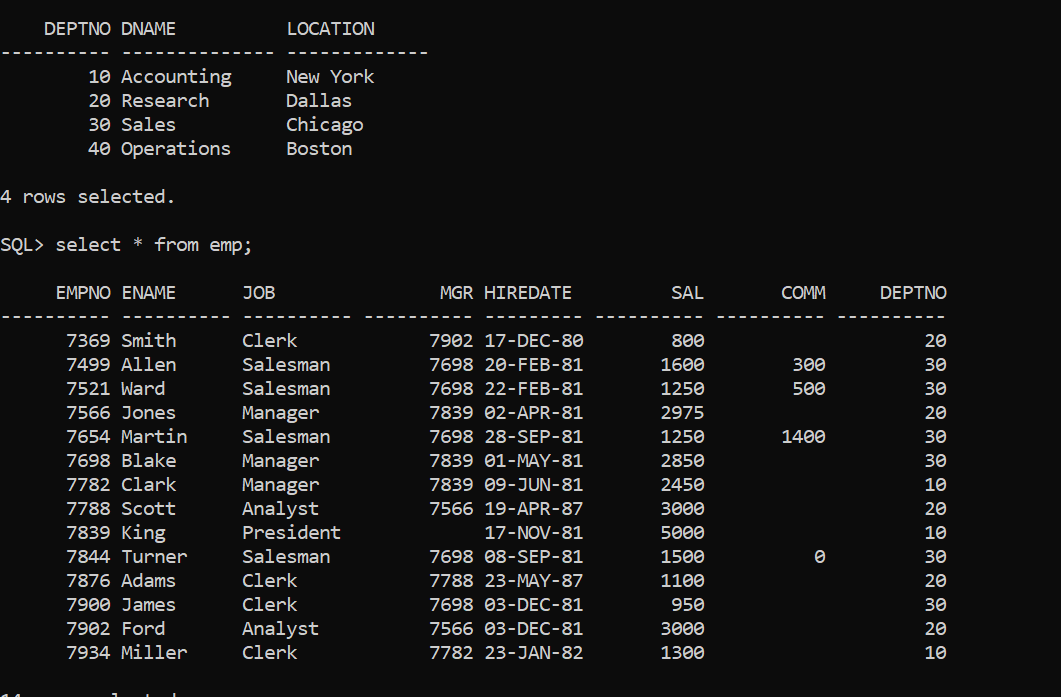
This opportunity will give you a chance to work with the EMP and DEPT tables that we have begun talking about in class. These tables can be created by downloading the file opportunitytables.sq attached to this opportunity. As was the case with SQL Opportunity No before making a copy of this file, please make sure it is copied to a folder with a name that contains no embedded blanks. Then copy contents of this file to that folder. Once you have executed this file using the start command given below, the tables necessary to complete this exercise will exist in your database permanently ie for as long as Oracle c is installed on your machine and can begin working on SQL Opportunity No
Once in SQLPlus at the SQL prompt, enter the command
SQLstart opportunitytables.sq
When you issue the above start command, please remember to precede the file name with name of the folder or folders in which it is stored.
Display the name, job and salary of all employees who work for a department located in New York in ascending order by salary. Note that EMP table does not know that department number is located in New York.
ENAME
For each department, including department number display the number of employees working in the department along with their average salary. Include the department number, number of employees, and average salary for each department.
DEPTNO DNAME Number of Employees Average Salary
Write a query that displays for each department in the DEPT table the number of employees, the average salary of the employes, the average commission of employees and the average of the difference between each employees salary and commission.
DEPTNO DNAME No Employees Average Sal Average Comm Average Diff
Accounting
Research
Sales
Operations
rows selected.
Step by Step Solution
There are 3 Steps involved in it
1 Expert Approved Answer
Step: 1 Unlock

Question Has Been Solved by an Expert!
Get step-by-step solutions from verified subject matter experts
Step: 2 Unlock
Step: 3 Unlock
 Study Help