







Question: sql queries for the following questions # mark 1 5 Step Step 1 - Create Command: Create database BestBuy; Question A- Create BestBuy database, 28-
sql queries for the following questions
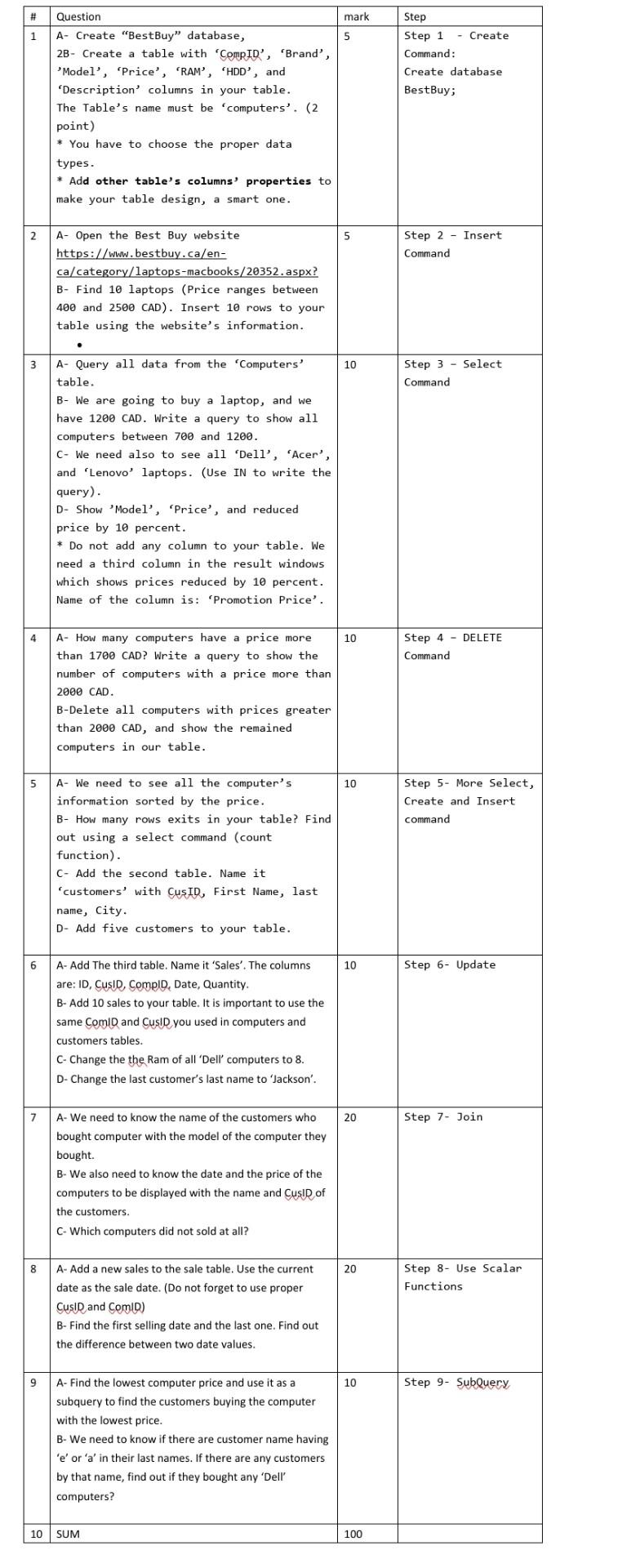
# mark 1 5 Step Step 1 - Create Command: Create database BestBuy; Question A- Create "BestBuy" database, 28- Create a table with CompID', 'Brand', Model', 'Price', 'RAM', 'HDD', and 'Description' columns in your table. The Table's name must be computers'. (2 point) * You have to choose the proper data types. * Add other table's columns' properties to make your table design, a smart one. Step 2 - Insert Command A- Open the Best Buy website https://www.bestbuy.ca/en- ca/category/laptops-macbooks/20352.aspx? B- Find 10 laptops (Price ranges between 400 and 2500 CAD). Insert 10 rows to your table using the website's information. 3 10 Step 3 - Select Command A- Query all data from the Computers table. B- We are going to buy a laptop, and we have 1200 CAD. Write a query to show all computers between 700 and 1200. C- We need also to see all 'Dell', 'Acer', and 'Lenovo' laptops. (Use IN to write the query). D- Show Model', 'Price', and reduced price by 10 percent. * Do not add any column to your table. We need a third column in the result windows which shows prices reduced by 10 percent. Name of the column is: 'Promotion Price'. 4 10 Step 4 - DELETE Command A- How many computers have a price more than 1700 CAD? Write a query to show the number of computers with a price more than 2000 CAD. B-Delete all computers with prices greater than 2000 CAD, and show the remained computers in our table. 5 10 Step 5- More Select, Create and Insert command A- We need to see all the computer's information sorted by the price. B- How many rows exits in your table? Find out using a select command (count function). C- Add the second table. Name it 'customers' with CusID, First Name, last name, City. D- Add five customers to your table. 6 10 Step 6- Update A- Add The third table. Name it 'Sales'. The columns are: ID, CusID, ComplD, Date, Quantity. B- Add 10 sales to your table. It is important to use the same ComID and CusID you used in computers and customers tables. C- Change the the Ram of all 'Dell computers to 8. D- Change the last customer's last name to 'Jackson'. 7 20 Step 7 - Join A- We need to know the name of the customers who bought computer with the model of the computer they bought. B- We also need to know the date and the price of the computers to be displayed with the name and Cusid of the customers. C-Which computers did not sold at all? 8 20 Step 8- Use Scalar Functions A- Add a new sales to the sale table. Use the current date as the sale date. (Do not forget to use proper Cusin and ComD) B- Find the first selling date and the last one. Find out the difference between two date values. 9 10 Step 9- SubQuery A- Find the lowest computer price and use it as a subquery to find the customers buying the computer with the lowest price. B- We need to know if there are customer name having 'e' or 'a' in their last names. If there are any customers by that name, find out if they bought any 'Dell' computers? 10 SUM 100
Step by Step Solution
There are 3 Steps involved in it

Get step-by-step solutions from verified subject matter experts
 Study Help