







Question: SQL SERVER QUERY HELP. 1. Create a view named vCustomerOrderServices that returns columns from the CUSTOMER, ORDER, EMPLOYEE and SERVICE details. This view should return
SQL SERVER QUERY HELP.
1. Create a view named vCustomerOrderServices that returns columns from the CUSTOMER, ORDER, EMPLOYEE and SERVICE details.
This view should return at least the following columns , OrderID, CustomerID, CustomerFullName, EmployeeID, EmployeeFullName, ServiceID, ServiceDescription, PriceofService, DateofOrder
2. Create another view named vOrderServiceSummary that uses the view you created above in #1
This view should return some summary information about each service completed.
Each row should include these columns:
. Employee's name
. Customer's name
. Service description
. Total number of services (the number of times an order includes a given service)
. This view should return the calculated columns of each service rendered as "TotalCost"
3. Create a view named vEmployeeTime that returns these columns:
Employee FirstName, Employee LastName, Order total, Date of Service
4. Write a query using vEmployeeTime to return the following
a. The total amount for all orders by each employee
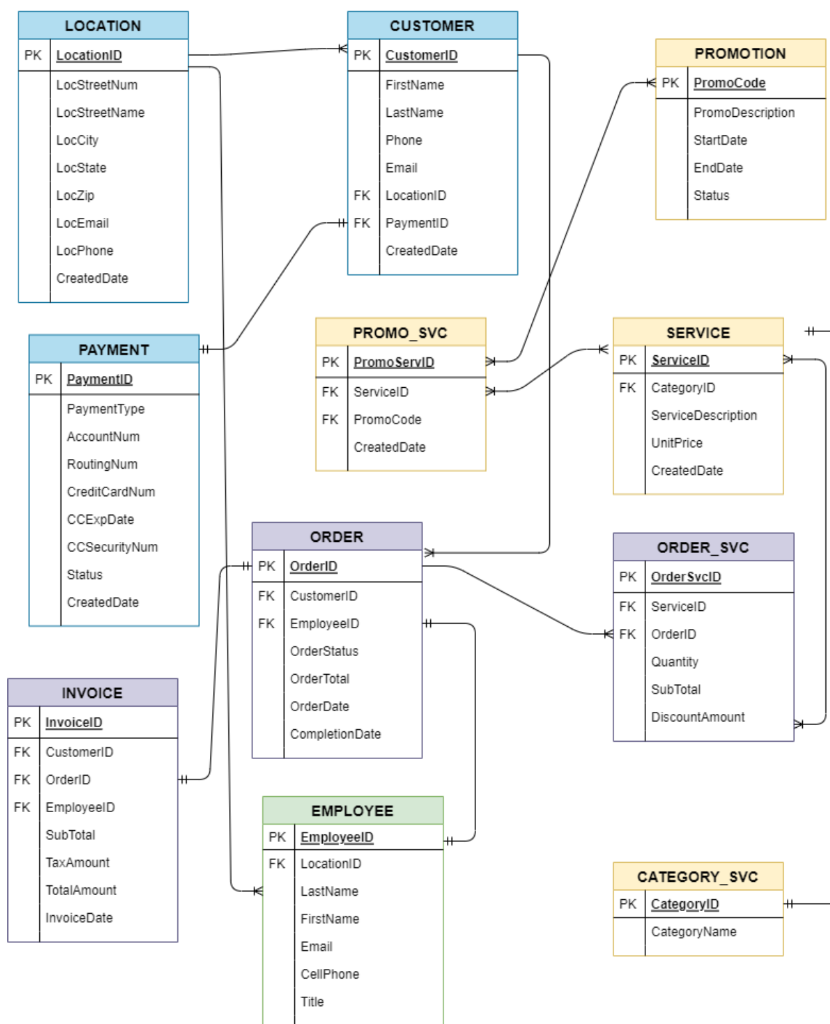
\begin{tabular}{|l|l|} \hline \multicolumn{2}{|c|}{ LOCATION } \\ \hline PK & LocationID \\ \hline & LocStreetNum \\ & LocStreetName \\ & LocCity \\ LocState \\ LocZip \\ LocEmail \\ LocPhone \\ CreatedDate \\ \hline \end{tabular} \begin{tabular}{|l|l|} \hline \multicolumn{2}{|c|}{ SERVICE } \\ \hline PK & ServiceID \\ \hline FK & CategoryID \\ & ServiceDescriptionUnitPriceCreatedDate \\ \hline \end{tabular} \begin{tabular}{|l|l|} \hline \multicolumn{2}{|c|}{ INVOICE } \\ \hline PK & InvoicelD \\ \hline FK & CustomerlD \\ FK & OrderID \\ & EmployeelD \\ & SubTotal \\ TaxAmount \\ TotalAmount \\ & InvoiceDate \\ \hline \end{tabular} \begin{tabular}{|l|l|} \hline \multicolumn{2}{|c|}{ CATEGORY_SVC } \\ \hline PK & CategoryID \\ \hline & CategoryName \\ \hline \end{tabular} CellPhone Title
Step by Step Solution
There are 3 Steps involved in it

Get step-by-step solutions from verified subject matter experts
 Study Help