







Question: SQL SERVER (SQL FUNCTION CHAPTER) QUERY help. Please use the data entity and attribute names on the diagram provided. Any help would be greatly appreciated!
SQL SERVER (SQL FUNCTION CHAPTER) QUERY help.
Please use the data entity and attribute names on the diagram provided. Any help would be greatly appreciated!
Write a SELECT statement that returns these columns from the Order table:
-A column that uses the CONVERT function to return the order date column in this format: MM/DD/YYYY. In other words, use 2-digit months and days and a 4-digit year, and separate each date component with slashes.
-A column that uses the CONVERT function to return the order date column with the date, and the hours and minutes on a 12-hour clock with an am/pm indicator.
-A column that uses the CONVERT function to return the order date column with just the time in a 24-hour format, including the milliseconds.
-A column that uses the CONVERT function to return the order date column with just the month and day.
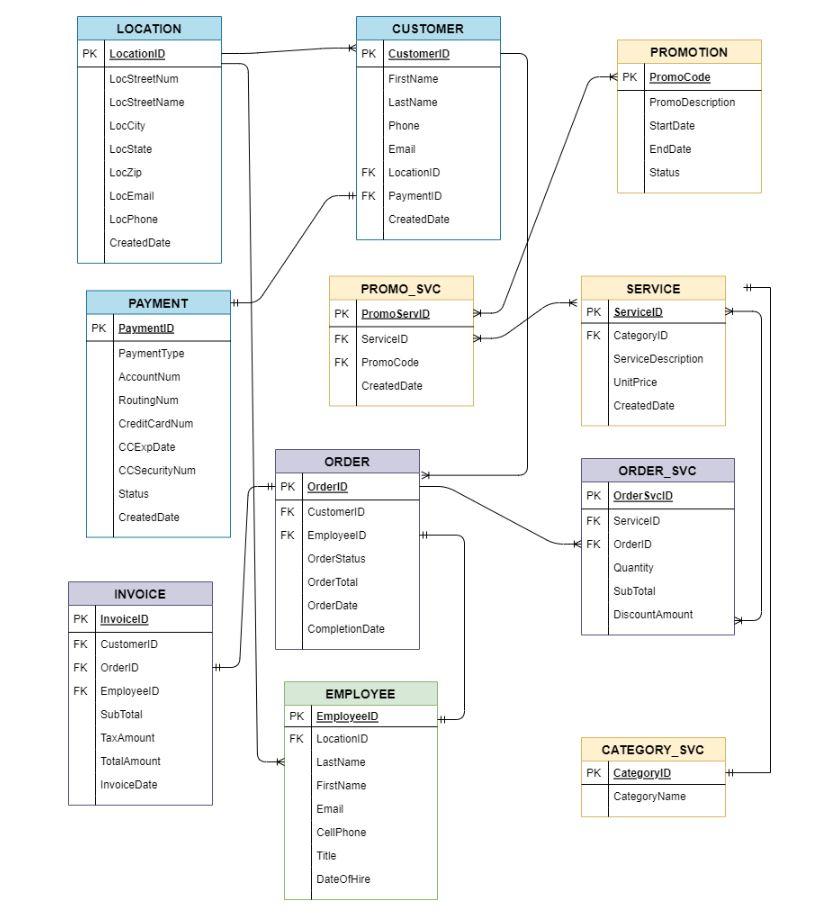
Please use the data entity and attribute names on the diagram provided. Any help would be greatly appreciated!
\begin{tabular}{|l|l|} \hline \multicolumn{2}{|c|}{ LOCATION } \\ \hline PK & LocationID \\ \hline & LocStreetNum \\ LocStreetName \\ LocCity \\ LocState \\ LocZip \\ LocEmail \\ LocPhone \\ CreatedDate \\ \hline \end{tabular} \begin{tabular}{|l|l|} \hline \multicolumn{2}{|c|}{ PROMOTION } \\ \hline PK & PromoCode \\ \hline & PromoDescription \\ StartDate \\ EndDate \\ Status \\ \hline \end{tabular} \begin{tabular}{|l|l|} \hline \multicolumn{2}{|c|}{ PAYMENT } \\ \hline PK & PaymentID \\ \hline & PaymentType \\ AccountNum \\ RoutingNum \\ CreditCardNum \\ CCExpDate \\ CCSecurityNum \\ Status \\ CreatedDate \\ \hline \end{tabular} \begin{tabular}{|l|l|} \hline \multicolumn{2}{|c|}{ PROMO_SVC } \\ \hline PK & PromeservID \\ \hline FK & ServicelD \\ FK & PromoCode \\ & CreatedDate \\ \hline \end{tabular} \begin{tabular}{|l|l|} \hline \multicolumn{2}{|c|}{ INVOICE } \\ \hline PK & InvoicelD \\ \hline FK & CustomerID \\ FK & OrderiD \\ FK & EmployeelD \\ & SubTotal \\ TaxAmount \\ TotalAmount \\ InvoiceDate \\ \hline \end{tabular} CellPhone Title DateOfHire
Step by Step Solution
There are 3 Steps involved in it

Get step-by-step solutions from verified subject matter experts
 Study Help