







Question: START FROM QUESTION 6 DATABASE SQL PLUS Lab Exercises Q1. Create user name DBLAB10A, set password db123. Q2. What are the privileges that should be
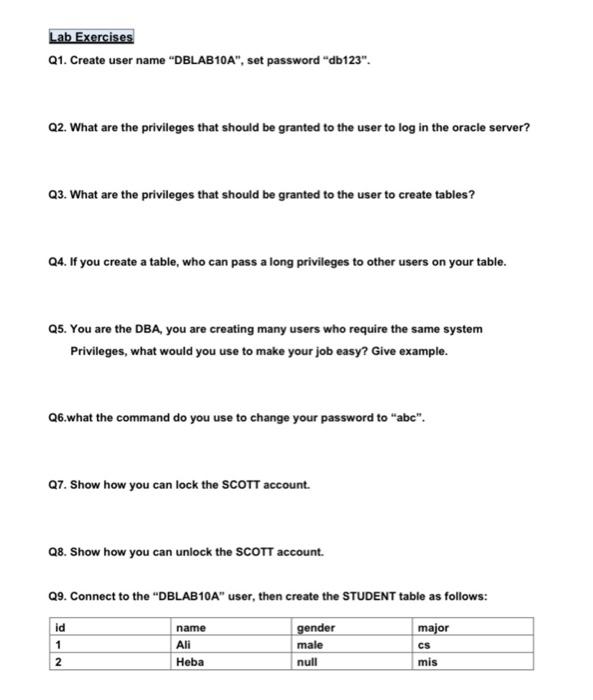
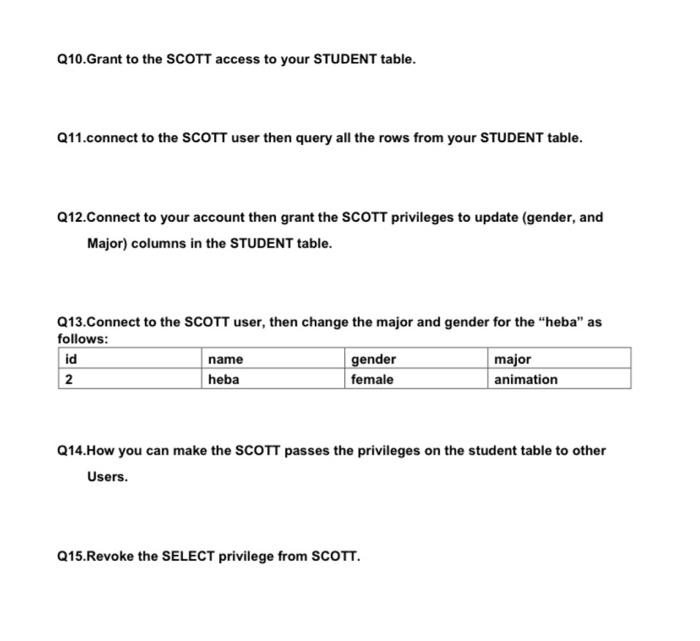
Lab Exercises Q1. Create user name "DBLAB10A", set password "db123". Q2. What are the privileges that should be granted to the user to log in the oracle server? Q3. What are the privileges that should be granted to the user to create tables ? Q4. If you create a table, who can pass a long privileges to other users on your table. Q5. You are the DBA, you are creating many users who require the same system Privileges, what would you use to make your job easy? Give example. Q6.what the command do you use to change your password to "abc". 07. Show how you can lock the SCOTT account. Q8. Show how you can unlock the SCOTT account. 09. Connect to the "DBLAB10A" user, then create the STUDENT table as follows: id 1 2 name Ali Heba gender male null major CS mis Q10.Grant to the SCOTT access to your STUDENT table. Q11.connect to the SCOTT user then query all the rows from your STUDENT table. Q12.Connect to your account then grant the SCOTT privileges to update (gender, and Major) columns in the STUDENT table. Q13.Connect to the SCOTT user, then change the major and gender for the "heba" as follows: id name gender major 2 heba female animation Q14.How you can make the SCOTT passes the privileges on the student table to other Users. Q15. Revoke the SELECT privilege from SCOTT
Step by Step Solution
There are 3 Steps involved in it

Get step-by-step solutions from verified subject matter experts
 Study Help