







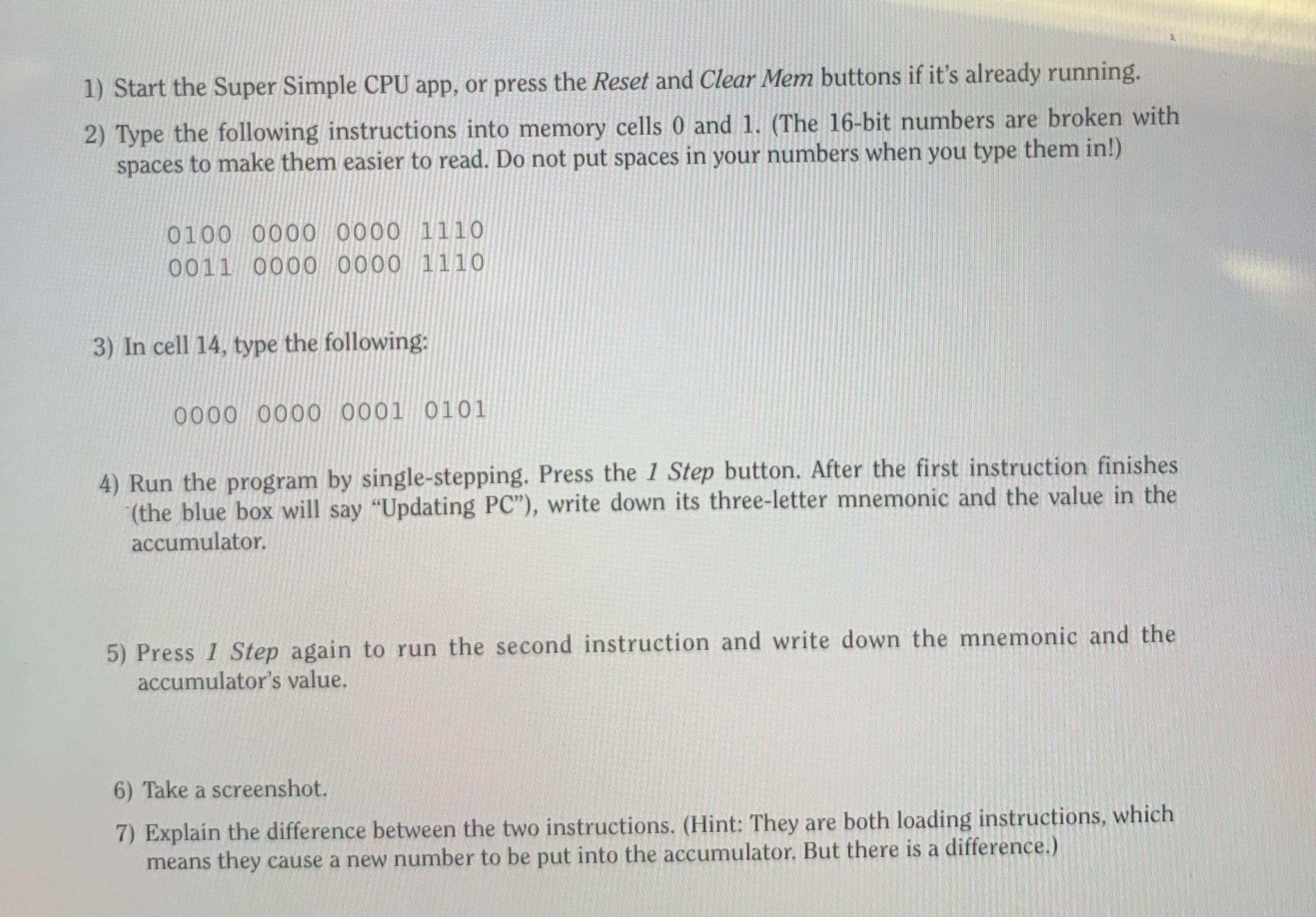
Question: Start the Super Simple CPU app, or press the Reset and Clear Mem buttons if it's already running. Type the following instructions into memory cells
Start the Super Simple CPU app, or press the Reset and Clear Mem buttons if it's already running.
Type the following instructions into memory cells and The bit numbers are broken with spaces to make them easier to read. Do not put spaces in your numbers when you type them in
In cell type the following:
Run the program by singlestepping. Press the Step button. After the first instruction finishes the blue box will say "Updating PC write down its threeletter mnemonic and the value in the accumulator.
Press Step again to run the second instruction and write down the mnemonic and the accumulator's value.
Take a screenshot.
Explain the difference between the two instructions. Hint: They are both loading instructions, which means they cause a new number to be put into the accumulator. But there is a difference.
Step by Step Solution
There are 3 Steps involved in it
1 Expert Approved Answer
Step: 1 Unlock

Question Has Been Solved by an Expert!
Get step-by-step solutions from verified subject matter experts
Step: 2 Unlock
Step: 3 Unlock
 Study Help