







Question: Starter File: AutoParts.java STEP #1: 40 pts Read num2name.txt into a map whose key is a part # and value is that part's name. Print
Starter File: AutoParts.java
STEP #1: 40 pts
Read num2name.txt into a map whose key is a part # and value is that part's name. Print that map out such that row of the map is printed to one line of output: part# TAB part-name. Rows of output must be sorted vertically by part#.
STEP #2: 60 pts
Read num2quant.txt into a map whose key is a part # and value is that part's quantity in stock. Then print a table that uses both maps. On each line print part# TAB part-name TAB quantity of that part. Rows of output be sorted vertically by part number.
COMPLETE CORRECT OUTPUT LOOKS *EXACTLY* LIKE THIS
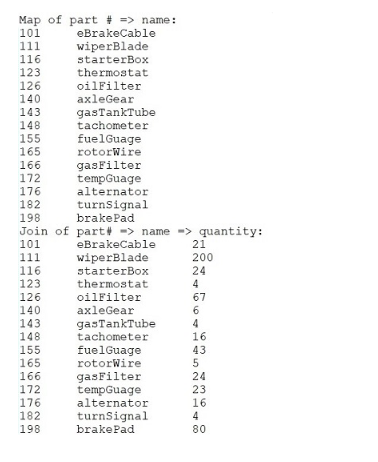
num2name.txt:
148 tachometer 172 tempGuage 123 thermostat 111 wiperBlade 143 gasTankTube 155 fuelGuage 101 eBrakeCable 198 brakePad 165 rotorWire 140 axleGear 116 starterBox 176 alternator 182 turnSignal 126 oilFilter 166 gasFilter
num2quant.txt
148 16 172 23 123 4 111 200 143 4 155 43 101 21 198 80 165 5 140 6 116 24 176 16 182 4 126 67 166 24
Starter File:
import java.util.*; import java.io.*; public class AutoParts { public static void main( String[] args ) throws Exception { BufferedReader num2quantFile = new BufferedReader( new FileReader( "num2quant.txt" ) ); BufferedReader num2nameFile = new BufferedReader( new FileReader( "num2name.txt" ) ); // STEP #1: read num2name.txt into a map named num2name and print that map part#partName sorted vertically by part# System.out.println("Map of part # => name:"); // LEAVE THIS IN HERE // STEP #2: read num2quant.txt into map of same name. DON'T PRINT map#2 // Use both 1st & 2nd map to print a joint of the two tables: part#namequantity sorted vertically again by part# System.out.println("Join of part# => name => quantity:"); // LEAVE THIS HERE } // END MAIN } // END CLASS Step by Step Solution
There are 3 Steps involved in it
1 Expert Approved Answer
Step: 1 Unlock

Question Has Been Solved by an Expert!
Get step-by-step solutions from verified subject matter experts
Step: 2 Unlock
Step: 3 Unlock
 Study Help