







Question: Starting with the code provided in log_spiral_login.py, add turtle commands into the main function in the program to draw the logarithmic spiral shown below.
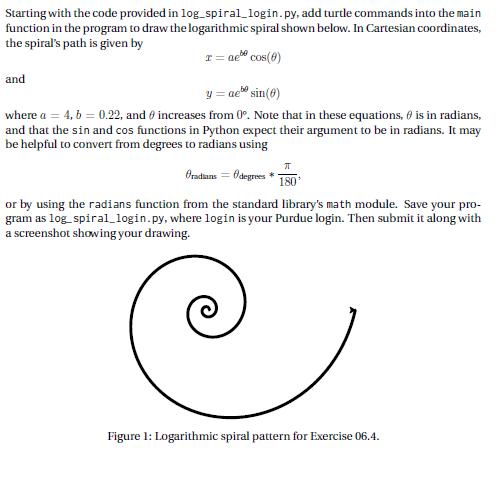
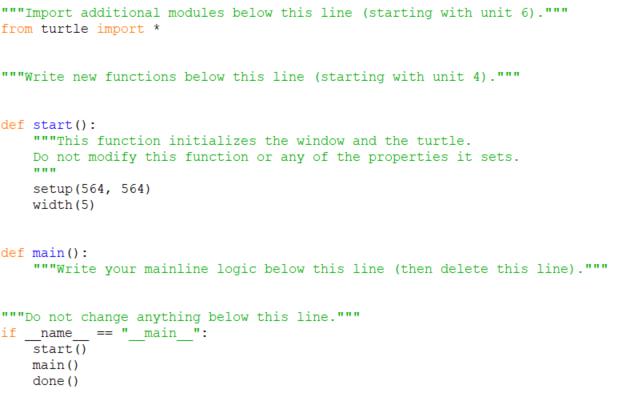
Starting with the code provided in log_spiral_login.py, add turtle commands into the main function in the program to draw the logarithmic spiral shown below. In Cartesian coordinates, the spiral's path is given by T = ae* cos(6) and =ae sin(0) y ae where a = 4, b = 0.22, and increases from 0. Note that in these equations, is in radians, and that the sin and cos functions in Python expect their argument to be in radians. It may be helpful to convert from degrees to radians using T Oradians = Odegrees * 180 or by using the radians function from the standard library's math module. Save your pro- gram as log_spiral_login.py, where login is your Purdue login. Then submit it along with a screenshot showing your drawing. Figure 1: Logarithmic spiral pattern for Exercise 06.4. ""Import additional modules below this line (starting with unit 6)." from turtle import * """Write new functions below this line (starting with unit 4)."" def start(): """This function initializes the window and the turtle. Do not modify this function or any of the properties it sets. www setup (564, 564) width (5) def main (): """Write your mainline logic below this line (then delete this line)." """Do not change anything below this line.""" if name == "___main__": start() www main () done () www
Step by Step Solution
There are 3 Steps involved in it
Step No 1 Program import turtle import math Import additional modules ... View full answer

Get step-by-step solutions from verified subject matter experts
 Study Help