







Question: State the configuration command. Addressing Table Address Table for Routers Location/AS Device G0/0 G0/1 G0/2 Internet AS: 60000 Internet 1.1.1.3/24 - - ISP1 AS:
State the configuration command.
- Addressing Table
Address Table for Routers
Location/AS | Device | G0/0 | G0/1 | G0/2 |
Internet | Internet | 1.1.1.3/24 | - | - |
ISP1 AS: 65000 | ISP1 | 200.1.1.1/24 | 200.1.2.1/24 | 1.1.1.1/24 |
ISP2 AS: 65001 | ISP2 | 201.1.1.1/24 | 201.1.2.1/24 | 1.1.1.2/24 |
Remote AS: 50000 | Remote | 200.1.1.2/24 | 201.1.1.2/24 | 210.0.0.254/24 |
RemoteA | 210.0.0.253/24 | 172.17.2.1/24 | 172.17.6.1/24 | |
RemoteB | 172.17.2.2/24 | 172.17.0.1/24 | 172.17.1.1/24 | |
RemoteC | 172.17.6.2/24 | 172.17.4.1/24 | 172.17.5.1/24 | |
HQ AS: 50001 | HQ | 200.1.2.2/24 | 201.1.2.2/24 | 220.0.0.254/24 |
HQ1 | 220.0.0.253/24 | 172.16.8.1/24 | 172.16.24.1/24 | |
HQA1 | 172.16.8.2/24 | 172.16.2.1/24 | 172.16.6.1/24 | |
HQA2 | 172.16.2.2/24 | 172.16.0.1/24 | 172.16.1.1/24 | |
HQA3 | 172.16.6.2/24 | 172.16.4.1/24 | 172.16.5.1/24 | |
HQB1 | 172.16.24.2/24 | 172.16.18.1/24 | 172.16.22.1/24 | |
HQB2 | 172.16.18.2/24 | 172.16.16.1/24 | 172.16.17.1/24 | |
HQB3 | 172.16.22.2/24 | 172.16.20.1/24 | 172.16.21.1/24 |
Address Table for Switches and End Devices
Location/AS | Device | Interface VLAN1 |
Remote AS: 50000 | RemoteS1 | 172.17.0.2/24 |
RemoteS2 | 172.17.1.2/24 | |
RemoteS3 | 172.17.4.2/24 | |
RemoteS4 | 172.17.5.2/24 | |
NTP Server | 172.17.5.3/24 | |
Syslog Server | 172.17.5.4/24 | |
HQ AS: 50001 | HQAS1 | 172.16.0.2/24 |
HQAS2 | 172.16.1.2/24 | |
HQAS3 | 172.16.4.2/24 | |
HQAS4 | 172.16.5.2/24 | |
HQBS1 | 172.16.16.2/24 | |
HQBS2 | 172.16.17.2/24 | |
HQBS3 | 172.16.20.2/24 | |
HQBS4 | 172.16.21.2/24 |
Scenario
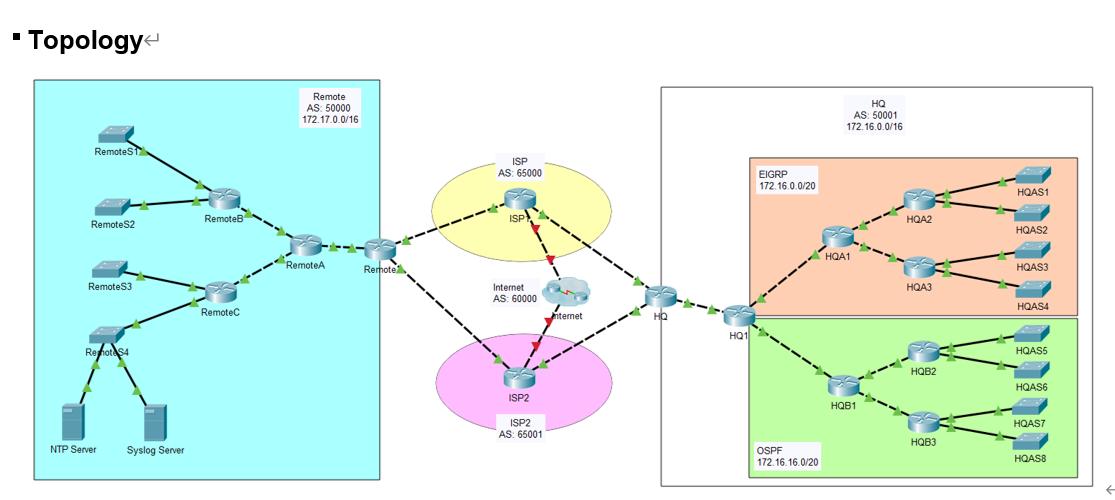
The XYZ Corporation have two offices located in different places and are connected through the ISP. You are required to configure the network.
Redistribute Network between EIGRP and OSPF in HQ1
- The metric of redistributed network in OSPF use the default value and the metric type is E1.
- The default metric for the redistributed network on EIGRP network are as follows:
- bandwidth-metric = 1500
- delay-metric = 100
- reliability-metric = 255
- effective-bandwidth-metric = 1
- mtu-bytes = 1500
Stub Network
- Configure a summary route on HQA2 router.
- Configure the HQA2 as a stub router and apply the summary route to the appropriate interface
AAA
- Configure RemoteB to use AAA.
- Create a local user account of admin01 with a secret password of admin01only.
- Enable AAA services.
- Implement AAA services using the local database.
- Create the default login authentication method list using local authentication with no backup method.
Topology < RemoteST RemoteS2 Remote S3 Rehote$4 NTP Server Syslog Server RemoteB RemoteC Remote AS 50000 172.17.0.0/16 RemoteA Remote ISP AS: 65000 ISP Internet AS: 60000 ISP2 ISP2 AS: 65001 Internet HQ1 EIGRP 172.16.0.0/20 OSPF 172.16.16.0/20 HQ AS: 50001 172.16.0.0/16 HQA1 HQB1 HQA2 HQA3 HQB2 HQB3 HQAS1 HQAS2 HQAS3 HQAS4 HQAS5 HQAS6 HQAS7 HQAS8
Step by Step Solution
3.44 Rating (154 Votes )
There are 3 Steps involved in it
Certainly Below are the configuration commands based on the provided sce... View full answer

Get step-by-step solutions from verified subject matter experts
 Study Help