







Question: Step 1 : Complete the OrderInfo Worksheet 1 . Add columns to the OrderInfo worksheet so that your column headers in row 1 are organized
Step : Complete the OrderInfo Worksheet
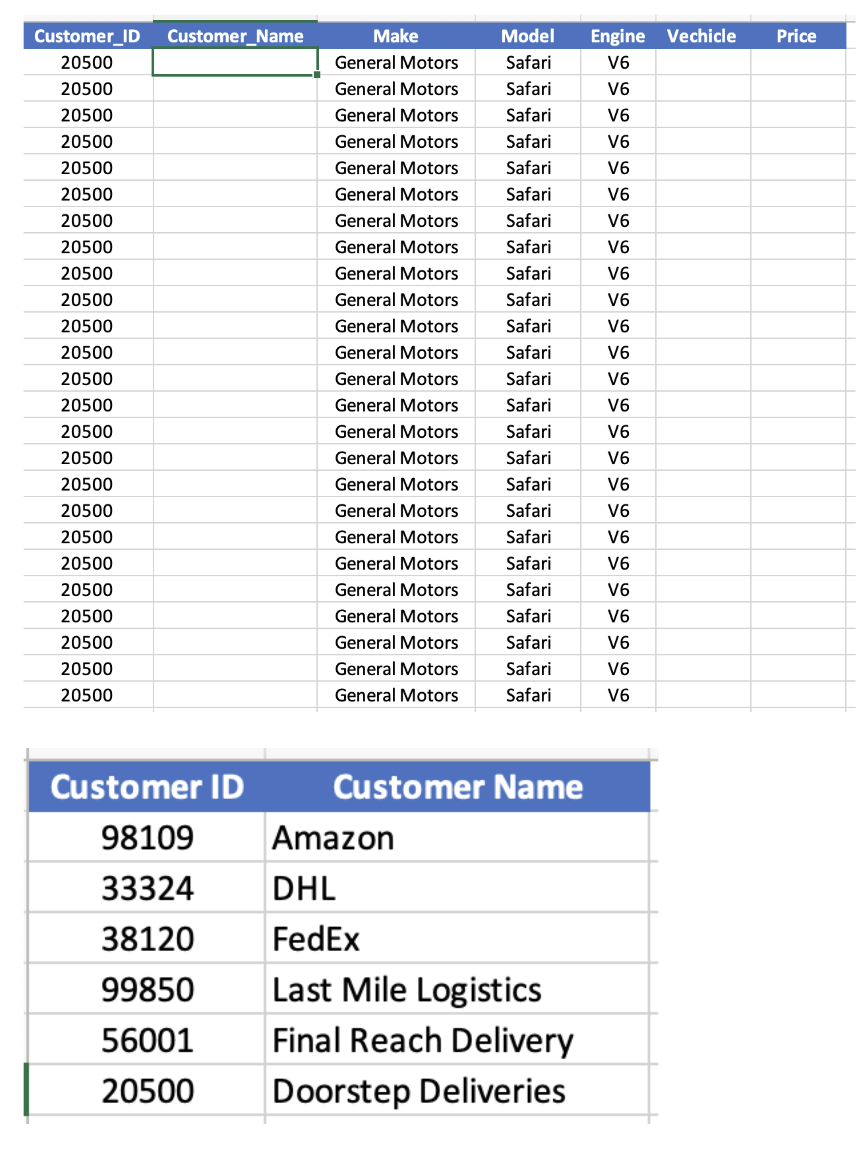
Add columns to the OrderInfo worksheet so that your column headers in row are organized like shown below:
Using an Excel function, add the customer name to all rows in the CustomerName column.
Using an Excel Function, combine Make, Model, and Engine in the Vehicle column, separating each attribute with a hyphen eg General MotorsSafariV
Using an Excel Function add the appropriate price for each vehicle sold in the Price column for each row.
Step by Step Solution
There are 3 Steps involved in it
1 Expert Approved Answer
Step: 1 Unlock

Question Has Been Solved by an Expert!
Get step-by-step solutions from verified subject matter experts
Step: 2 Unlock
Step: 3 Unlock
 Study Help