







Question: Step 1 : Create Customer Inquiry Task Create a customer inquiry. Short Description Use the SAP Easy Access Menu to create a customer inquiry. Time
Step : Create Customer Inquiry
Task Create a customer inquiry.
Short Description Use the SAP Easy Access Menu to create a customer inquiry.
Time
Name Position Matthias Dosch Sales Person
min
Now we will enter an inquiry from our customer, Peachtree Bikes. An inquiry is a customer's request to be provided with sales information without obligation. An inquiry can relate to materials or services, conditions, and if necessary delivery dates.
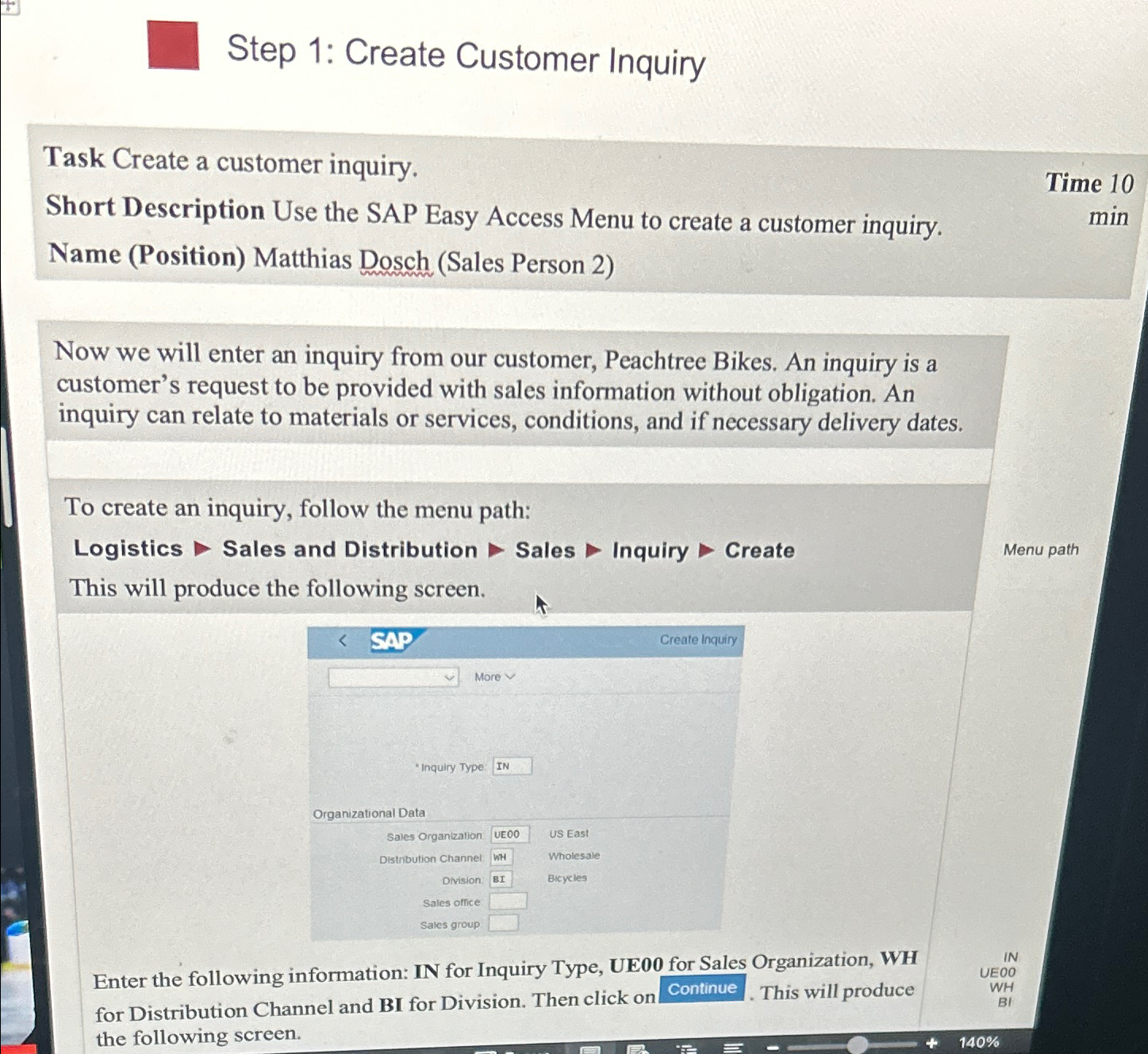
To create an inquiry, follow the menu path:
Logistics Sales and Distribution Sales Inquiry Create
Menu path
This will produce the following screen.
Enter the following information: IN for Inquiry Type, UE for Sales Organization, WH for Distribution Channel and BI for Division. Then click on Continue. This will produce the following screen.
Step by Step Solution
There are 3 Steps involved in it
1 Expert Approved Answer
Step: 1 Unlock

Question Has Been Solved by an Expert!
Get step-by-step solutions from verified subject matter experts
Step: 2 Unlock
Step: 3 Unlock
 Study Help