







Question: Step 1 - Create Tables ( 1 5 points total ) Take the database design we created from the soccer database design exercise ( HOE#
Step Create Tables points total
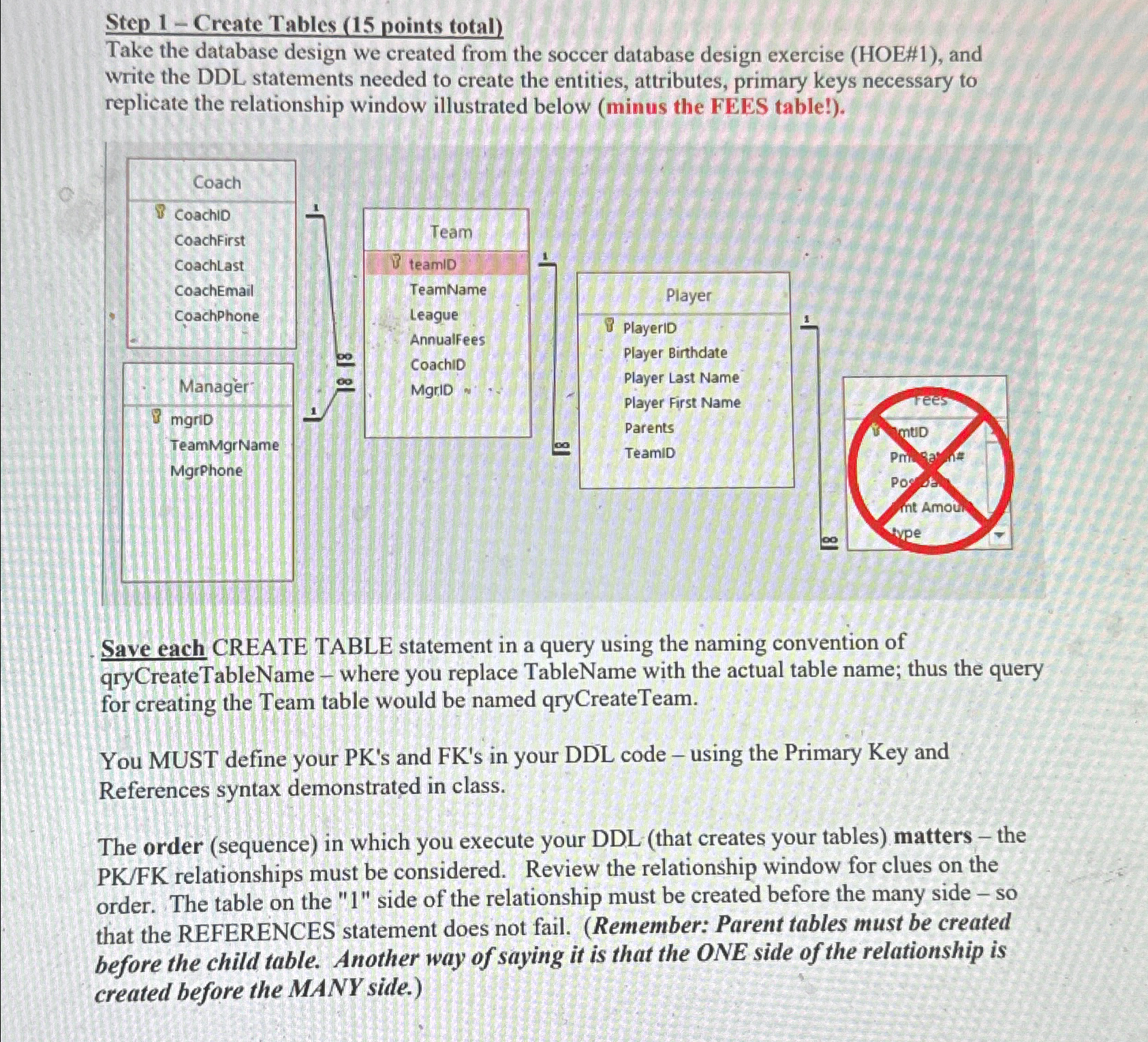
Take the database design we created from the soccer database design exercise HOE# and write the DDL statements needed to create the entities, attributes, primary keys necessary to replicate the relationship window illustrated below minus the FEES table!
Save each CREATE TABLE statement in a query using the naming convention of qryCreateTableName where you replace TableName with the actual table name; thus the query for creating the Team table would be named qryCreateTeam.
You MUST define your PKs and FKs in your DDL code using the Primary Key and References syntax demonstrated in class.
The order sequence in which you execute your DDL that creates your tables matters the PKFK relationships must be considered. Review the relationship window for clues on the order. The table on the side of the relationship must be created before the many side so that the REFERENCES statement does not fail. Remember: Parent tables must be created before the child table. Another way of saying it is that the ONE side of the relationship is created before the MANY side.
Step by Step Solution
There are 3 Steps involved in it
1 Expert Approved Answer
Step: 1 Unlock

Question Has Been Solved by an Expert!
Get step-by-step solutions from verified subject matter experts
Step: 2 Unlock
Step: 3 Unlock
 Study Help