







Question: Step 1: Define/understand purpose - predict or classify? Step 2: Obtain data (may involve random sampling) Step 3: Explore, clean, pre-process data a. Check for
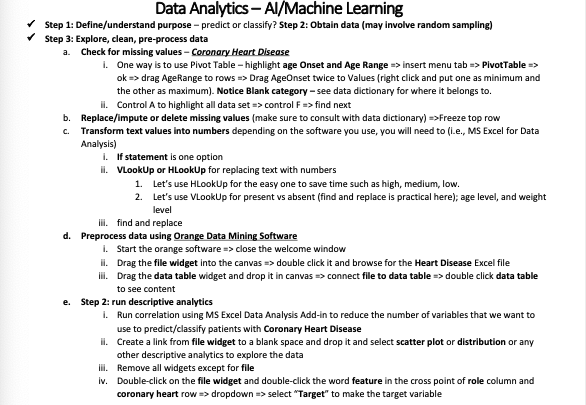
Step 1: Define/understand purpose - predict or classify? Step 2: Obtain data (may involve random sampling) Step 3: Explore, clean, pre-process data a. Check for missing values - Coronary Heart Disease i. One way is to use Pivot Table - highlight age Onset and Age Range > insert menu tab PivotTable > ok drag AgeRange to rows > Drag AgeOnset twice to Values (right click and put one as minimum and the other as maximum). Notice Blank category - see data dictionary for where it belongs to. ii. Control A to highlight all data set > control F> find next b. Replace/impute or delete missing values (make sure to consult with data dictionary) Freeze top row c. Transform text values into numbers depending on the software you use, you will need to (i.e., MS Excel for Data Analysis) i. If statement is one option ii. VLookUp or HLookUp for replacing text with numbers 1. Let's use HLookUp for the easy one to save time such as high, medium, low. 2. Let's use VLookUp for present vs absent (find and replace is practical here); age level, and weight level iil. find and replace d. Preprocess data using Orange Data Mining Software i. Start the orange software > close the welcome window ii. Drag the file widget into the canvas double click it and browse for the Heart Disease Excel file iii. Drag the data table widget and drop it in canvas connect file to data table double click data table to see content e. Step 2: run descriptive analytics i. Run correlation using MS Excel Data Analysis Add-in to reduce the number of variables that we want to use to predict/classify patients with Coronary Heart Disease ii. Create a link from file widget to a blank space and drop it and select scatter plot or distribution or any other descriptive analytics to explore the data iil. Remove all widgets except for file iv. Double-click on the file widget and double-click the word feature in the cross point of role column and coronary heart row dropdown > select "Target" to make the target variable
Step by Step Solution
There are 3 Steps involved in it

Get step-by-step solutions from verified subject matter experts
 Study Help