







Question: Step 1) Generate the problem using bootlegging taught in the class. If you don't have your bootlegging notes (or missed lecture that day), use the
Step 1) Generate "the problem" using bootlegging taught in the class. If you don't have your bootlegging notes (or missed lecture that day), use the Bootlegging Table linked above to generate a new idea.
Step 2) Brainstorm and sketch solutions to the problem. Even brainstorming for 15 minutes in a group (individual or 2 people) should be enough to generate 10 - 15 ideas per person. These should be divergent sketches - each should represent a different approach to presenting this information. Try to think outside of the box. If you're stuck and can't think of something new, use the third column (Unique Interaction) to help you think of a new way to solve your problem. Don't worry about whether the sketches look good for now, just get the ideas out.
Step 3) Prioritize your sketches. Once you've generated some ideas, look through them. Which do you like? Are there elements from one of your sketches that you can use in another sketch? Pick the best ideas from your brainstorming session. (10 mins)
Step 4) Build a Storyboard. Based on refining your sketches. Now you will generate a storyboard with at least 5 panels. Each panel should convey a different interaction for its user and build on a sequence of interaction. You should also annotate each panel of the storyboard describing the user interaction.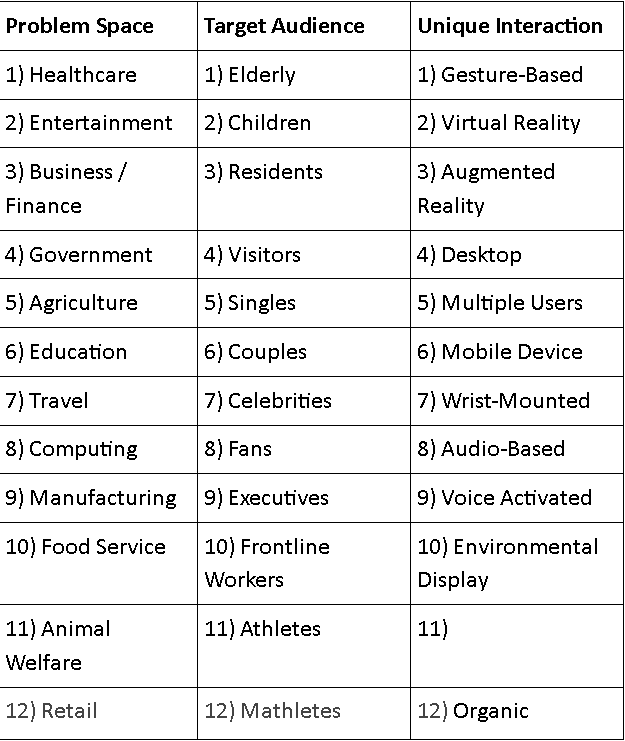
Step by Step Solution
There are 3 Steps involved in it

Get step-by-step solutions from verified subject matter experts
 Study Help