







Question: Step 1: Practice the conversion between binary and decimal numbering system. Questions: Convert the following decimal numbers to binary. Convert the following binary numbers to
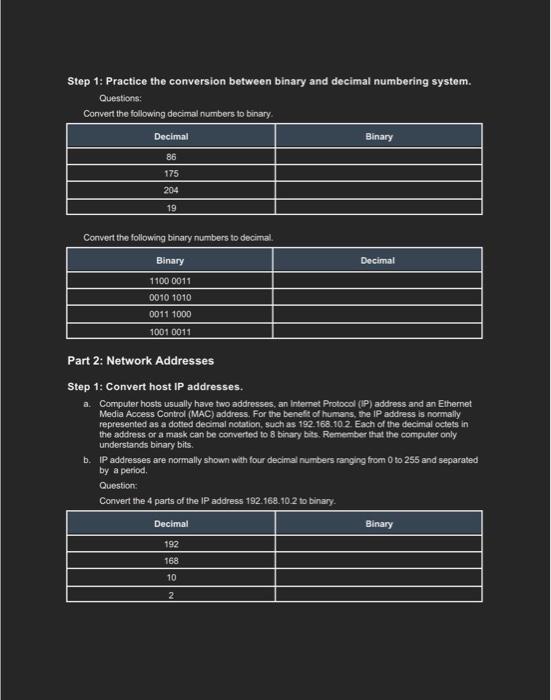
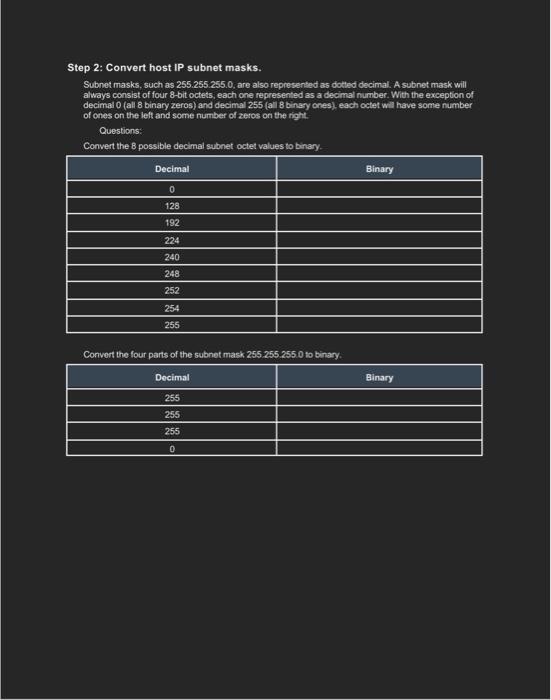
Step 1: Practice the conversion between binary and decimal numbering system. Questions: Convert the following decimal numbers to binary. Convert the following binary numbers to decimal. Part 2: Network Addresses Step 1: Convert host IP addresses. a. Computer hosts usually have two addresses, an Intemet Protocol (IP) address and an Ethernet Media Access Control (MAC) address. For the beneft of humans, the IP address is normally represented as a dotted decimal notation, such as 192.168.102. Each of the decimal octets in the address or a mask can be converted to 8 binary tits. Remember that the computer only understands binary bits. b. IP addresses are normally shown with four decimal numbers ranging from 0 to 255 and separated by a period. Question: Convert the 4 parts of the IP address 192.168.10.2 to binary. Step 2: Convert host IP subnet masks. Subnet masks, such as 255.255.255.0, are also represented as dotted decimal. A subnet mask will always consist of four 8-bit octets, each one represented as a decimal number. With the exception of decimal 0 (all 8 binary zeros) and decimal 255 (all 8 binary ones), each octet will have some number of ones on the left and some number of zeros on the right. Questions: Convert the 8 possible decimal subnet octet values to binary
Step by Step Solution
There are 3 Steps involved in it

Get step-by-step solutions from verified subject matter experts
 Study Help