







Question: Step 3 : Implement TimeoutManager's add _ timeout ( ) and update ( ) methods Complete the TimeoutManager class implementation in TimeoutManager.py . add _
Step : Implement TimeoutManager's addtimeout and update methods
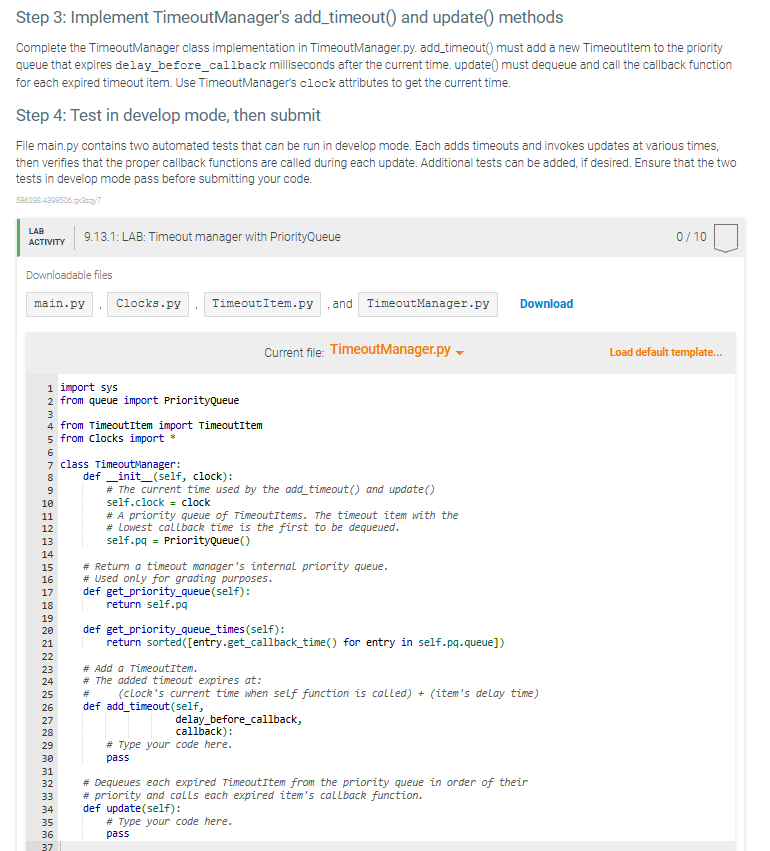
Complete the TimeoutManager class implementation in TimeoutManager.py addtimeout must add a new Timeoutltem to the priority queue that expires delaybeforecallback milliseconds after the current time. update must dequeue and call the callback function for each expired timeout item. Use TimeoutManager's clock attributes to get the current time.
Step : Test in develop mode, then submit
File main.py contains two automated tests that can be run in develop mode. Each adds timeouts and invokes updates at various times, then verifies that the proper callback functions are called during each update. Additional tests can be added, if desired. Ensure that the two tests in develop mode pass before submitting your code.
Downloadable files
Current file: TimeoutManager.py
import sys
from queue import PriorityQueue
from TimeoutItem import TimeoutItem
from Clocks import
Class TimeoutManager:
def initself clock:
# The current time used by the addtimeout and update
self.clock clock
# A priority queue of TimeoutItems. The timeout item with the
# Lowest callback time is the first to be dequeued.
self.pq PriorityQueue
# Return a timeout manager's internal priority queue.
# Used only for grading purposes.
def getpriorityqueueself:
return self.pq
def getpriorityqueuetimesself:
return sortedentrygetcallbacktime for entry in self.pqqueue
# Add a TimeoutItem.
# The added timeout expires at:
# clocks current time when self function is calleditems delay time
def addtimeoutself
delaybeforecallback,
callback:
# Type your code here.
pass
# Dequeues each expired TimeoutItem from the priority queue in order of their
# priority and calls each expired item's callback function.
def updateself:
# Type your code here.
pass
Step by Step Solution
There are 3 Steps involved in it
1 Expert Approved Answer
Step: 1 Unlock

Question Has Been Solved by an Expert!
Get step-by-step solutions from verified subject matter experts
Step: 2 Unlock
Step: 3 Unlock
 Study Help