







Question: Step by Step 1. Create an HTML page, leaving the space between the and tags open. 2. Between the and tags, add the and
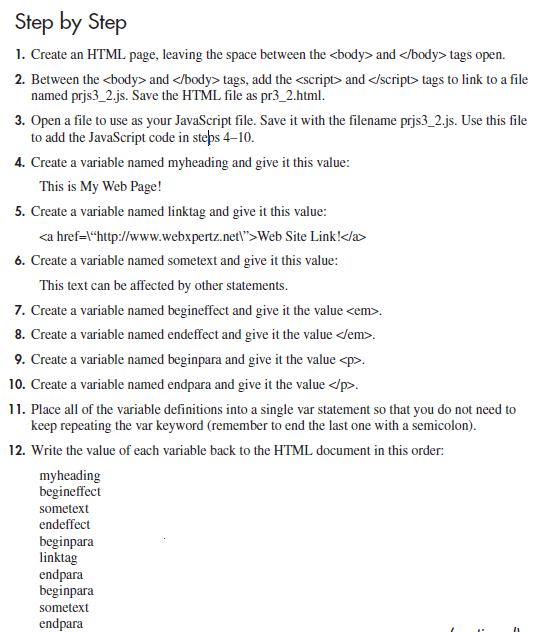
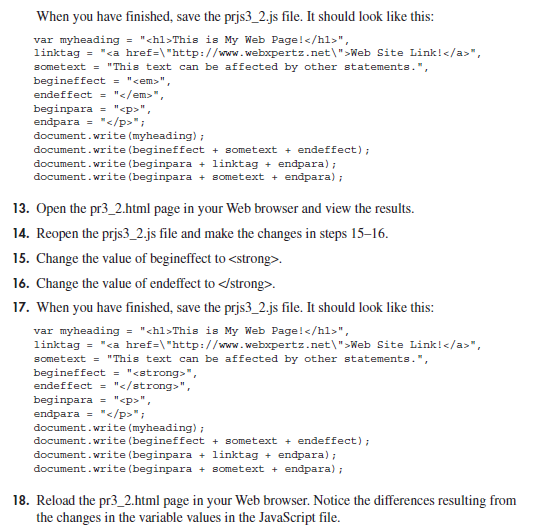
Step by Step 1. Create an HTML page, leaving the space between the and tags open. 2. Between the and tags, add the and tags to link to a file named prjs3_2.js. Save the HTML file as pr3_2.html. 3. Open a file to use as your JavaScript file. Save it with the filename prjs3_2.js. Use this file to add the JavaScript code in steps 4-10. 4. Create a variable named myheading and give it this value: This is My Web Page! 5. Create a variable named linktag and give it this value: Web Site Link! 6. Create a variable named sometext and give it this value: This text can be affected by other statements. 7. Create a variable named begineffect and give it the value . 8. Create a variable named endeffect and give it the value . 9. Create a variable named beginpara and give it the value . 10. Create a variable named endpara and give it the value . 11. Place all of the variable definitions into a single var statement so that you do not need to keep repeating the var keyword (remember to end the last one with a semicolon). 12. Write the value of each variable back to the HTML document in this order: myheading begineffect sometext endeffect beginpara linktag endpara beginpara sometext endpara When you have finished, save the prjs3_2.js file. It should look like this: var myheading = " This is My Web Page! ", linktag = " Web Site Link! ", sometext = "This text can be affected by other statements.", begineffect = " ", endeffect = " ", beginpara = " ", endpara = " "; document.write(myheading); document.write (begineffect + sometext + endeffect); document.write(beginpara + linktag + endpara); document.write (beginpara + sometext + endpara); 13. Open the pr3_2.html page in your Web browser and view the results. 14. Reopen the prjs3_2.js file and make the changes in steps 15-16. 15. Change the value of begineffect to . 16. Change the value of endeffect to . 17. When you have finished, save the prjs3_2.js file. It should look like this: var myheading = " This is My Web Page! ", linktag = " Web Site Link! ", sometext = "This text can be affected by other statements.", begineffect = " ", endeffect = " ", beginpara = " ", endpara = " "; document.write (myheading); document.write (begineffect + sometext + endeffect); document.write (beginpara + linktag + endpara); document.write (beginpara + sometext + endpara); 18. Reload the pr3_2.html page in your Web browser. Notice the differences resulting from the changes in the variable values in the JavaScript file.
Step by Step Solution
There are 3 Steps involved in it

Get step-by-step solutions from verified subject matter experts
 Study Help