





Question: Step Instructions Points Possible Create a query in Design view based on the tblinventory, tblTransaction, and 13 tblTransactionDetails tables to help determine which Your Office
Step Instructions Points Possible Create a query
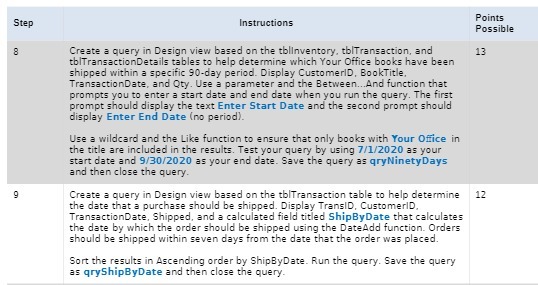
Step Instructions Points Possible Create a query in Design view based on the tblinventory, tblTransaction, and 13 tblTransactionDetails tables to help determine which Your Office books have been shipped within a specific 90-day period. Display CustomerID, BookTitle, TransactionDate, and Qty. Use a parameter and the Between... And function that prompts you to enter a start date and end date when you run the query. The first prompt should display the text Enter Start Date and the second prompt should display Enter End Date (no period). Use a wildcard and the Like function to ensure that only books with Your Office in the title are included in the results. Test your query by using 7/1/2020 as your start date and 9/30/2020 as your end date. Save the query as qry Ninety Days and then close the query. Create a query in Design view based on the tblTransaction table to help determine 12 the date that a purchase should be shipped. Display TransID, CustomerID. TransactionDate, Shipped, and a calculated field titled ShipByDate that calculates the date by which the order should be shipped using the DateAdd function. Orders should be shipped within seven days from the date that the order was placed. Sort the results in Ascending order by ShipByDate. Run the query. Save the query as qryShipByDate and then close the query

Step by Step Solution

There are 3 Steps involved in it

1 Expert Approved Answer
Step: 1 Unlock blur-text-image

Question Has Been Solved by an Expert!

Get step-by-step solutions from verified subject matter experts

Step: 2 Unlock
Step: 3 Unlock

Students Have Also Explored These Related Mathematics Questions!