



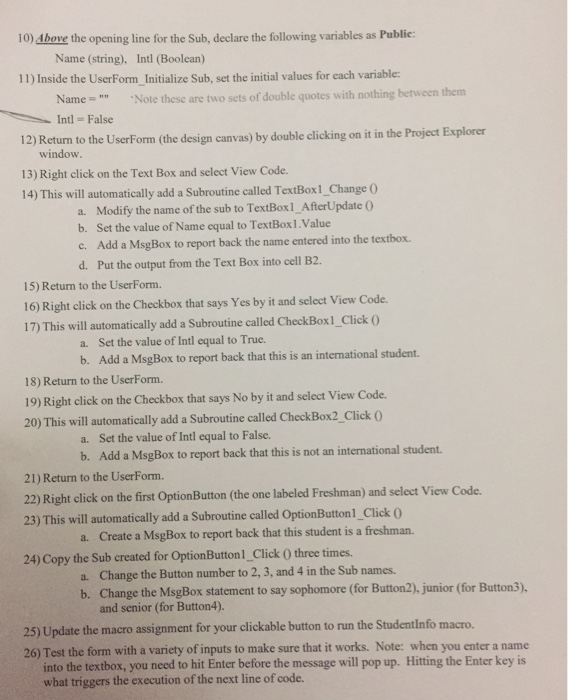
Question: Steps 10 through 26 Instructions 1) You are going to develop a VBA program that asks users (students in this case) to specify a few
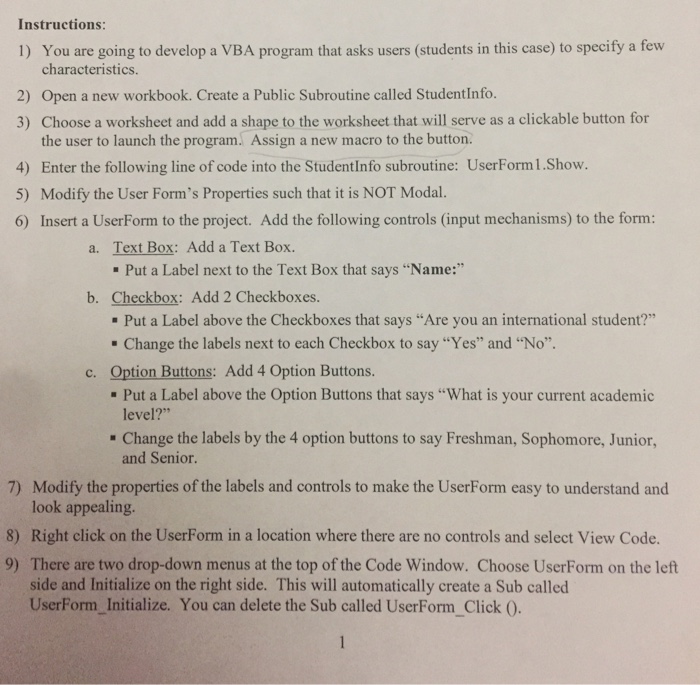
Instructions 1) You are going to develop a VBA program that asks users (students in this case) to specify a few characteristics. 2) Open a new workbook. Create a Public Subroutine called StudentInfo. 3) Choose a worksheet and add a shape to the worksheet that will serve as a clickable button for the user to launch the program. Assign a new macro to the button. 4) Enter the following line of code into the StudentInfo subroutine: UserForm1.Show. 5) Modify the User Form's Properties such that it is NOT Modal. 6) Insert a UserForm to the project. Add the following controls (input mechanisms) to the form: a. Text Box: Add a Text Box. Put a Label next to the Text Box that says "Name:" b. Checkbox: Add 2 Checkboxes. Put a Label above the Checkboxes that says "Are you an international student?" Change the labels next to each Checkbox to say "Yes" and "No". c. tion Buttons: Add 4 Option Buttons Put a Label above the Option Buttons that says "What is your current academic level?" Change the labels by the 4 option buttons to say Freshman, Sophomore, Junior and Senior 7) Modify the properties of the labels and controls to make the UserForm easy to understand and look appealing. 8) Right click on the UserForm in a location where there are no controls and select View Code. 9) There are two drop-down menus at the top of the Code Window. Choose UserForm on the left side and Initialize on the right side. This will automatically create a Sub called UserForm Initialize. You can delete the Sub called UserForm Click 0
Step by Step Solution
There are 3 Steps involved in it

Get step-by-step solutions from verified subject matter experts