







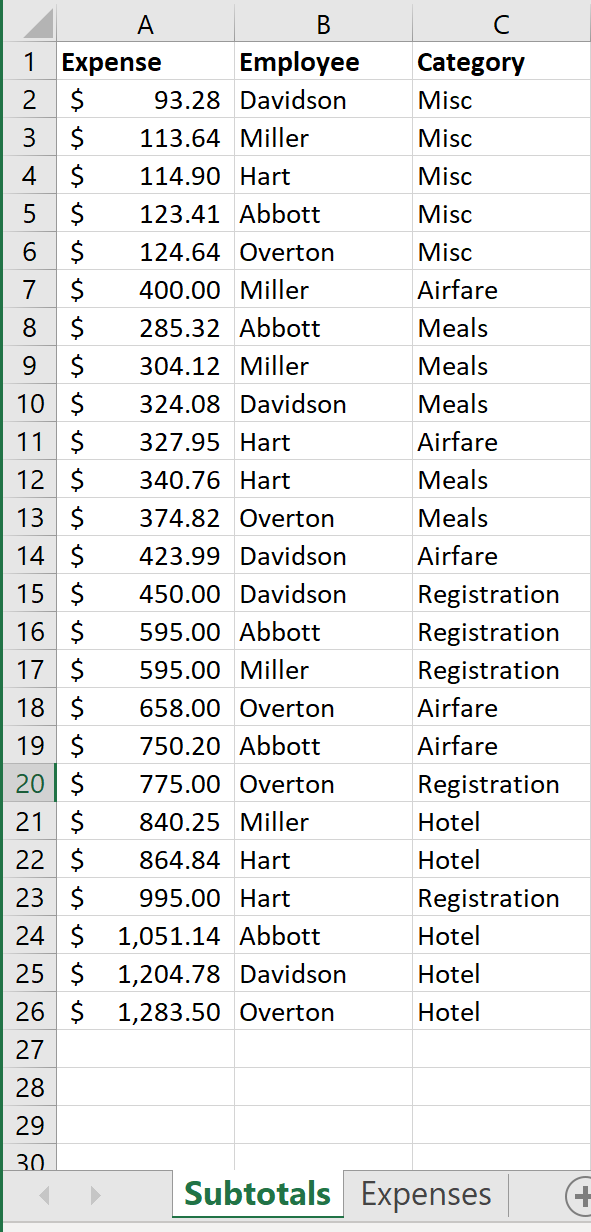
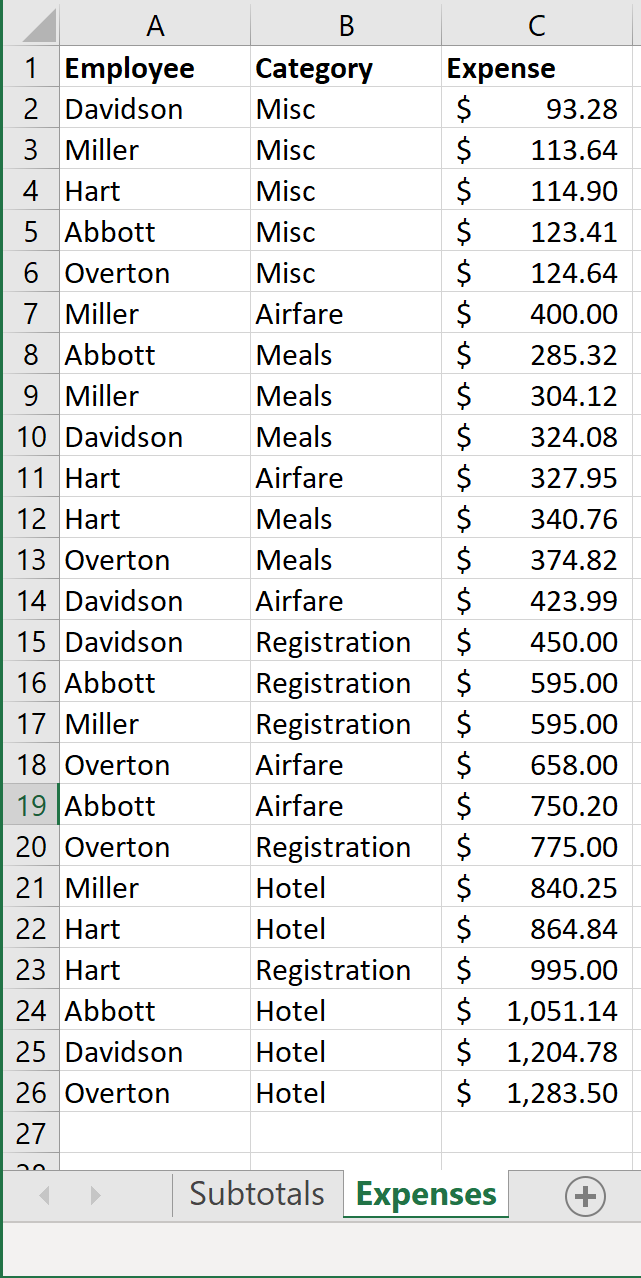
Question: Steps to Perform: it doesn't let me upload the excel file so that is why the pictures of the two sheets are at the bottom
Steps to Perform: it doesn't let me upload the excel file so that is why the pictures of the two sheets are at the bottom ( The excel document have a subtotals sheet and an expenses sheet). The items with in those sheets are listed below.
| Step | Instructions | Points Possible |
| 1 | Start Excel. Download and open the file named Exp19_Excel_Ch05_CapAssessment_Travel.xlsx. Grader has automatically added your last name to the beginning of the filename. | 0 |
| 2 | Before using the Subtotal command, you must first sort the data. On the Subtotals worksheet, sort the data by Employee and further sort by Category, both in alphabetical order. | 4 |
| 3 | You want to subtotal the data to calculate expenses by employee. Use the Subtotals feature to insert subtotal rows by Employee to calculate the total expense by employee. | 6 |
| 4 | Now you want to hide the details for two employees and focus on details for the remaining employees. Collapse the Davidson and Miller sections to show only their totals. Leave the other employees individual rows displayed. | 5 |
| 5 | For more detailed analysis, you are ready to create a PivotTable. Use the Expenses worksheet to create a blank PivotTable on a new worksheet named Summary. Name the PivotTable Categories. | 8 |
| 6 | You want to include the Category and Expense fields in the PivotTable. Use the Category and Expense fields, enabling Excel to determine where the fields go in the PivotTable. | 5 |
| 7 | You want to display average expenses instead of totals. Modify the Values field to determine the average expense by category. Change the custom name to Average Expense. | 4 |
| 8 | Format the Values field with Accounting number type. | 4 |
| 9 | You want to display a meaningful label and select a different layout. Type Category in cell A3 and change the Grand Totals layout option to On for Rows Only. | 5 |
| 10 | Apply Light Blue, Pivot Style Dark 2 and display banded rows. | 5 |
| 11 | To make it easy to filter the PivotTable results, you will insert and format a slicer. Insert a slicer for the Employee field, change the slicer height to 2 inches and apply the Light Blue, Slicer Style Dark 5. Move the slicer so that the upper-left corner is in cell A10. | 6 |
| 12 | You want to insert another PivotTable to analyze the data on the Expenses worksheet. Use the Expenses worksheet to create another blank PivotTable on a sheet named Totals. Name the PivotTable Employees. Add the Employee to the Rows and add the Expense field to the Values area. Sort the PivotTable from largest to smallest expense. | 10 |
| 13 | Change the name for the Expenses column to Totals and format the field with Accounting number format. | 6 |
| 14 | Insert a calculated field to subtract 2659.72 from the Totals field. Change the custom name to Above or Below Average and apply Accounting number format to the field. | 10 |
| 15 | Set 10.86 (approximate) as the width for column B and 13.71 for column C, change the row height of row 3 to 30, and apply word wrap to cell C3. | 4 |
| 16 | Now, you want to create a PivotChart to depict the data visually. Create a clustered column PivotChart from the PivotTable. Move the PivotChart to a new sheet named Chart. Hide all field buttons in the PivotChart, if necessary. | 8 |
| 17 | Add a chart title above the chart and type Expenses by Employee. Change the chart style to Style 14. Note, Mac users, continue on to the next Step. | 2 |
| 18 | Apply 11 pt font size to the value axis and display the axis as Accounting with zero decimal places. | 4 |
| 19 | Create a footer on all worksheets with your name in the left section, the sheet name code in the center section, and the file name code in the right section. | 4 |
| 20 | Ensure that the worksheets are correctly named and placed in the following order in the workbook: Subtotals, Summary, Chart, Totals, Expenses. | 0 |
| 21 | Save and close Exp19_Excel_Ch05_CapAssessment_Travel.xlsx. Exit Excel. Submit the file as directed. | 0 |
Subtotals:
Expenses:
Step by Step Solution
There are 3 Steps involved in it

Get step-by-step solutions from verified subject matter experts
 Study Help