







Question: Steps to Perform: Step Instructions Points Possible 1 Start Excel. Download and open the file named 0 Exp19_Excel_Ch01_ CapAssessment_ Training.xisx. Grader has automatically added your
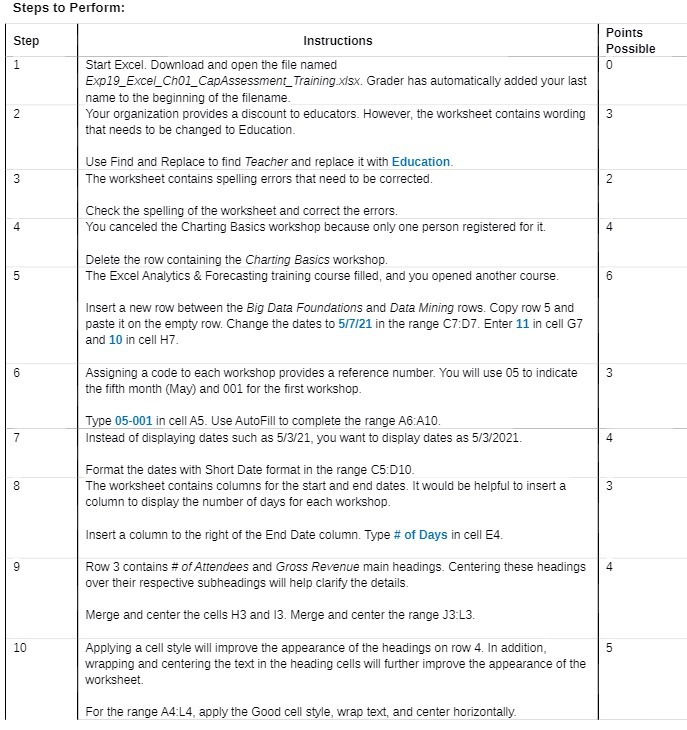
Steps to Perform: Step Instructions Points Possible 1 Start Excel. Download and open the file named 0 Exp19_Excel_Ch01_ CapAssessment_ Training.xisx. Grader has automatically added your last name to the beginning of the filename. Your organization provides a discount to educators. However, the worksheet contains wording 3 that needs to be changed to Education. Use Find and Replace to find Teacher and replace it with Education. 3 The worksheet contains spelling errors that need to be corrected Check the spelling of the worksheet and correct the errors. 4 You canceled the Charting Basics workshop because only one person registered for it. 4 Delete the row containing the Charting Basics workshop. 5 The Excel Analytics & Forecasting training course filled, and you opened another course. 6 Insert a new row between the Big Data Foundations and Data Mining rows. Copy row 5 and paste it on the empty row. Change the dates to 5/7/21 in the range C7:07. Enter 11 in cell G7 and 10 in cell H7. 6 Assigning a code to each workshop provides a reference number. You will use 05 to indicate 3 the fifth month (May) and 001 for the first workshop. Type 05-001 in cell A5. Use AutoFill to complete the range A6:A10. 7 Instead of displaying dates such as 5/3/21, you want to display dates as 5/3/2021. 4 Format the dates with Short Date format in the range C5:D10. 8 The worksheet contains columns for the start and end dates. It would be helpful to insert a 3 column to display the number of days for each workshop Insert a column to the right of the End Date column. Type # of Days in cell E4. 9 Row 3 contains # of Attendees and Gross Revenue main headings. Centering these headings 4 over their respective subheadings will help clarify the details. Merge and center the cells H3 and 13. Merge and center the range J3:L3. 10 Applying a cell style will improve the appearance of the headings on row 4. In addition, 5 wrapping and centering the text in the heading cells will further improve the appearance of the worksheet. For the range A4:L4, apply the Good cell style, wrap text, and center horizontally
Step by Step Solution
There are 3 Steps involved in it

Get step-by-step solutions from verified subject matter experts
 Study Help