





Question: Stop Instructions Points Possible 1 0 2 16 3 6 4 o 6 10 6 6 7 Start Excel. Download and open the file named
Stop Instructions Points Possible 1 0 2 16 3 6 4
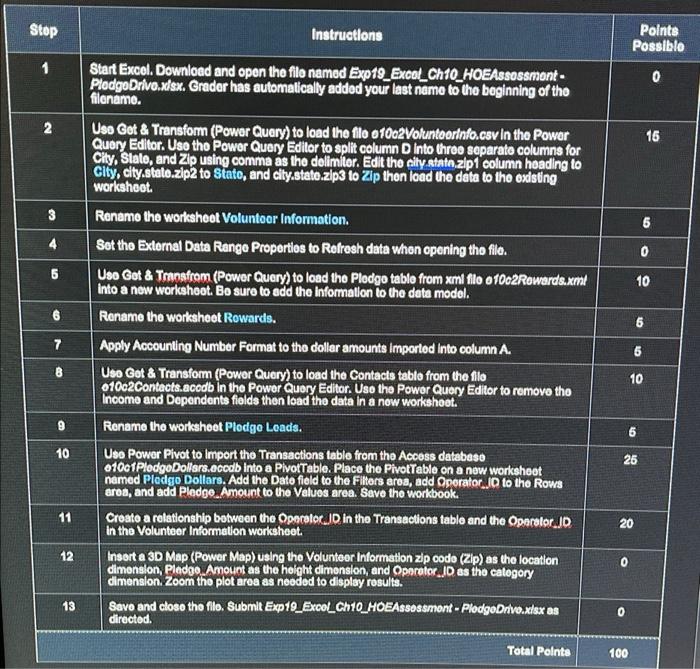
Stop Instructions Points Possible 1 0 2 16 3 6 4 o 6 10 6 6 7 Start Excel. Download and open the file named Exp19_Excal_Ch 10_HOEAssossmont- PledgeDrivo.xlsx. Grader has automatically added your last name to the beginning of the filenamo. Uso Get & Transform (Power Query) to load the filo o 10c2Voluntoorinfo.csv In the Power Query Editor. Uso tho Power Query Editor to split column D Into threo saparato columns for City, Stato, and Zlp using comma as the delimitor. Edit the alty state.zip 1 column heading to City, city.state.zip2 to Stato, and city.state.zip3 to Zip then load the data to the odsting workshoot. Renamo the worksheet Voluntoar Information. Set the External Data Range Proportios to Rofresh data when opening the file. Uso Got & Transfrom (Power Query) to load tho Pledgo table from xml filo o 10c2Rowards.xml into a new workshoot. Bo sure to add the information to the data model. Rename the worksheet Rowards. Apply Accounting Number Format to the dollar amounts Imported into column A. Uso Got & Transform (Power Query) to load the Contacts table from the file 01002 Contacts.acodb in the Power Query Editor. Uso tho Power Query Editor to remove tho Income and Dependents fields then load the data in a now workshoot. Rename tho worksheet Plodge Loads. Uso Power Pivot to Import the Transactions table from tho Access database 01001 PlodgeDollars.accdb into a Pivottable. Place the PivotTable on a new workshoot named Pledgo Dollars. Add the Dato field to the Filters aroa, add Operator Jo to the Rows area, and add Pledoo.Amount to the Values area. Save the workbook. Croato a relationship between the Opocalor.JD in the Transactions table and the Operator JD In the Volunteer Information worksheet. Insert a 3D Map (Power Map) using the Volunteer Information zip code (Zip) as the location dimension, Pledoo Amount as the height dimension, and Operator JD as the category dimension. Zoom tho plot area as needed to display rosults. Savo and close the filo. Submit Exp19_Excol_Ch10_HOEAssossmont - PlodgeDrivo.xlsx as directed. 6 B 10 9 LO 10 26 11 20 12 0 0 13 0 Total Points 100 Stop Instructions Points Possible 1 0 2 16 3 6 4 o 6 10 6 6 7 Start Excel. Download and open the file named Exp19_Excal_Ch 10_HOEAssossmont- PledgeDrivo.xlsx. Grader has automatically added your last name to the beginning of the filenamo. Uso Get & Transform (Power Query) to load the filo o 10c2Voluntoorinfo.csv In the Power Query Editor. Uso tho Power Query Editor to split column D Into threo saparato columns for City, Stato, and Zlp using comma as the delimitor. Edit the alty state.zip 1 column heading to City, city.state.zip2 to Stato, and city.state.zip3 to Zip then load the data to the odsting workshoot. Renamo the worksheet Voluntoar Information. Set the External Data Range Proportios to Rofresh data when opening the file. Uso Got & Transfrom (Power Query) to load tho Pledgo table from xml filo o 10c2Rowards.xml into a new workshoot. Bo sure to add the information to the data model. Rename the worksheet Rowards. Apply Accounting Number Format to the dollar amounts Imported into column A. Uso Got & Transform (Power Query) to load the Contacts table from the file 01002 Contacts.acodb in the Power Query Editor. Uso tho Power Query Editor to remove tho Income and Dependents fields then load the data in a now workshoot. Rename tho worksheet Plodge Loads. Uso Power Pivot to Import the Transactions table from tho Access database 01001 PlodgeDollars.accdb into a Pivottable. Place the PivotTable on a new workshoot named Pledgo Dollars. Add the Dato field to the Filters aroa, add Operator Jo to the Rows area, and add Pledoo.Amount to the Values area. Save the workbook. Croato a relationship between the Opocalor.JD in the Transactions table and the Operator JD In the Volunteer Information worksheet. Insert a 3D Map (Power Map) using the Volunteer Information zip code (Zip) as the location dimension, Pledoo Amount as the height dimension, and Operator JD as the category dimension. Zoom tho plot area as needed to display rosults. Savo and close the filo. Submit Exp19_Excol_Ch10_HOEAssossmont - PlodgeDrivo.xlsx as directed. 6 B 10 9 LO 10 26 11 20 12 0 0 13 0 Total Points 100

Step by Step Solution

There are 3 Steps involved in it

1 Expert Approved Answer
Step: 1 Unlock blur-text-image

Question Has Been Solved by an Expert!

Get step-by-step solutions from verified subject matter experts

Step: 2 Unlock
Step: 3 Unlock

Students Have Also Explored These Related General Management Questions!