







Question: String. StringBuilder. and Wrapper Classes Please complete the following using the showInputDialog and showMessageDialog methods in the JOptionPane class in the javax swing library: 1.
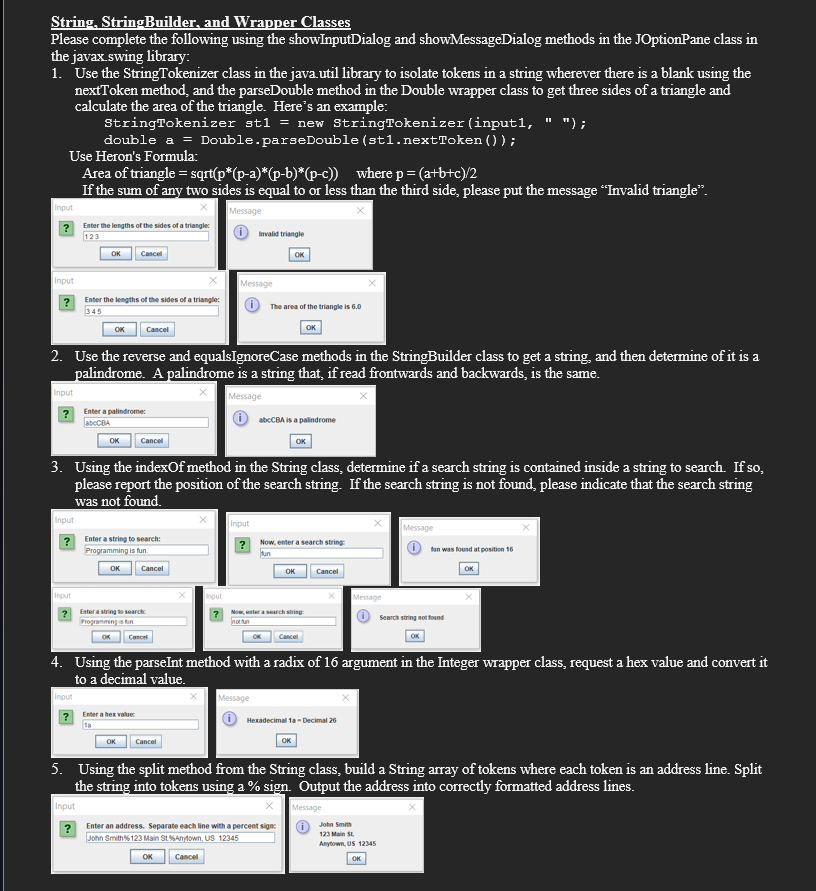
String. StringBuilder. and Wrapper Classes Please complete the following using the showInputDialog and showMessageDialog methods in the JOptionPane class in the javax swing library: 1. Use the StringTokenizer class in the java.util library to isolate tokens in a string wherever there is a blank using the nextToken method, and the parseDouble method in the Double wrapper class to get three sides of a triangle and calculate the area of the triangle. Here's an example: StringTokenizer at1 = new StringTokenizer (input1, " ") ; double a = Double. parseDouble (st1. nextToken () ) ; Use Heron's Formula: Area of triangle = sqrt(p*(p-a)*(p-b)*(p-c)) where p = (a+b+c)/2 If the sum of any two sides is equal to or less than the third side, please put the message "Invalid triangle". Input Message ? Enter the lengths of the sides of a triangles 123 O wald triangle OK Cancel OK Input Message X ? Enter the lengths of the sides of a triangle: 345 The area of the triangle is 6.0 OK Cancel OK 2. Use the reverse and equalsIgnoreCase methods in the StringBuilder class to get a string, and then determine of it is a palindrome. A palindrome is a string that, if read frontwards and backwards, is the same. input Message ? Enter a palindrome abcCBA is a palindrome OK Cancel OK 3. Using the indexOf method in the String class, determine if a search string is contained inside a string to search. If so, please report the position of the search string. If the search string is not found, please indicate that the search string was not found. Input X nput Message ? Enter a string to search: ? Now. enter a search string Programming is fun fun was found at position 16 OK Cancel OK Cancel OK Input Message ? Enter a string to search 7 Now, enter a search string Programming is hin ( Search string not found Cancel CK Cancel OK 4. Using the parseInt method with a radix of 16 argument in the Integer wrapper class, request a hex value and convert it to a decimal value. Input Message ? Enter a hex values Hexadecimal 1a = Decimal 26 OK Cancel OK 5. Using the split method from the String class, build a String array of tokens where each token is an address line. Split the string into tokens using a % sign. Output the address into correctly formatted address lines. Input Message ? Enter an address. Separate each line with a percent signs John Smith John Smith's 123 Main SL 5%Anytown, US 12345 123 Main St. Anytown, US 12345 OK Cancel OK
Step by Step Solution
There are 3 Steps involved in it

Get step-by-step solutions from verified subject matter experts
 Study Help