



Question: Student . 8:13 PM 97% CIS329 Project 1: HTML and CSS Due: Wed, Jan 30, 2019 at 11:59 PM Problem 1 (20 points) Create a
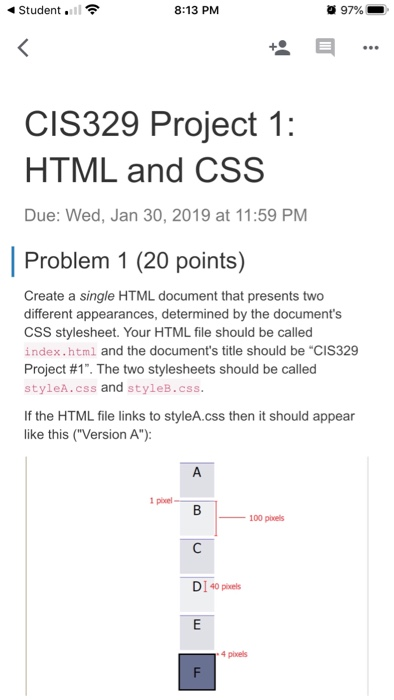
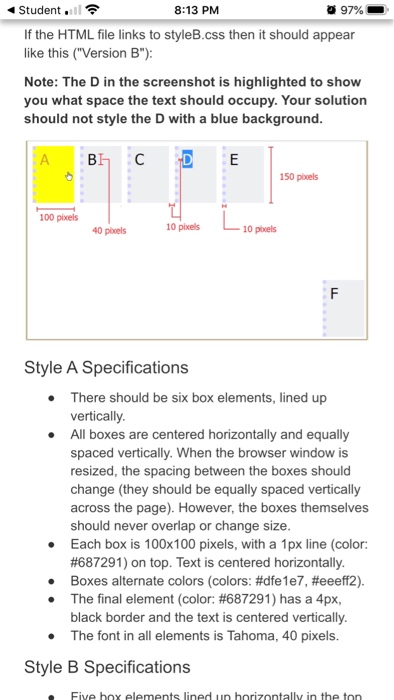
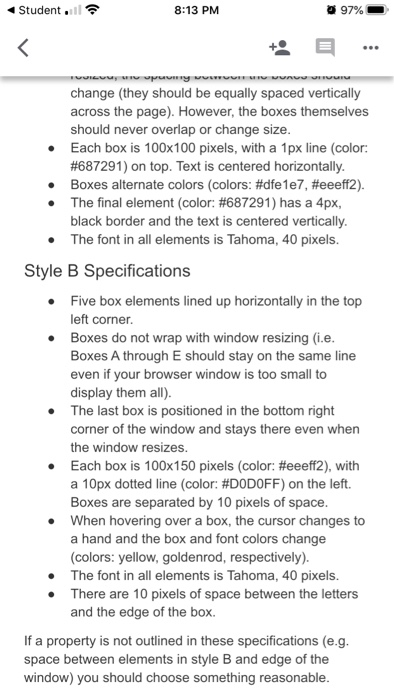
Student . 8:13 PM 97% CIS329 Project 1: HTML and CSS Due: Wed, Jan 30, 2019 at 11:59 PM Problem 1 (20 points) Create a single HTML document that presents two different appearances, determined by the document's CSS stylesheet. Your HTML file should be called index.html and the document's title should be "CIS329 Project #1". The two stylesheets should be called styleA.css and styleB.css. If the HTML file links to styleA.css then it should appear like this ("Version A"): 100 pels DI 40 pixels Student 1 8 :13 PM 97% If the HTML file links to styleB.css then it should appear like this ("Version B"): Note: The D in the screenshot is highlighted to show you what space the text should occupy. Your solution should not style the D with a blue background. BH D 150 pixels 100 pixels 10 pixels 40 pixels 10 pels Style A Specifications There should be six box elements, lined up vertically. All boxes are centered horizontally and equally spaced vertically. When the browser window is resized, the spacing between the boxes should change (they should be equally spaced vertically across the page). However, the boxes themselves should never overlap or change size. Each box is 100x100 pixels, with a 1px line (color: #687291) on top. Text is centered horizontally. Boxes alternate colors (colors: #dfe1e7, #eeeff2). The final element (color: #687291) has a 4px, black border and the text is centered vertically. The font in all elements is Tahoma, 40 pixels. Style B Specifications Five hoy elements lined un horizontally in the ton Student . 8:13 PM 97% puunny w WUAVU UUUU "VOICU w change (they should be equally spaced vertically across the page). However, the boxes themselves should never overlap or change size. Each box is 100x100 pixels, with a 1px line (color: #687291) on top. Text is centered horizontally. Boxes alternate colors (colors: #dfe1e7, #eeeff2). The final element (color: #687291) has a 4px, black border and the text is centered vertically. The font in all elements is Tahoma, 40 pixels. Style B Specifications Five box elements lined up horizontally in the top left corner Boxes do not wrap with window resizing (i.e. Boxes A through E should stay on the same line even if your browser window is too small to display them all). The last box is positioned in the bottom right corner of the window and stays there even when the window resizes. Each box is 100x150 pixels (color: #eeeff2), with a 10px dotted line (color: #DODOFF) on the left. Boxes are separated by 10 pixels of space. When hovering over a box, the cursor changes to a hand and the box and font colors change (colors: yellow, goldenrod, respectively). The font in all elements is Tahoma, 40 pixels. There are 10 pixels of space between the letters and the edge of the box. If a property is not outlined in these specifications (e.g. space between elements in style B and edge of the window) you should choose something reasonable
Step by Step Solution
There are 3 Steps involved in it

Get step-by-step solutions from verified subject matter experts