







Question: Student grade recording system (File I/O and C++ String) Skeleton code here: #include #include using namespace std; #define MAX_NUM_STU 10 //maximum number of students #define
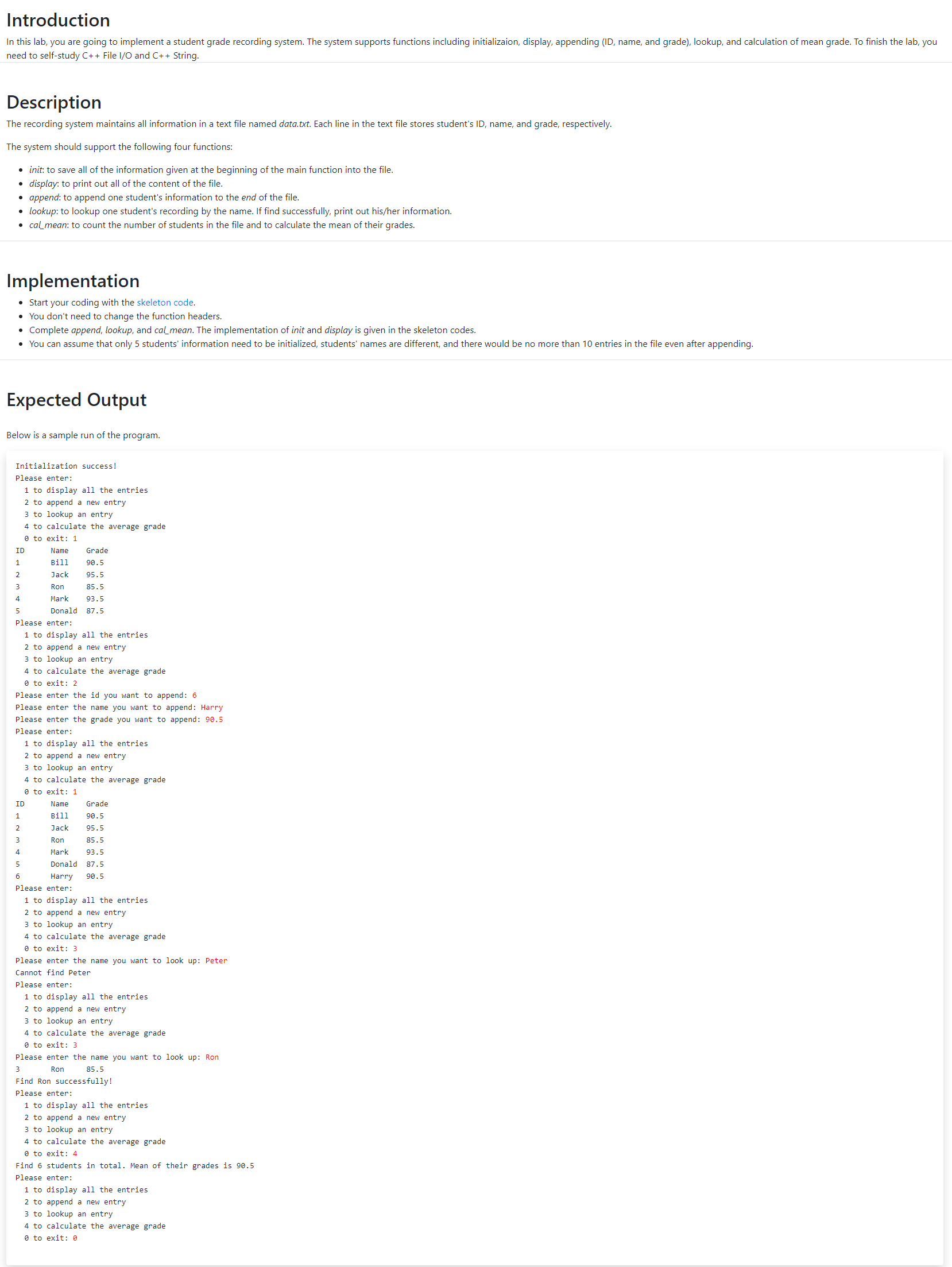
Student grade recording system (File I/O and C++ String)
Skeleton code here:
#include #include using namespace std; #define MAX_NUM_STU 10 //maximum number of students #define NUM_INIT 5 /umber of initial students //Save initial data into the file. void init(const int id[], const string name[], const float grade[], const string filename){ ofstream ofs(filename); int i; if (ofs){ ofs cmd; switch (cmd){ case 0: return 0; case 1: display(filename); break; case 2: cout > test_id; cout > test_name; cout > test_grade; append(test_id, test_name, test_grade, filename); break; case 3: cout > test_name; find = lookup(test_name, filename); if (find) cout Introduction In this lab, you are going to implement a student grade recording system. The system supports functions including initializaion, display, appending (ID, name, and grade), lookup, and calculation of mean grade. To finish the lab, you need to self-study C++ File 1/0 and C++ String. Description The recording system maintains all information in a text file named data.txt. Each line in the text file stores student's ID, name, and grade, respectively. The system should support the following four functions: . init to save all of the information given at the beginning of the main function into the file. display: to print out all of the content of the file. append: to append one student's information to the end of the file. lookup: to lookup one student's recording by the name. If find successfully, print out his/her information. cal_mean: to count the number of students in the file and to calculate the mean of their grades. Implementation Start your coding with the skeleton code. You don't need to change the function headers. Complete append, lookup, and cal_mean. The implementation of init and display is given in the skeleton codes. You can assume that only 5 students' information need to be initialized, students' names are different, and there would be no more than 10 entries in the file even after appending. Expected Output Below is a sample run of the program. Initialization success! Please enter: 1 to display all the entries to append a new entry 3 to lookup an entry 4 to calculate the average grade O to exit: 1 ID Name Grade 1 Bill 90.5 2 Jack 95.5 3 Ron 85.5 4 Mark 93.5 5 Donald 87.5 Please enter: 1 to display all the entries 2 to append a new entry 3 to lookup an entry 4 to calculate the average grade to exit: 2 Please enter the id you want to append: 6 Please enter the name you want to append: Harry Please enter the grade you want to append: 90.5 Please enter: 1 to display all the entries 2 to append a new entry 3 to lookup an entry 4 to calculate the average grade O to exit: 1 ID Name Grade 1 Bill 90.5 2 Jack 95.5 3 Ron 85.5 4 Mark 93.5 5 Donald 87.5 6 Harry 90.5 Please enter: 1 to display all the entries 2 to append a new entry 3 to lookup an entry 4 to calculate the average grade O to exit: 3 Please enter the name you want to look up: Peter Cannot find Peter Please enter: 1 to display all the entries 2 to append a new entry 3 to lookup an entry 4 to calculate the average grade O to exit: 3 Please enter the name you want to look up: Ron 3 Ron 85.5 Find Ron successfully! Please enter: 1 to display all the entries 2 to append a new entry 3 to lookup an entry 4 to calculate the average grade to exit: 4 Find 6 students in total. Mean of their grades is 90.5 Please enter: 1 to display all the entries 2 to append a new entry 3 to lookup an entry 4 to calculate the average grade O to exit: 0 Step by Step Solution
There are 3 Steps involved in it
1 Expert Approved Answer
Step: 1 Unlock

Question Has Been Solved by an Expert!
Get step-by-step solutions from verified subject matter experts
Step: 2 Unlock
Step: 3 Unlock
 Study Help