







Question: Student Learning Outcomes .Build graphical user interfaces using JavaFX Event handling JFileChooser Audio file playback Overview This lab will give you more experience with the
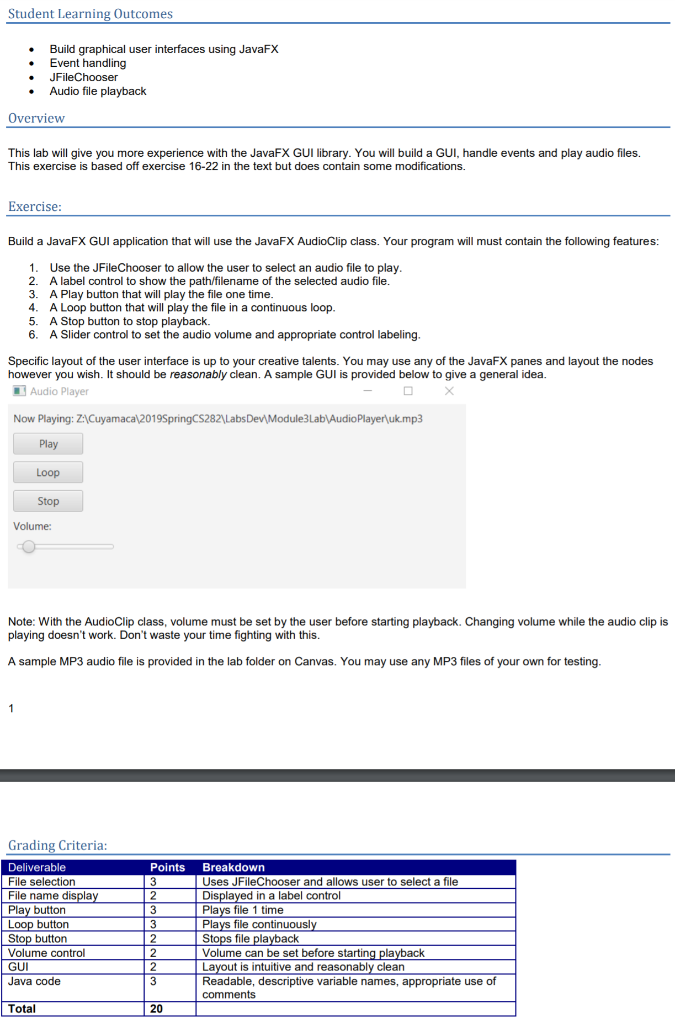
Student Learning Outcomes .Build graphical user interfaces using JavaFX Event handling JFileChooser Audio file playback Overview This lab will give you more experience with the JavaFX GUI library. You will build a GUI, handle events and play audio files. This exercise is based off exercise 16-22 in the text but does contain some modifications. Exercise Build a JavaFX GUI application that will use the JavaFX AudioClip class. Your program will must contain the following features 1. 2. 3. 4. 5. 6. Use the JFileChooser to allow the user to select an audio file to play A label control to show the path/filename of the selected audio file. A Play button that will play the file one time A Loop button that will play the file in a continuous loop A Stop button to stop playback. A Slider control to set the audio volume and appropriate control labeling Specific layout of the user interface is up to your creative talents. You may use any of the JavaFX panes and layout the nodes however you wish. It should be reasonably clean. A sample GUI is provided below to give a general idea Audio Player Now Playing: ZACuyamacal2019SpringC$2821 LabsDe Module3Lab AudioPlayerluk.mp3 Play Loop Stop Volume: Note: With the AudioClip class, volume must be set by the user before starting playback. Changing volume while the audio clip is playing doesn't work. Don't waste your time fighting with this. A sample MP3 audio file is provided in the lab folder on Canvas. You may use any MP3 files of your own for testing Grading Criteria: Deliverable File selection File name displa Play button Loop button Stop button Volume control GUI Java code Points Breakdown Uses JFileChooser and allows user to select a file in a label control Plays file 1 time Plays file continuousl Stops file pla Volume can be set before starting pla Layout is intuitive and reasonably clean Readable, descriptive variable names, appropriate use of comments 2 Total 20 Student Learning Outcomes .Build graphical user interfaces using JavaFX Event handling JFileChooser Audio file playback Overview This lab will give you more experience with the JavaFX GUI library. You will build a GUI, handle events and play audio files. This exercise is based off exercise 16-22 in the text but does contain some modifications. Exercise Build a JavaFX GUI application that will use the JavaFX AudioClip class. Your program will must contain the following features 1. 2. 3. 4. 5. 6. Use the JFileChooser to allow the user to select an audio file to play A label control to show the path/filename of the selected audio file. A Play button that will play the file one time A Loop button that will play the file in a continuous loop A Stop button to stop playback. A Slider control to set the audio volume and appropriate control labeling Specific layout of the user interface is up to your creative talents. You may use any of the JavaFX panes and layout the nodes however you wish. It should be reasonably clean. A sample GUI is provided below to give a general idea Audio Player Now Playing: ZACuyamacal2019SpringC$2821 LabsDe Module3Lab AudioPlayerluk.mp3 Play Loop Stop Volume: Note: With the AudioClip class, volume must be set by the user before starting playback. Changing volume while the audio clip is playing doesn't work. Don't waste your time fighting with this. A sample MP3 audio file is provided in the lab folder on Canvas. You may use any MP3 files of your own for testing Grading Criteria: Deliverable File selection File name displa Play button Loop button Stop button Volume control GUI Java code Points Breakdown Uses JFileChooser and allows user to select a file in a label control Plays file 1 time Plays file continuousl Stops file pla Volume can be set before starting pla Layout is intuitive and reasonably clean Readable, descriptive variable names, appropriate use of comments 2 Total 20
Step by Step Solution
There are 3 Steps involved in it

Get step-by-step solutions from verified subject matter experts
 Study Help