







Question: Student.csv Jon, 1310, Java, 88 Ravi, 1325, Advanced Java, 90 Jane, 1310, Java, 80 Sarah, 1320, C, 88 Bob, 1325, Advanced Java, 70 Julia, 1325,
Student.csv
Jon, 1310, Java, 88 Ravi, 1325, Advanced Java, 90 Jane, 1310, Java, 80 Sarah, 1320, C, 88 Bob, 1325, Advanced Java, 70 Julia, 1325, Advanced Java, 83 Fredrick, 1325, Advanced Java, 90 Jean Luc, 1325, Advanced Java, 100 Sarah-Lee, 1320, C, 88 Motaz, 1320, C, 73 Krystal, 1320, C, 71 Ayman, 1310, Java, 65 Salem, 1310, Java, 82
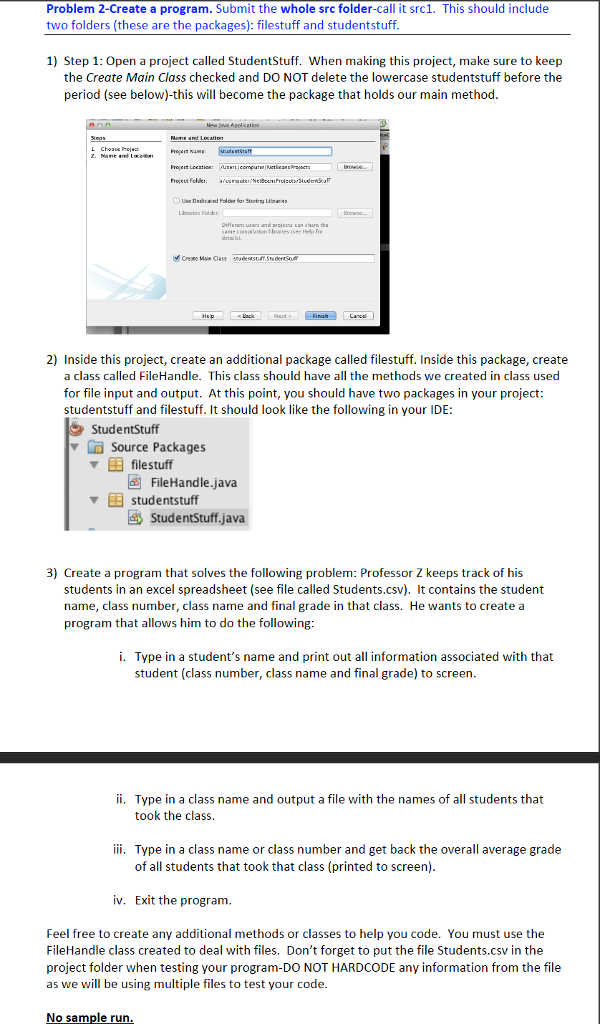
Problem 2-Create a program. Submit the whole src folder-call it src1. This should include two folders (these are the packages): filestuff and studentstuff 1) Step 1: Open a project called StudentStuff. When making this project, make sure to keep the Create Main Class checked and DO NOT delete the lowercase studentstuff before the period (see below)-this will become the package that holds our main method Uve Deciced Polder far Storing Lirs Cresne ie Class 2) Inside this project, create an additional package called filestuff. Inside this package, create a class called FileHandle. This class should have all the methods we created in class used for file input and output. At this point, you should have two packages in your project: studentstuff and filestuff. It should look like the following in your IDE StudentStuff Source Packages filestuff FileHandle.java studentstuff StudentStuff.java 3) Create a program that solves the following problem: Professor Z keeps track of his students in an excel spreadsheet (see file called Students.csv). It contains the student name, class number, class name and final grade in that class. He wants to create a program that allows him to do the following: i. Type in a student's name and print out all information associated with that student (class number, class name and final grade) to screen Type in a class name and output a file with the names of all students that took the class. ii. ii. Type in a class name or class number and get back the overall average grade of all students that took that class (printed to screen) iv. Exit the program Feel free to create any additional methods or classes to help you code. You must use the FileHandle class created to deal with files. Don't forget to put the file Students.csv in the project folder when testing your program-DO NOT HARDCODE any information from the file as we will be using multiple files to test your code No sample run
Step by Step Solution
There are 3 Steps involved in it

Get step-by-step solutions from verified subject matter experts
 Study Help