







Question: Student.java class coding here: 6 public class Student { 7 // attributes of a Student 8 private String firstName; 9 private String lastName; 10 private
Student.java class coding here:
6 public class Student { 7 // attributes of a Student 8 private String firstName; 9 private String lastName; 10 private int studentId; 11 private double gpa; 12 13 // NOTE: the methods whose name are the same as the class 14 // are called constructors. Their job is to initialize the attributes 15 // to values passed in as parameters. 16 // 17 // They do NOT return a result, but have NO return TYPE, not even 'void' 18 public Student(String _fName, String _lName, int _id, double _gpa) { 19 firstName = _fName; 20 lastName = _lName; 21 studentId = _id; 22 gpa = _gpa; 23 } 24 25 // Accessor for first name 26 public String getFirstName() { 27 return firstName; 28 } 29 30 // Accessor for last name 31 public String getLastName() { 32 return lastName; 33 } 34 35 // Accessor for student id 36 public int getStudentId() { 37 return studentId; 38 } 39 40 // Accessor for gpa 41 public double getGpa() { 42 return gpa; 43 } 44 45 // Mutator for first name 46 public void setFirstName(String _fName) { 47 firstName = _fName; 48 } 49 50 // Mutator for last name 51 public void setLastName(String _lastName) { 52 lastName = _lastName; 53 } 54 55 // Mutator for student id 56 public void setStudentId(int _id) { 57 studentId = _id; 58 } 59 60 // Mutator for gpa 61 public void setGpa(double _gpa) { 62 gpa = _gpa; 63 } 64 }
TestStudent.java class coding here:
6 public class TestStudent {
7 public static void main(String[] args) { 8 // Create two students 9 Student stu1 = new Student("Fred", "Smith", 117834, 3.4); 10 Student stu2 = new Student("Mary", "Brown", 887234, 2.8); 11 12 // print out student 1 13 System.out.println("Student: " + 14 stu1.getFirstName() + " " + stu1.getLastName() + " " + 15 stu1.getStudentId() + " " + stu1.getGpa()); 16 17 // print out student 2 18 System.out.println("Student: " + 19 stu2.getFirstName() + " " + stu2.getLastName() + " " + 20 stu2.getStudentId() + " " + stu2.getGpa()); 21 22 // change the GPA and ID of student 1 23 stu1.setGpa(3.6); 24 stu1.setStudentId(449234); 25 26 // print out the changed student 1 27 System.out.println("After changing stu1"); 28 System.out.println("Student: " + 29 stu1.getFirstName() + " " + stu1.getLastName() + " " + 30 stu1.getStudentId() + " " + stu1.getGpa()); 31 } 32 } 33
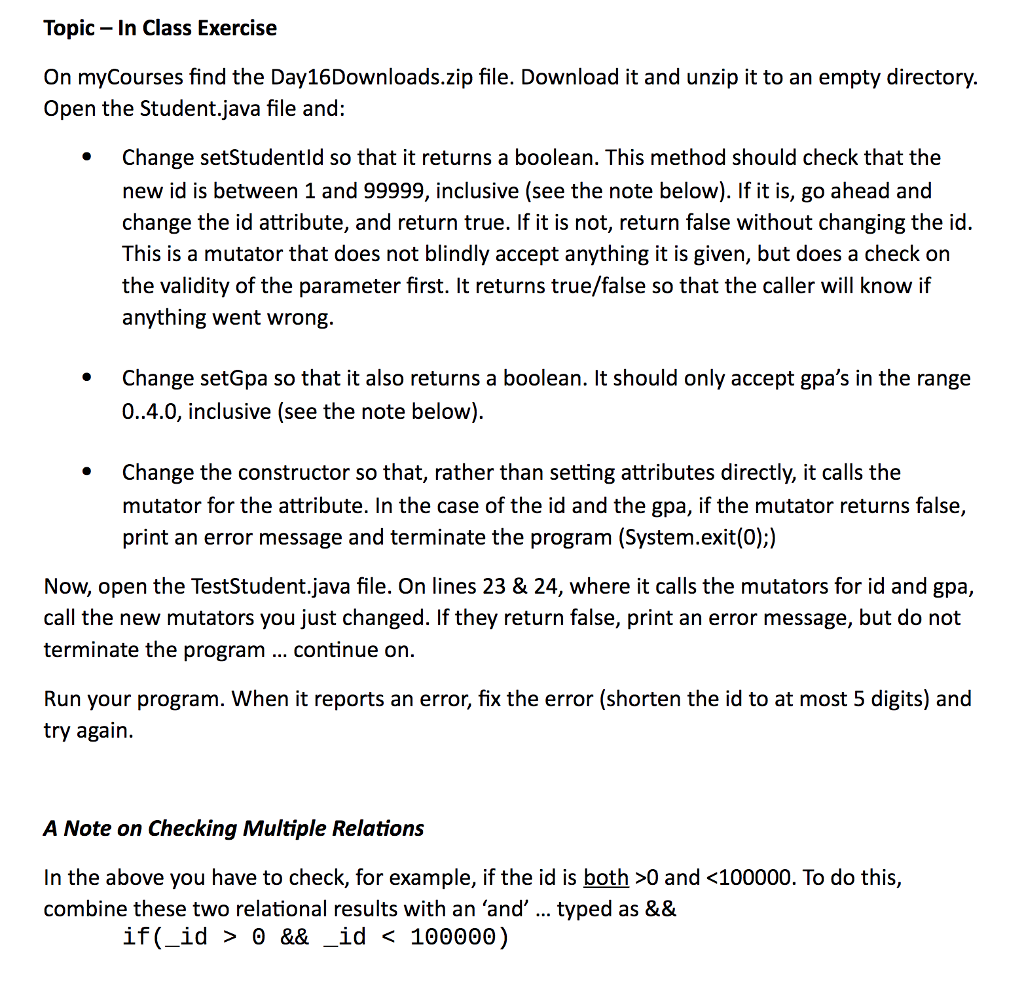
Topic- In Class Exercise On myCourses find the Day16Downloads.zip file. Download it and unzip it to an empty directory. Open the Student.java file and: Change setStudentld so that it returns a boolean. This method should check that the new id is between 1 and 99999, inclusive (see the note below). If it is, go ahead and change the id attribute, and return true. If it is not, return false without changing the id. This is a mutator that does not blindly accept anything it is given, but does a check on the validity of the parameter first. It returns true/false so that the caller will know if anything went wrong Change setGpa so that it also returns a boolean. It should only accept gpa's in the range 0..4.0, inclusive (see the note below) Change the constructor so that, rather than setting attributes directly, it calls the mutator for the attribute. In the case of the id and the gpa, if the mutator returns false, print an error message and terminate the program (System.exit(0);) Now, open the TestStudent.java file. On lines 23 & 24, where it calls the mutators for id and gpa, call the new mutators you just changed. If they return false, print an error message, but do not terminate the program .. continue on. Run your program. When it reports an error, fix the error (shorten the id to at most 5 digits) and try again. A Note on Checking Multiple Relations In the above you have to check, for example, if the id is both >0 and 0 && _id
Step by Step Solution
There are 3 Steps involved in it

Get step-by-step solutions from verified subject matter experts
 Study Help