







Question: student.java import java.awt.*; import javax.swing.*; public class student { String firstName; String lastName; int age; public student(String a, String b, int x) { super(); firstName
student.java import java.awt.*; import javax.swing.*;
public class student { String firstName; String lastName; int age;
public student(String a, String b, int x) { super(); firstName = a; lastName = b; age = x; } String getInfo() { return "NAME = "+firstName+ " "+lastName+" "+"Age = "+age; } String whatsUp() { double r = Math.random(); int myNumber = (int) (r * 3f); //comment: a random number between 0 and 2 String answer = "I don't know"; if(myNumber == 0) answer = "searching the web"; if(myNumber == 1) answer = "doing Java"; if(myNumber == 2) answer = "Listening to endless lecture"; return answer; }
}
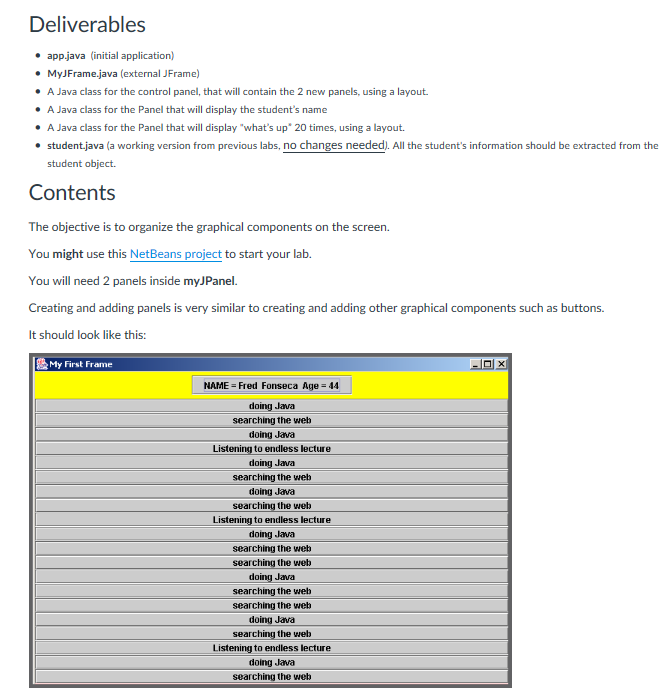
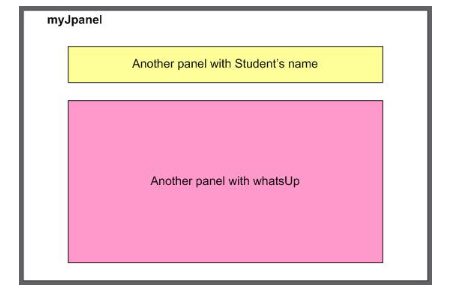
Deliverables app.java (initial application) MyJFrame.java (external JFrame) A Java class for the control panel, that will contain the 2 new panels, using a layout. A Java class for the Panel that will display the student's name A Java class for the Panel that will display "what's up 20 times, using a layout. . student.java (a working version from previous labs, no changes needed). All the student's information should be extracted from the student object. Contents The objective is to organize the graphical components on the screen. You might use this NetBeans project to start your lab. You will need 2 panels inside myJPanel. Creating and adding panels is very similar to creating and adding other graphical components such as buttons. It should look like this: My First Frame NAME = Fred Fonseca Age=44 doing Java searching the web doing Java List to endless lecture doing Java searching the we doing Java the web Listening to endless lecture doing Jawa searching the web the web doing Java searching the web searching the web doing Java searching the web Listening to endless lecture doing Java searching the wetb Deliverables app.java (initial application) MyJFrame.java (external JFrame) A Java class for the control panel, that will contain the 2 new panels, using a layout. A Java class for the Panel that will display the student's name A Java class for the Panel that will display "what's up 20 times, using a layout. . student.java (a working version from previous labs, no changes needed). All the student's information should be extracted from the student object. Contents The objective is to organize the graphical components on the screen. You might use this NetBeans project to start your lab. You will need 2 panels inside myJPanel. Creating and adding panels is very similar to creating and adding other graphical components such as buttons. It should look like this: My First Frame NAME = Fred Fonseca Age=44 doing Java searching the web doing Java List to endless lecture doing Java searching the we doing Java the web Listening to endless lecture doing Jawa searching the web the web doing Java searching the web searching the web doing Java searching the web Listening to endless lecture doing Java searching the wetb
Step by Step Solution
There are 3 Steps involved in it

Get step-by-step solutions from verified subject matter experts
 Study Help