







Question: Subject - Database management instruction - before you begin this you must download postgreSQL. This the table Level 1 Expected Result 1 N 3 Display
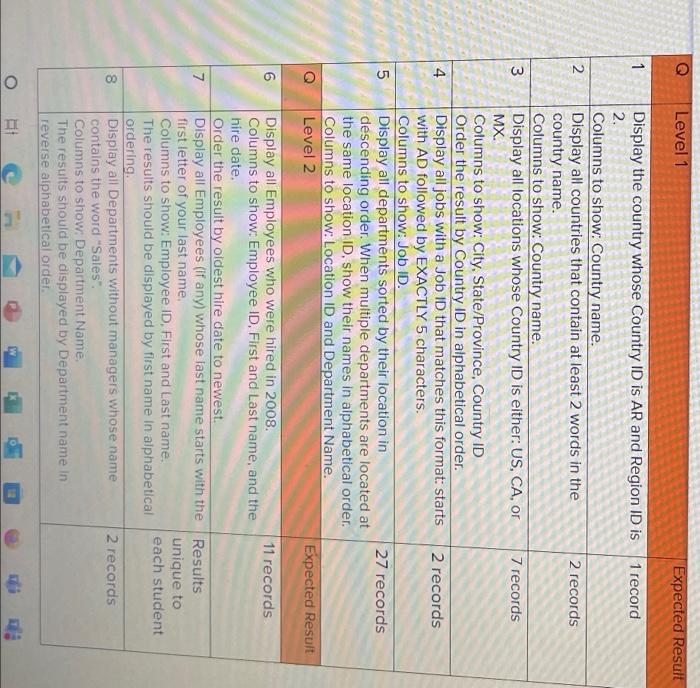
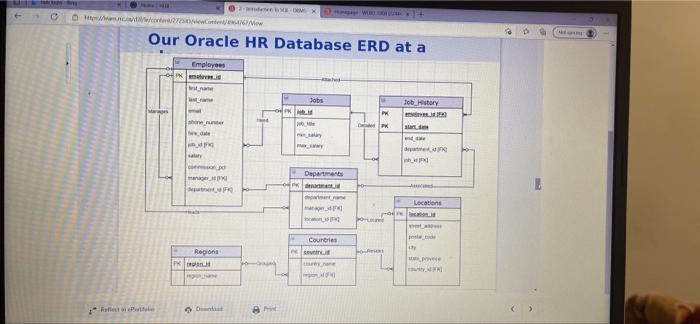
Level 1 Expected Result 1 N 3 Display the country whose Country ID is AR and Region ID is 1 record 2. Columns to show: Country name. Display all countries that contain at least 2 words in the 2 records country name. Columns to show: Country name. Display all locations whose Country ID is either: US, CA, or 7 records MX Columns to show: City, State/Province, Country ID Order the result by Country ID in alphabetical order. Display all jobs with a Job ID that matches this format: starts 2 records with AD followed by EXACTLY 5 characters. Columns to show: Job ID. Display all departments sorted by their location in 27 records descending order. When multiple departments are located at the same location ID, show their names in alphabetical order. Columns to show: Location ID and Department Name. Level 2 Expected Result 4 5 7 Display all Employees who were hired in 2008. 11 records Columns to show: Employee ID. First and Last name, and the hire date. Order the result by oldest hire date to newest. Display all Employees (if any) whose last name starts with the Results first letter of your last name, unique to Columns to show: Employee ID. First and last name. each student The results should be displayed by first name in alphabetical ordering. Display all Departments without managers whose name 2 records contains the word "Sales". Columns to show. Department Name, The results should be displayed by Department name in reverse alphabetical order. 00 8 o II 2X O MWC x Our Oracle HR Database ERD at a Employees - Jobs Job History PK Departments IM Locations RO PO Countries Region FOSS WS Retete
Step by Step Solution
There are 3 Steps involved in it

Get step-by-step solutions from verified subject matter experts
 Study Help