







Question: SUBJECT: VISUAL PROGRAMMING 25 marks 20 3 Q.3: Create a Web Application in ASP.Net MVC. Give a Project name as VPTerminalMVCQuestion. For this purpose, you
SUBJECT: VISUAL PROGRAMMING 25 marks
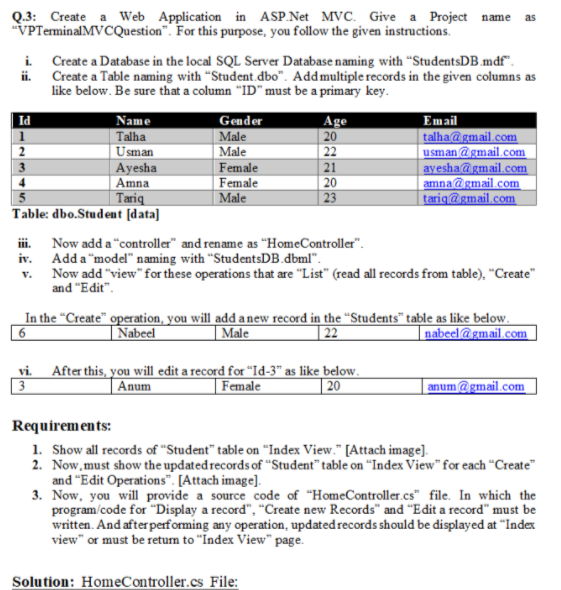
20 3 Q.3: Create a Web Application in ASP.Net MVC. Give a Project name as "VPTerminalMVCQuestion". For this purpose, you follow the given instructions i Create a Database in the local SQL Server Database naming with "StudentsDB mdf". ii. Create a Table naming with "Student.dbo". Add multiple records in the given columns as like below. Be sure that a column "ID"must be a primary key. Id Name Gender Age Email Talha Male talha@gmail.com 2 Usman Male 22 usman@gmail.com Ayesha Female 21 ayesha@gmail.com Amna Female amna@gmail.com Tariq Male 23 tariq@gmail.com Table: dbo.Student (data) ii. Now add a "controller" and rename as "HomeController". iv. Add a "model" naming with "StudentsDB.dbml". v. Now add "view" for these operations that are "List" (read all records from table). "Create" and "Edit". In the "Create" operation, you will add a new record in the "Students" table as like below. Nabeel Male 22 nabeel@gmail.com 20 6 vi. After this, you will edit a record for "Id-3" as like below. 3 Anum Female 20 anum@gmail.com Requirements: 1. Show all records of "Student" table on "Index View." [Attach image] 2. Now,must show the updated records of "Studenttable on "Index View" for each "Create" and Edit Operations. [Attach image] 3. Now, you will provide a source code of "Home Controller cs" file. In which the program code for "Display a record", "Create new Records" and "Edit a record must be written. And after performing any operation, updated records should be displayed at "Index view" or must be return to "Index View page. Solution: HomeController.cs File
Step by Step Solution
There are 3 Steps involved in it

Get step-by-step solutions from verified subject matter experts
 Study Help