







Question: Submission Guidelines Zip the folder that contains the Visual studio project and upload the zipped file to Blackboard. Description of Pop Quiz Update the attached
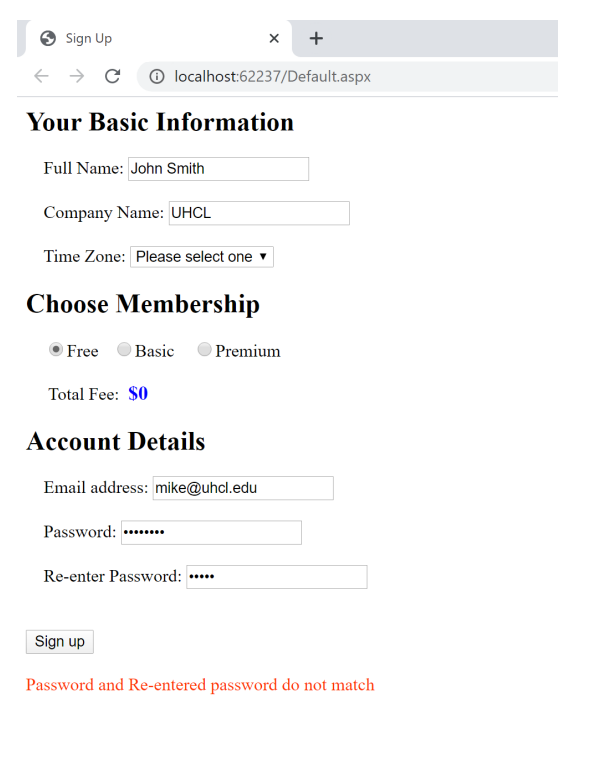
Submission Guidelines Zip the folder that contains the Visual studio project and upload the zipped file to Blackboard. Description of Pop Quiz Update the attached PQ1 ASP.NET web application by adding below functionality: - The user must be able to choose one of the below options from the dropdown for time zone. The first option in the drop down must say Please choose one, which is selected by default until the user selects one of the below options: Pacific Time Mountain Time Central Time Eastern Time - The fee must be automatically updated depending on user's selected membership: Free: $0 Basic: $30 Premium: $60 - The text boxes to enter password must hide the text with a special character - When the user clicks on the Sign Up button, If the user did not select a time zone in the dropdown, then show an error message in the status label at the bottom of the page in red color If the email address doesn't contain the special character @, then show an error message in the status label at the bottom of the page in red color If the password is less than 8 characters, then show an error message in the status label at the bottom of the page in red color If the password and re-entered password do not match, then show an error message in the status label at the bottom of the page in red color If all the above criteria for time zone, email address and password are met, then show a message in the status label at the bottom of the page in green color. Also reset all the controls on the webpage to their initial defaults. Your Basic Information Full Name: Company Name: Time Zone
Step by Step Solution
There are 3 Steps involved in it

Get step-by-step solutions from verified subject matter experts
 Study Help