







Question: SUBMISSION INSTRUCTIONS Submit I python file using the naming convention below: - accounts.py OUESTION 1 . Inside accounts.py , create a class named Account with
SUBMISSION INSTRUCTIONS
Submit I python file using the naming convention below:
accounts.py
OUESTION
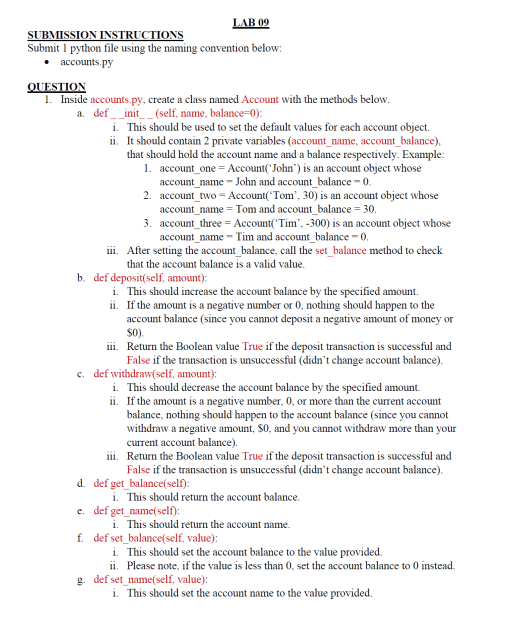
Inside accounts.py create a class named Account with the methods below.
i This should be used to set the default values for each account object.
ii It should contain private variables accountname, accountbalance that should hold the account name and a balance respectively. Example:
accountone AccountJohn is an account object whose accountname John and accountbalance
account two Account Tom is an account object whose accountname Tom and accountbalance
accountthree AccountTim is an account object whose accountname Tim and account balance
iii. After setting the account balance, call the set balance method to check that the account balance is a valid value.
b def depositself amount:
i This should increase the account balance by the specified amount.
ii If the amount is a negative number or nothing should happen to the account balance since you cannot deposit a negative amount of money or $
iii. Return the Boolean value True if the deposit transaction is successful and False if the transaction is unsuccessful didnt change account balance
c def withdrawself amount:
i This should decrease the account balance by the specified amount.
ii If the amount is a negative number, or more than the current account balance, nothing should happen to the account balance since you cannot withdraw a negative amount, $ and you cannot withdraw more than your current account balance
iii. Return the Boolean value True if the deposit transaction is successful and False if the transaction is unsuccessful didnt change account balance
d def get balanceself:
i This should return the account balance.
e def getnameself:
i This should return the account name.
f def set balanceself value:
i This should set the account balance to the value provided.
ii Please note, if the value is less than set the account balance to instead. g def set nameself value:
i This should set the account name to the value provided. h def strself:
i This should return the account details use getter methods where applicable
ii Check main.py for the format of the string to be returned.
Inside accounts.py create another class named SavingAccount with the variables and methods below SavingAccount should be designed as a child of Account
a MINIMUM:
i This should be a class variable whose initial value is $
ii This is the minimum balance the account can have at any one point.
b RATE:
i This should be a class variable whose initial value is
ii It's the interest rate to be applied to the account balance when applicable.
c def initself name:
i This should be used to set the default values for each saving account object.
ii It should contain a private variable to keep track of the number of deposits made in the account depositcount
iii. Example: accounttwo SavingAccountJane is a savings account object whose accountname Jane, accountbalance and depositcount
d def applyinterestself:
i This should apply a interest rate to the account balance for every deposits made on the account if someone deposits $ times, on the text th deposit their account balance would be $ instead of $ since they started off with $ in their account at the time of creation
e def depositself amount:
i This should increase the account balance by the specified amount.
ii If the amount is a negative number or nothing should happen to the account balance since you cannot deposit a negative amount of money or $
iii. You need to check whether it's appropriate to apply an interest based off the number of deposits made.
iv Return the Boolean value True if the deposit transaction is successful and False if the transaction is unsuccessful didnt change account balance
f def withdrawself amount:
i This should decrease the account balance by the specified amount.
ii If the amount is a negative number, or reduces the account balance to an amount less than the minimum, nothing should happen to the account balance.
iii. Return the Boolean value True if the withdraw transaction is successful and False if the transaction is unsuccessful didnt change account balance g def getbalanceself:
i This should return the account balance.
h def getnameself:
i This should return the account name.
i def setbalanceself value:
i This should set the account balance to the value provided.
ii Please note, if the value is less than the account minimum, set the account balance to the account minimum instead.
j def setnameself value:
i This should set the account name to the value provided.
k defstrself:
i This should return the account details.
ii Check main.py for the format of the string to be returned.
Test if the code in the accounts.py file works as expected by downloading main.py to the same location accounts.py is located and the
Step by Step Solution
There are 3 Steps involved in it
1 Expert Approved Answer
Step: 1 Unlock

Question Has Been Solved by an Expert!
Get step-by-step solutions from verified subject matter experts
Step: 2 Unlock
Step: 3 Unlock
 Study Help